Author Archive: Lisa Hendrickson

Lisa Hendrickson is the owner of Call That Girl. She is an Outlook Expert and Microsoft 365 Consultant.

rss feed

Author's Website

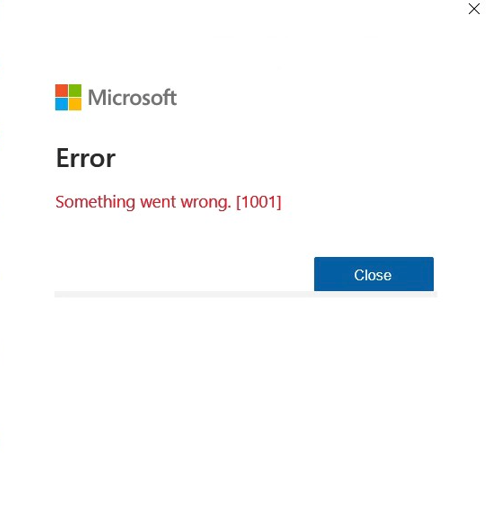
SOLVED: Outlook Error Something went wrong [1001]

| February 8, 2024

Outlook Error Something went wrong [1001]

I solved this problem by removing accounts in Windows.

Go to search

Type “Accounts”

In that window click on Work or School accounts

In that area, you might see many Windows accounts logged in with your emails in Outlook. This happens when you add a new account in Outlook and agree to sign in. (Next time you add an account in Outlook click the option at the lower left, “Sign into only this app”).

Click on the “disconnect” button

It will take a minute to disconnect, then it should be gone. Take note that when you launch Outlook again, you will need to log in again with the account password.

If you cannot remove the account, then that email is connected in the Windows account as the default and this will be a bit more difficult to repair.


If you need help with this error, please contact me using the form below.

How to fix Microsoft Exchange 365 emails bouncing yahoo and gmail emails

| January 30, 2024

How to fix Microsoft Exchange 365 emails bouncing yahoo and gmail emails

Google and Yahoo have revealed plans to introduce new email authentication standards for all email senders starting February 2024. The aim is to enhance deliverability and combat spam by preventing fraudulent messages like scams and phishing attempts. Under these changes, emails sent from unauthenticated addresses won’t land in recipients’ inboxes.

Basically, if you are emailing anyone with a yahoo.com or gmail.com email address, you might find the email bounced back. This is important to know if you are using a Microsoft 365 Exchange account. I have no details yet on other email hosts that only support IMAP or POP. I’m guessing those companies will follow along in time.

Many of my clients still use their yahoo, hotmail or AOL for business, and many with Microsoft 365 Exchange still email their clients who are using yahoo.com or any of the variants (AOL, Verizon, sbcglobal.net, Pacbell.com, etc)

AOL, Yahoo. Verizon, sbcglobal.net, pacificbell.com, pacbell.com, all of these will have issues at some point. These are not business email accounts and are and have been always “personal email” in the eyes of the internet, therefore they need to be validated for you to email them.



How to resolve: 

You can update this record in your DNS: (This may or may not work but it’s worth a try before hiring help to get this done)

TXT

_dmarc or _dmarc.yourdomain.com

Value:

v=DMARC1; p=none;

OR this is now working better

v=DMARC1; p=quarantine; pct=100; rua=mailto:jane@coolexample.com; ruf=mailto:jane@coolexample.com

Replace the coolexample with another email, this email might get some alerts. 

If you need my help, fill out the form below or schedule an appt. Take note these updates can take a bit of time and sometimes a few efforts, things have changed in the past couple of days with the DMARC/Yahoo records.

How to install the Copilot add-in for Outlook

| January 5, 2024

How to install the Copilot add-in for Outlook

You’ve heard of Copilot and want to know if you can use the app in Outlook? So far, my testing says yes! I have been playing around with Microsoft Copilot for a few weeks, trying to figure out new things and I figured out the Outlook add-in. Here are some simple instructions to help you. I site my sources as well, from Microsoft

1.) Close Outlook

2.) Click on this link https://learn.microsoft.com/en-us/microsoft-sales-copilot/install-sales-copilot

3.) Read this page so you can know more

4.) Then on that page, you will see this “Install Sales Copilot Outlook add-in from AppSource” about half way down, then “Sign in to Microsoft AppSource” 

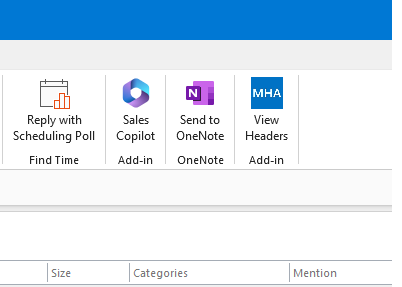
5.) After you finish setting it up, open Outlook and it will or should be in your ribbon like my graphic below

6.) Test it! Reply to an email and in that message, the Sales Pilot Add-In is in the message. Click on it and you will see “draft an email”

7.) Another box will be lower and you can type in something like “reply to Liz” and it will AI generate a response using keywords in the message you received.

8.) Then you will see generated text, click “add to email” and it will move to the body of the message you’re replying to

9.) Edit as needed

10.) Send

11.) Love the message? Make it a template!

12.) Before you send, click on the “templates” and add to you 365 templates.

If you need my help, please contact me below. Thanks!


Copilot for Microsoft Outlook

| January 5, 2024

Copilot for Microsoft Outlook

You’ve heard of Copilot and want to know if you can use the app in Outlook? So far, my testing says yes! I have been playing around with Microsoft Copilot for a few weeks, trying to figure out new things and I figured out the Outlook add-in. Here are some simple instructions to help you. I site my sources as well, from Microsoft. For this app, you do not need an enterprise license, just a 365 Exchange account.

1.) Close Outlook

2.) Click on this link https://learn.microsoft.com/en-us/microsoft-sales-copilot/install-sales-copilot

3.) Read this page so you can know more

4.) Then on that page, you will see this “Install Sales Copilot Outlook add-in from AppSource” about half way down, then “Sign in to Microsoft AppSource” 

5.) After you finish setting it up, open Outlook and it will or should be in your ribbon like my graphic below

6.) Test it! Reply to an email and in that message, the Sales Pilot Add-In is in the message. Click on it and you will see “draft an email”

7.) Another box will be lower and you can type in something like “reply to Liz” and it will AI generate a response using keywords in the message you received.

8.) Then you will see generated text, click “add to email” and it will move to the body of the message you’re replying to

9.) Edit as needed

10.) Send

11.) Love the message? Make it a template!

12.) Before you send, click on the “templates” and add to you 365 templates.

If you need my help, please contact me below. Thanks!