Microsoft 365 Home Accounts Explained
PERSONAL ACCOUNTS
When you bought your new computer, during the setup, Microsoft asked you to login with an email account or create an account. What I see most is people just type in any email and that right there, created a personal Microsoft account for you. And this is where the problems begin because many people type in their business email and not a personal email (like Outlook.com, Hotmail, Gmail, etc) and if you’re on Microsoft 365 for business, this can be a confusing problem to disconnect.
To find out what email account you are logged into your computer with, go to your “search” box at the far bottom left of your computer (next to the Windows icon) In the search box type “manage account” then click on “Manage your account”
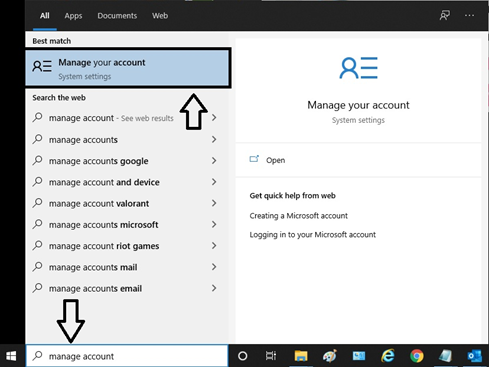
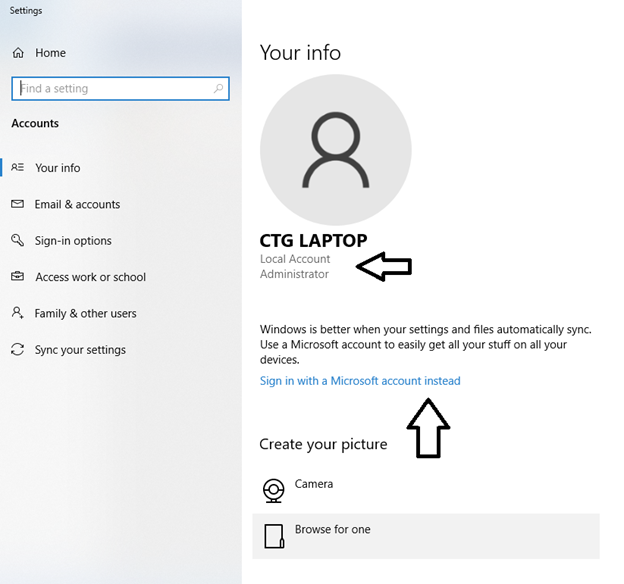
You will see this window pop up next. If you are logged into a Microsoft account, it will show there. You can see that I am not logged in and am a local administrator. You also see the option to log into a Microsoft account. I will review the benefits of that later but for now, you know if you are logged in or not.
Not logged into a Microsoft account
Logged into a Microsoft personal account
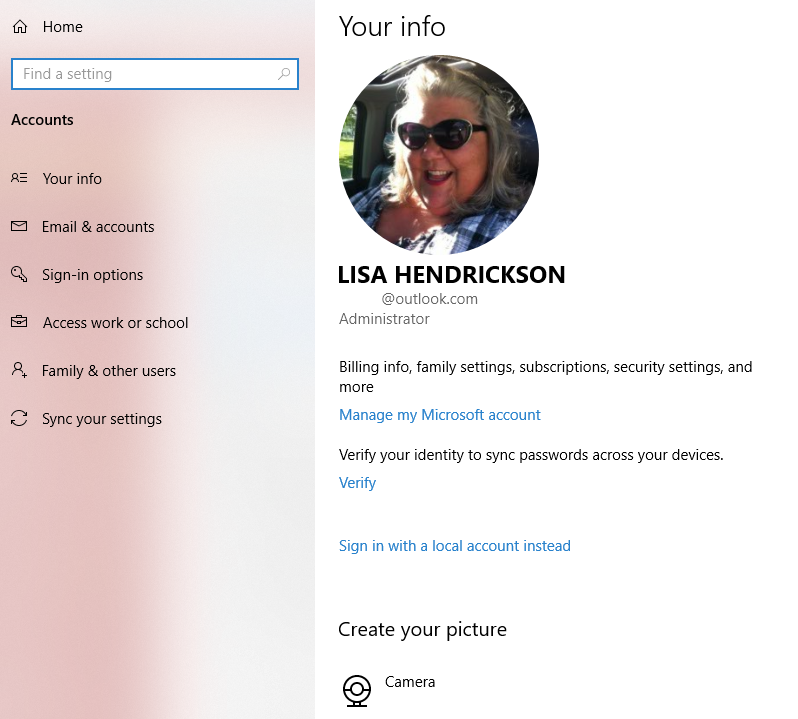
If you are logged with one of your email accounts, then you more than likely have a OneDrive account also logged into that computer with that email. And this folks, is where the first round of confusion happens.
Here is the link that you can use to test your logins. www.office.com/myaccount
This link will only log you into a personal account. Go ahead and test it! If you log in with any email and it offers a password box, then you do have a Microsoft account with that email. If you login with a business email that you own and you see a password box, that means you have a business email used for your personal account. This is not recommended especially if you plan to use your business email with a Microsoft Exchange server and the MS 365 products (OneDrive, SharePoint, Teams).
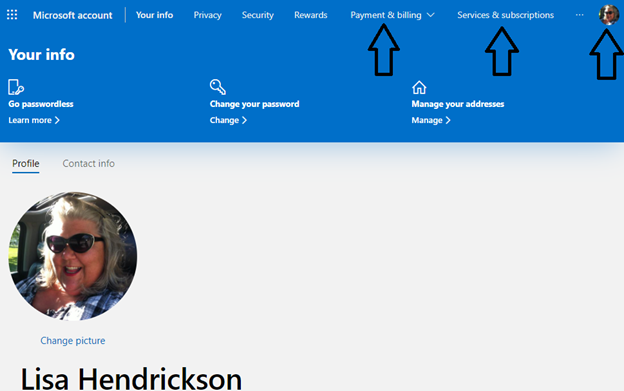
When you log into the personal account, it should look like this screenshot below. The black arrows are important for you to click on and look at. You will find if you have 365 Family accounts (renamed from home accounts this past year).
- Payments and Billing show you how you paid for it and when it’s up for renewal.
- Services & subscriptions shows you everything you have purchased and how many installations you have used.
- If you click on the picture, it shows you the email you logged in with.
MICROSOFT FAMILY 365
The Microsoft Family 365 accounts are $99 for a year, up to 6 installations of the Office software (Outlook, Word, Excel, PowerPoint, Access and Publisher). These licenses should not be used by a business, with some exceptions. Here is what I tell my clients, “If you work from home, then you are following their policies” and that’s what I have read and follow. Although I have rarely seen Microsoft force anyone off their Family 365 accounts, if you call in for support, the agent might tell you to not renew that account and purchase the business.
With the Microsoft Family 365 accounts, you get a lot of extras, you can read about it here From my experience supporting clients with a Microsoft Family 365 account, the family members typically just use the Office software.
PURCHASED OFFICE PRODUCTS
If you are one of those folks that don’t like having a subscription to software and prefer purchasing, here is what I know and recommend.
When you purchase the Office suite:
- There is no free support offered from Microsoft. If something bad happens and you and your computer technician cannot fix it, you sometimes have to call Microsoft and they charge a fee. It’s often way more than what you purchased it for, this is why I recommend the subscription model.
- When you purchase it, you can only install it on one computer.



