RSSCategory: New Outlook

Best Way to Export Contacts from New Outlook for CRM Integration

| June 29, 2025

Best Way to Export Contacts from New Outlook for CRM Integration

You can skip to the bottom for the instructions, much of this blog post is about exporting/importing and the different data types. 

This post in “in progress” and will be updated as I have new information about exporting and importing contacts to and from New Outlook. People will be needing to export contacts from New Outlook for a variety of reasons, moving to a new CRM, setting up Dynamics 365 (D365), moving to a new email server (Google Workspace to Exchange or vice versa) setting up a newsletter list, import into LinkedIn, etc. I’m writing up all the different export options for Outlook Classic, New Outlook, Mac Contacts, Mac Outlook contacts, Exchange contacts (OWA),  iCloud contacts, Gmail Contacts, Yahoo/AOL Contacts, iPhone and Android contacts.  I will also do import options next and do a section on categories. Categories are not matching up between all the different types found from my research.

Before doing any serious contact work (migrating to CRM, Dynamics), please read this post and understand how it works. It might save you some time working on it.

New Outlook Contacts does not export the same fields as Outlook Classic does. Microsoft Exchange, IMAP (This Computer Only) and PST contact data typically export to a standardized Outlook template with the same fields. This has not changed since I’ve been working in Outlook.

It’s also hard to write up a “how-to” as so many people have different types of contact data setup in New Outlook. This post is long but worth the read if you are having issues or want to learn. I will update this page as I have more testing results. This is the kick off of my whitepaper. Bookmark this page if you like, it will be posted on this page as well https://callthatgirl.biz/new-outlook-resource-guide/

Few things to note:

  • Fields that you are used to seeing a typical export template in Outlook  Classic might be missing in New Outlook
  • Fields you see in New Outlook contacts export might be missing all of your data (seen that happen), or have some of your custom fields missing (very common)
  • When you export out of New Outlook, the fields have some new fields that will not match in Outlook Classic (such as Surname, Given Yomi, many others).

THE TEMPLATE: 

  • You will see that this template is not a typical Microsoft Outlook Classic export template. The export is also missing “Title” and “Display Name” and at this point, before importing into a CRM or another database, I would highly recommend that you have a template for Outlook handy so you can change the fields (I have one here you can download). https://callthatgirl.biz/wp-content/uploads/2025/06/Outlook-Classic-Contacts-Template.csv

How each type exports and views: 

  • Outlook Classic –Imports all your fields, even custom fields
  • New Outlook –-Will export Exchange data, but exports to a new csv that does not follow the Outlook Classic, there are new fields added (Given Yomi, Surname, etc.)
  • Mac Contacts (testing in a few weeks)
  • Mac Outlook contacts (testing in a few weeks)
  • Exchange contacts (OWA) -Will export Exchange data, but exports to a new csv that does not follow the Outlook Classic, there are new fields added (Given Yomi, Surname, etc)
  • iCloud contacts –these can be exported from Outlook Classic with the iCloud for Windows installed. The data seems to match but the first/last name seems to be needing to be switched in the template before you export. I am testing exporting out of New Outlook now. Just like many people, my iCloud account is setup with an email I have already set up and associated with a Microsoft personal account. New Outlook will not allow you to add this account natively, you will need to make an alias in the Apple ID area. Confusing yes but can be done and keep both emails. Be aware that the iPhone might not see the first/last name the same on the iPhone contacts or Outlook app (seen that happen for some of my clients). It’s a view issue, data is fine.
  • Gmail Contacts –These contacts can be exported but most likely will not import into Outlook or any version correctly. I need to open my template and then fix the fields to match for importing
  • Yahoo/AOL Contacts –These contacts can be exported but most likely will not import into Outlook or any version correctly. I need to open my template and then fix the fields to match for importing. This export is my least favorite to fix.
  • Outlook App (iPhone and Android) –these are connected to the cloud and should not need to be exported/imported from phone.

Later for Importing: 

  • iPhone contacts –if these are “on my iPhone” these will have to be exported out through an app on the phone to get exported, cleaned up in a template and then imported

How to export contacts from New Outlook

Open New Outlook

Go to the “People” on the left blade

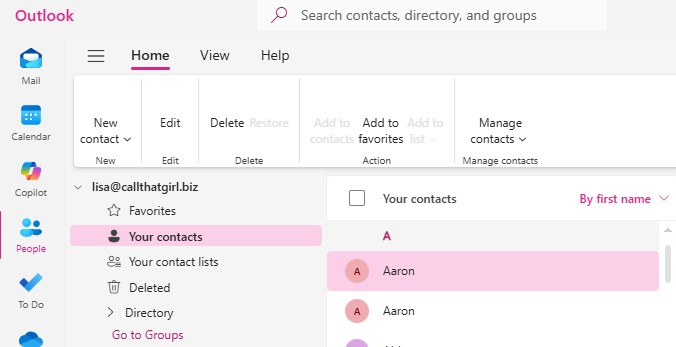
To go “Your contacts” and then you will see a “Mange contacts” on the right/middle area” (see image below)

Click on “export contacts” and right now you should only see an option for “All contacts” and it will export to a CSV file.


If you need my help, use the form below to get in contact.

How to Export Contacts Out of New Outlook

| June 29, 2025

How to Export Contacts Out of New Outlook

You can skip to the bottom for the instructions, much of this blog post is about exporting/importing and the different data types. 

This post in “in progress” and will be updated as I have new information about exporting and importing contacts to and from New Outlook. People will be needing to export contacts from New Outlook for a variety of reasons, moving to a new CRM, setting up Dynamics 365 (D365), moving to a new email server (Google Workspace to Exchange or vice versa) setting up a newsletter list, import into LinkedIn, etc. I’m writing up all the different export options for Outlook Classic, New Outlook, Mac Contacts, Mac Outlook contacts, Exchange contacts (OWA),  iCloud contacts, Gmail Contacts, Yahoo/AOL Contacts, iPhone and Android contacts.  I will also do import options next and do a section on categories. Categories are not matching up between all the different types found from my research.

Before doing any serious contact work (migrating to CRM, Dynamics), please read this post and understand how it works. It might save you some time working on it.

New Outlook Contacts does not export the same fields as Outlook Classic does. Microsoft Exchange, IMAP (This Computer Only) and PST contact data typically export to a standardized Outlook template with the same fields. This has not changed since I’ve been working in Outlook.

It’s also hard to write up a “how-to” as so many people have different types of contact data setup in New Outlook. This post is long but worth the read if you are having issues or want to learn. I will update this page as I have more testing results. This is the kick off of my whitepaper. Bookmark this page if you like, it will be posted on this page as well https://callthatgirl.biz/new-outlook-resource-guide/

Few things to note:

  • Fields that you are used to seeing a typical export template in Outlook  Classic might be missing in New Outlook
  • Fields you see in New Outlook contacts export might be missing all of your data (seen that happen), or have some of your custom fields missing (very common)
  • When you export out of New Outlook, the fields have some new fields that will not match in Outlook Classic (such as Surname, Given Yomi, many others).

THE TEMPLATE: 

  • You will see that this template is not a typical Microsoft Outlook Classic export template. The export is also missing “Title” and “Display Name” and at this point, before importing into a CRM or another database, I would highly recommend that you have a template for Outlook handy so you can change the fields (I have one here you can download). https://callthatgirl.biz/wp-content/uploads/2025/06/Outlook-Classic-Contacts-Template.csv

How each type exports and views: 

  • Outlook Classic –Imports all your fields, even custom fields
  • New Outlook –-Will export Exchange data, but exports to a new csv that does not follow the Outlook Classic, there are new fields added (Given Yomi, Surname, etc.)
  • Mac Contacts (testing in a few weeks)
  • Mac Outlook contacts (testing in a few weeks)
  • Exchange contacts (OWA) -Will export Exchange data, but exports to a new csv that does not follow the Outlook Classic, there are new fields added (Given Yomi, Surname, etc)
  • iCloud contacts –these can be exported from Outlook Classic with the iCloud for Windows installed. The data seems to match but the first/last name seems to be needing to be switched in the template before you export. I am testing exporting out of New Outlook now. Just like many people, my iCloud account is setup with an email I have already set up and associated with a Microsoft personal account. New Outlook will not allow you to add this account natively, you will need to make an alias in the Apple ID area. Confusing yes but can be done and keep both emails. Be aware that the iPhone might not see the first/last name the same on the iPhone contacts or Outlook app (seen that happen for some of my clients). It’s a view issue, data is fine.
  • Gmail Contacts –These contacts can be exported but most likely will not import into Outlook or any version correctly. I need to open my template and then fix the fields to match for importing
  • Yahoo/AOL Contacts –These contacts can be exported but most likely will not import into Outlook or any version correctly. I need to open my template and then fix the fields to match for importing. This export is my least favorite to fix.
  • Outlook App (iPhone and Android) –these are connected to the cloud and should not need to be exported/imported from phone.

Later for Importing: 

  • iPhone contacts –if these are “on my iPhone” these will have to be exported out through an app on the phone to get exported, cleaned up in a template and then imported

How to export contacts from New Outlook

Open New Outlook

Go to the “People” on the left blade

To go “Your contacts” and then you will see a “Mange contacts” on the right/middle area” (see image below)

Click on “export contacts” and right now you should only see an option for “All contacts” and it will export to a CSV file.


If you need my help, use the form below to get in contact.

Does Classic Outlook and New Outlook share any data files?

| June 22, 2025

Does Classic Outlook and New Outlook share any data files?

Some of my clients are emailing me questions about New Outlook and I am thrilled to see the questions. I’m going to post these questions in my website posts and then add to my New Outlook Resource Guide. https://callthatgirl.biz/new-outlook-resource-guide

Question for today!

Does Classic Outlook and New Outlook share any data files?

Answer!

Yes and No

  • For Exchange, IMAP, Gmail and Google Workspace they can share the same data on many devices/iPhone/Android
  • PST files can be open in both applications at the same time, PST will never sync with the cloud or another application, so it’s not recommended to have open in both Outlook Classic or New Outlook.

More Info:

Outlook Classic was very customizable and it had the capability of doing some amazing configurations. New Outlook does not have that at this time. New Outlook sets up with a connection directly to your email server, Exchange, IMAP and Google Workspace for sure connect this way. If you had POP/PST setup in Outlook Classic, New Outlook will not work the same way, at least not at this time. I recommend migrating your POP/PST emails and all data (calendar, contacts, notes, tasks, etc) to a Business Microsoft 365 account. Home users may opt to use Outlook.com.

Another easy answer folks! If you need help with switching to New Outlook or anything else, please use the form below to get in touch.


Is iCloud for Windows compatible with New Outlook

| June 22, 2025

Is iCloud for Windows compatible with New Outlook

Some of my clients are emailing me questions about New Outlook and I am thrilled to see the questions. I’m going to post these questions in my website posts and then add to my New Outlook Resource Guide. https://callthatgirl.biz/new-outlook-resource-guide

Question for today!

Is iCloud for Windows compatible with New Outlook?

Answer!

New Outlook connects directly with iCloud so there is no need to download iCloud for Windows. One issue that I have seen often is that clients have the same email address for their iCloud as they do for their Microsoft 365 business or personal accounts. Microsoft will setup it’s own account first and that’s when my clients need to change their iCloud email address if they want it setup in New Outlook.

Another easy answer folks! If you need help with switching to New Outlook or anything else, please use the form below to get in touch.

Can you use Outlook Classic and New Outlook at the same time?

| June 22, 2025

Can you use Outlook Classic and New Outlook at the same time?

Some of my clients are emailing me questions about New Outlook and I am thrilled to see the questions. I’m going to post these questions in my website posts and then add to my New Outlook Resource Guide. https://callthatgirl.biz/new-outlook-resource-guide

Question for today!

Can you use Outlook Classic and New Outlook at the same time?

Answer

I do this often during my testing and so far, so good. I haven’t had an issue with one not opening or requiring a reboot to get functioning again.

Easy answer folks! If you need help with switching to New Outlook or anything else, please use the form below to get in touch.


How to Import and Export PST into New Outlook

| June 20, 2025

How to Import and Export PST into New Outlook

As New Outlook develops, technicians and IT consultants are following the updates and features that are being added to the application. Our clients will have to switch in the next few years and it’s critical we know what is possible and not possible. It’s important we know how to accomplish the tasks our clients will ask us to perform as well as explain the process to them. I’m keeping up in the technical back end of the switch from Outlook Classic to New Outlook and I found this topic to be right up my alley. This is my second update on the topic since last year.

Last year there was no way to add a PST to New Outlook. Now you can add a PST into New Outlook. The functionality is not at peak performance yet, but Microsoft is slowing getting there. Currently you can add a PST, view and move emails to another inbox. You cannot move folders, view any calendars, contacts, notes or tasks in the PST. At this point, this data will need to get migrated manually into another mail server such as Exchange or Outlook.com or any other email program that has all the data sets at PST holds.

Today, I am testing exporting and importing within New Outlook. I do not plan on using any of these methods between now and 2029, but I thought it was an interesting topic either way. I do all of my migrations of PST data to Exchange or Outlook.com it will work in New Outlook.

My analyis:

Export:

  • Go to settings in the upper right corner of New Outlook

  • Click on “Files” (far left pane, under Accounts)

  • Then you will see in the middle column the two options for import/export

  • You can click on the export button and chose the account

  • Click on “Start”

  • Select the inbox or all subfolders

  • Click on “Next”

  • It you ask how you want to handle duplicates

  • Click on “Next”
  • Now Click on “Chose File” and find a location where you want the PST exported

  • Click on “Ok” on the next pop up box

  • The export will create a PST file

  • This will take many hours to do. I have a smaller mailbox, and it took a few hours. If you have a larger mailbox, this could run into the overnight and next day

  • I would take your computer out of sleep mode until complete. Also, it might appear that it’s not doing anything but there is a process bar showing you the export

Considering New Outlook is replacing Outlook Classic I’m trying to think of why anyone would need to export an entire mailbox and here are a few reasons:

  • Changing companies

  • Terminating employees and wanting to save their data off the server

  • Legal retention/matters cases

  • Your own backup

  • Variety of personal reasons

Backup after 2029 will be mostly cloud based but for those home users this might be worth doing so you have some type of backup. Most backup is for business accounts in 365.

Import:

The import process is a bit more challenging. As of right now, the import is only allowing .EML files. This is not going to be a good option for people who want to import a PST file. EML files are just one email message at a time. Many of my law clients use these for sorting their matters and organizing outside of Outlook into a folder in file explorer. Very few end users I know still save messaged out of Outlook.

I did some testing with a PST to EML converter software today and it’s a bit complicated to work with to be honest. I did a dry run, and it wasn’t successful. I’m not sure I will spend time on converting PST to EML as I hope New Outlook developers add in import a PST as an option. Right now, you can add a PST as I mentioned above. Or better yet, you can migrate all the PST data to Exchange or Outlook.com.

I hope this helps explain this topic a bit, more to come no doubt!

More videos to help you learn manual import PST options including data in an OST file

https://youtu.be/nbpjTLtKN9U?si=M0N6gg8Q9QiRmc17

https://youtu.be/kl0BmAJReG0?si=KRJdBEKS9wBBMfXY

Lisa
