RSSCategory: Outlook Support

TechSoup Office365 Consultants

| February 16, 2019 | 0 Comments

TechSoup Office 365 Consultants

Call That Girl offers all non-profits who use TechSoup for their Office 365 purchases a 20% discount on all services. Our hourly rate changes based upon availability, so please email Lisa@callthatgirl.biz for current rates. Prepay tickets are also available for helpdesk and on-going projects. Training is quoted for the entire company, not a per person rate. All training is offered remotely and customized for your company or department. We also offer technical advisers to help larger non-profits with over 100 employees act as technical liaison for top level CEO. Call That Girl has been in business since 2007 and has many testimonials at the top of the website for reference.

Services include:

  • Outlook support and Training
  • G Suite support and Training
  • Office 365 Migrations
  • SharePoint Basics and Training
  • Teams support/setup and Training
  • Email Management Training
  • Office 365 Security Training (email phishing awareness)


Contact us below to get scheduled for a no cost consult!

TechSoup Consultants

| February 16, 2019 | 0 Comments

TechSoup Consultants

Call That Girl offers all non-profits who use TechSoup for their Office 365 purchases a 20% discount on all services. Our hourly rate changes based upon availability, so please email Lisa@callthatgirl.biz for current rates. Prepay tickets are also available for helpdesk and on-going projects. Training is quoted for the entire company, not a per person rate. All training is offered remotely and customized for your company or department. We also offer technical advisers to help larger non-profits with over 100 employees act as technical liaison for top level CEO. Call That Girl has been in business since 2007 and has many testimonials at the top of the website for reference.

Services include:

  • Outlook support and Training
  • G Suite support and Training
  • Office 365 Migrations
  • SharePoint Basics and Training
  • Teams support/setup and Training
  • Email Management Training
  • Office 365 Security Training (email phishing awareness)


Contact us below to get scheduled for a no cost consult!

Remote Control

| February 15, 2019 | 0 Comments

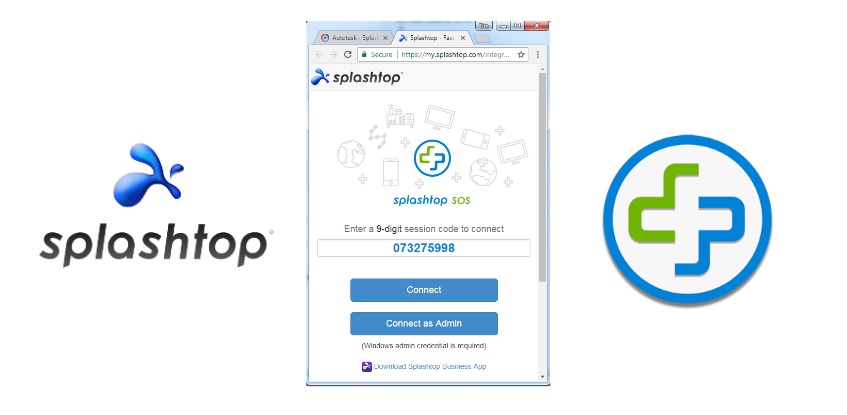
Please click on this link here to download right before the appointment

It will have a 9 digit code I need to remote in your computer

https://www.splashtop.com/sos-download

Old Software Site

It will download a file and you need to run it. After it runs, it will show you a 9 digit code. I need that code when I call for our appointment.

  • If you are using Firefox, look in the upper right area of the window and look for the down arrow (blue or green) and click on it from there
  • If you are using Chrome, the download is in the lower left area of your screen, click and run it
  • If you are using Internet Explorer, a window at the bottom of your screen will pop up when it’s ready to run or save. Select “run”
  • If you are using Edge, please switch to another browser

Contacting the server for information

| February 6, 2019 | 0 Comments

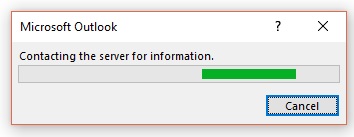
Contacting the server for information

Client called in saying they try to open an Outlook email and get this box and then their Outlook goes crazy. Black screen, then freezes, then finally opens the email.

Cause of this: Whoever is sending you an email, has an image stored on a server that needs to download in your Outlook.

This is not common but it seems to stem from companies like Dell mostly, Google drive maybe too. I first saw this with Paypal years ago.

Fix: I did all my usual tricks and even tried a regedit fix. The regedit worked but then it turned off viewing images in my Outlook for every email. No way around that. My fix is to let that email download, get the information you need, save to your computer and then delete it for good. This is not a common problem and this is what I will tell my clients moving forward.

If you need my help with other issues, please contact me with the form below.

C:\WINDOWS\SYSTEM32\MSVCR120.dll is either not designed to run on Windows or it contains an error

| February 2, 2019 | 0 Comments

“C:\WINDOWS\SYSTEM32\MSVCR120.dll is either not designed to run on Windows or it contains an error. Try installing the program again using the original installation media or contact your system administrator or the software vendor for support.Error status 0xc000012f

My client called in trying to open Outlook and got the above error. I fixed it by updating Office in Microsoft Word on the desktop. If that fails for you, try other google searches, but this fixed it for me! If you need my help, use the form below. Thanks!


Google Phishing Quiz

| January 23, 2019 | 0 Comments

Google Phishing Quiz

Call That Girl offers Email Security Awareness Training to clients around the world. Lisa is an Outlook and email expert and does training courses often, all remote and all in under an hour. Read below and see if you’re interested in booking a training session!

How the training works

  • All training is done via the internet using my screen-share program
  • All attendees are allowed to ask questions via chat
  • All training sessions are recorded for those that miss the training
  • If your company buys volume discount training, one recording will be sent to the coordinator
  • Office 365 and G Suite might have a different training session as each has different security setup

This training is for you if…

  • You are getting strange emails with your passwords in them telling you that if you don’t pay…your webcam activities will be shared online
  • If you don’t understand what links are safe to click on and which ones are phishing emails
  • You have received emails from people that seem suspicious and are not sure what to do
  • You have been asked to put your email password online and did
  • Have you been hacked already and didn’t know what to do

In this training, you will learn

  • How to tell if an email is real or fake
  • What to do and what not to do
  • Phishing emails examples
  • Prevention and Protection
  • First alerts of being hacked
  • What to do when you think you have been hacked
  • How to deal with your account if you got hacked
  • How to get 2 step security on accounts
  • iPhone and Android tips

Pricing

  • Sessions start at $50 per person and can go up to $100 per person depending on the training and time.
  • Most email security training sessions are 30 min in length and are $50 per person.
  • Group discounts available