RSSCategory: Uncategorized

Microsoft Office 365, Outlook, iCloud & iPhone Expert Support Newport News, Norfolk, Virginia Beach, Richmond, Virginia

| June 3, 2014

If you are here looking for Microsoft Office 365 & Outlook Expert help, you came to the right place. Lisa and her team of top notch experts in all versions of Outlook and email can assist with all services, repairs and projects. We now support the Newport News, Norfolk, Virginia Beach and Richmond Virginia Areas.

How can you get the fastest Microsoft Outlook Expert help?
Call That Girl at 612-865-4475

Questions

  • Are you searching for someone to quickly fix an Outlook problem? We can help!
  • Or maybe you have a lot of Outlook issues and need someone to figure them out?
  • Did you buy office 365 and not sure how it works or how to set it up?
  • Are you having difficulties with understanding what products to buy?
  • Are you an IT technician and need side help with Outlook or Office 365?

Did you know?

  • Even if you already have your own IT support company, you can hire us to just do this work
  • We are open nights and weekends
  • No contracts, no monthly fees
  • Same day appointments

MObanner1

mobanner2

mobanner3


What we can help with

General Outlook Repairs

  • Outlook Tune Ups
  • Quick fixes
  • Affordable solutions that help you be more efficient
  • Move PST files
  • Repairing fix OST files
  • iCloud issues

Office 365

  • IT Administration
  • Assist with users accounts, permissions and restrictions
  • Password reset, add new users, delete users
  • Setting up Microsoft Office 365
  • Configuring Exchange, SharePoint, Lync and OneNote

Synchronize your Outlook calendar and contacts to your iPad, iPhone, Android and contacts with the cloud products such as Microsoft Office 365, Hosted Exchange, Outlook.com, 3rd party apps.

  • 3rd party synchronization products
  • 3rd party apps for Gmail
  • iCloud transitional work & repairs
  • Gyschnit
  • CompanionLink
  • Outlook.com
  • Synchronize Outlook info with your smartphone via iTunes
  • Icloud and iTunes synching problems
  • Hosted Exchange Assistance/Set up and Configuration

Training

Software upgrades and transitions

  • Upgrades for Outlook 2013
  • Office 2013 installations
  • Moving to the cloud from POP/IMAP

Migrations

  • Pop3/Pop/IMAP to Microsoft Exchange or Hosted Exchange
  • Google Gmail Transitions
  • Yahoo, Earthlink, AOL transitions to Company branded email (.com)

Outside consulting

  • IT departments who need overflow help with Outlook calls


To book an appointment, please call 612-865-4475 or email info@callthatgirl.biz

Microsoft Office 365, Outlook, iCloud & iPhone Expert Support Hartford, Bridgeport, New Haven, Stamford, Waterbury, Connecticut

| June 3, 2014

If you are here looking for Microsoft Office 365 & Outlook Expert help, you came to the right place. Lisa and her team of top notch experts in all versions of Outlook and email can assist with all services, repairs and projects. We now support the Hartford, Bridgeport, New Haven, Stamford and Waterbury, Connecticut Areas.

How can you get the fastest Microsoft Outlook Expert help?
Call That Girl at 612-865-4475

Questions

  • Are you searching for someone to quickly fix an Outlook problem? We can help!
  • Or maybe you have a lot of Outlook issues and need someone to figure them out?
  • Did you buy office 365 and not sure how it works or how to set it up?
  • Are you having difficulties with understanding what products to buy?
  • Are you an IT technician and need side help with Outlook or Office 365?

Did you know?

  • Even if you already have your own IT support company, you can hire us to just do this work
  • We are open nights and weekends
  • No contracts, no monthly fees
  • Same day appointments

MObanner1

mobanner2

mobanner3


What we can help with

General Outlook Repairs

  • Outlook Tune Ups
  • Quick fixes
  • Affordable solutions that help you be more efficient
  • Move PST files
  • Repairing fix OST files
  • iCloud issues

Office 365

  • IT Administration
  • Assist with users accounts, permissions and restrictions
  • Password reset, add new users, delete users
  • Setting up Microsoft Office 365
  • Configuring Exchange, SharePoint, Lync and OneNote

Synchronize your Outlook calendar and contacts to your iPad, iPhone, Android and contacts with the cloud products such as Microsoft Office 365, Hosted Exchange, Outlook.com, 3rd party apps.

  • 3rd party synchronization products
  • 3rd party apps for Gmail
  • iCloud transitional work & repairs
  • Gyschnit
  • CompanionLink
  • Outlook.com
  • Synchronize Outlook info with your smartphone via iTunes
  • Icloud and iTunes synching problems
  • Hosted Exchange Assistance/Set up and Configuration

Training

Software upgrades and transitions

  • Upgrades for Outlook 2013
  • Office 2013 installations
  • Moving to the cloud from POP/IMAP

Migrations

  • Pop3/Pop/IMAP to Microsoft Exchange or Hosted Exchange
  • Google Gmail Transitions
  • Yahoo, Earthlink, AOL transitions to Company branded email (.com)

Outside consulting

  • IT departments who need overflow help with Outlook calls


To book an appointment, please call 612-865-4475 or email info@callthatgirl.biz

Microsoft Office 365, Outlook, iCloud, iPhone Expert support for Houston, San Antonio, Dallas Texas

| May 30, 2014

If you are here looking for Microsoft Office 365, Outlook, iCloud or iPhone Expert help, you came to the right place. Lisa and her team of top notch experts in all versions of Outlook and email can assist with all services, repairs and projects. We now support the Houston, San Antonio, Dallas, Fort Worth, Austin, El Paso, and Corpus Christi Areas.

How can you get the fastest Microsoft Outlook Expert help?
Call That Girl at 612-865-4475

Questions

  • Are you searching for someone to quickly fix an Outlook problem? We can help!
  • Or maybe you have a lot of Outlook issues and need someone to figure them out?
  • Did you buy office 365 and not sure how it works or how to set it up?
  • Are you having difficulties with understanding what products to buy?
  • Are you an IT technician and need side help with Outlook or Office 365?

Did you know?

  • Even if you already have your own IT support company, you can hire us to just do this work
  • We are open nights and weekends
  • No contracts, no monthly fees
  • Same day appointments

office365 podcast2

MObanner1


What we can help with

General Outlook Repairs

  • Outlook Tune Ups
  • Quick fixes
  • Affordable solutions that help you be more efficient
  • Move PST files
  • Repairing fix OST files
  • iCloud issues

Office 365

  • IT Administration
  • Assist with users accounts, permissions and restrictions
  • Password reset, add new users, delete users
  • Setting up Microsoft Office 365
  • Configuring Exchange, SharePoint, Lync and OneNote

Synchronize your Outlook calendar and contacts to your iPad, iPhone, Android and contacts with the cloud products such as Microsoft Office 365, Hosted Exchange, Outlook.com, 3rd party apps.

  • 3rd party synchronization products
  • 3rd party apps for Gmail
  • iCloud transitional work & repairs
  • Gyschnit
  • CompanionLink
  • Outlook.com
  • Synchronize Outlook info with your smartphone via iTunes
  • Icloud and iTunes synching problems
  • Hosted Exchange Assistance/Set up and Configuration

Training

Software upgrades and transitions

  • Upgrades for Outlook 2013
  • Office 2013 installations
  • Moving to the cloud from POP/IMAP

Migrations

  • Pop3/Pop/IMAP to Microsoft Exchange or Hosted Exchange
  • Google Gmail Transitions
  • Yahoo, Earthlink, AOL transitions to Company branded email (.com)

Outside consulting

  • IT departments who need overflow help with Outlook calls


To book an appointment, please call 612-865-4475 or email info@callthatgirl.biz

Office365 Podcast

What you need to know about Microsoft Office 365

| May 30, 2014

office365

People today are hearing more and more about Office 365, the awesome benefits and the pricing is right. Microsoft now offers monthly subscriptions that offer everyone a chance to have the full suite for around $15 a month. Since the full Office suite is around $400, this is a deal you can’t beat, especially when you get all the robust features including Office 2013.

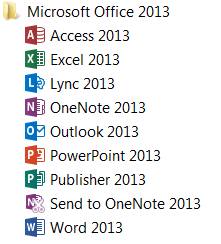
Here is the list of what you get…and then we will discuss each product and how we can help you.

FYI, Popular Misconceptions!

If you buy the $99 per year Office 365 package online, you do not have the full Office 365. You just purchased the Office 2013 subscription to use all the products.

If you did buy the $15 per month/per user, or any of the Small Business versions and you are not using the Exchange or SharePoint, you should get those setup (I can help) so you are getting the biggest bang for your buck. I have seen clients pay for the most expensive version and only use the OneDrive feature and the Office 2013!


How can you get the fastest Microsoft Outlook Expert help? Call That Girl at 612-865-4475 or fill out this form. If you need more information, read below.

Microsoft Exchange

  • Manages your email, calendar, contacts, tasks and notes
  • Synchronizes with all of your computers, devices, Androids, iPhones and iPad
  • Team sharing of calendars and appointments, contacts and tasks
  • To check out my 3 minutes video click here (middle of page)
  • We help you migrate your old information to the new Exchange server and help with phone setup and offer training on how to use Exchange

Office 2013

Latest upgrade

Includes

office2013


SharePoint

  • Collaborating  and co-authoring data, sharing within teams and external team members
  • Best for team sharing of documents
  • We help you setup your site, offer basic training

Lync

  • Online conferencing, chat and instant desktop sharing
  • We will setup for you on your desktop and offer training

OneDrive

  • For sharing data, pictures, videos on all devices/computers and phones
  • Best used for sharing data between your own devices (SharePoint is best for team sharing)
  • We will setup for you on your desktop and help setup on devices and offer training

Pricing: 

For all of Call That Girl pricing, click here

Usually for SharePoint, Lync and OneDrive setup and training, we take that time off a prepay ticket. What is left on the ticket can be used to help support your team as technical issues arise in the future. Our prepay tickets never expire and can be used by everyone on your team.

Free Microsoft Office 365 Webinars

| May 28, 2014

office365The webinars are offered free to give people insight of how Office 365 can help your business. With so many people needing mobility for their work, managing multiple devices (Computers, phones, iPads, etc), it’s critical to have your data all “Synchronize”. Office 365 steps in and does most of the work for you!

In this 30 minute webinar, I will offer a quick review of the following:

Microsoft Exchange, how it manages your email/calendar/contacts and team sharing opportunities.

Office 2013, Should you upgrade your software

SharePoint, collaborating and co-authoring data, sharing within teams and external team members

Lync, online conferencing, chat and instant desktop sharing

OneDrive, for sharing data, pictures, videos on all devices/computers and phones

Pricing, Review of costs and added benefits


In addition, I will address:

•Misconceptions to Office 365 webinar sales

•If you bought it but don’t feel you are getting your money’s worth

•Are you paying for the wrong products?

•What you can do yourself and what you need to hire someone else to help with


Why Googling things yourself can hurt your computer

| May 21, 2014

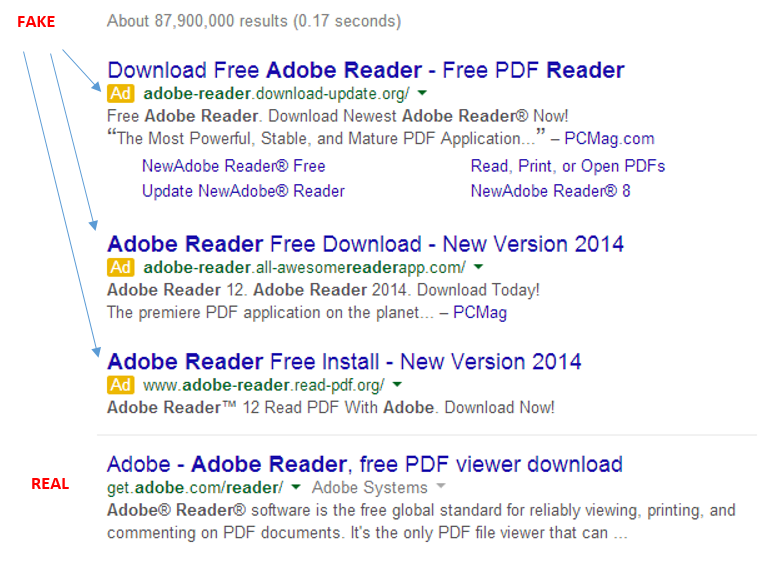
googleCall comes in, client says they downloaded Adobe and now they have junk all over their computer, their search engine is messed up and they have pornographic ads on their google page. Yep, it’s happening! Just downloading an easy program like Adobe can do this to your computer, but come on….Adobe Reader is in Google right? Of course it is, but not at the top of your Google search. It’s about 4 down. See my picture below?

adobefake


It shows you a basic search in Google for Adobe Reader I just did. The real one is the 4th one down, under the “Ads” that is sometimes hard to notice. I know this because the website is actually an Adobe website, not Adobereader.com or something of the like. Very tough to tell these days folks!

But hey Lisa, Adobe is downloaded and works, so what happened?

You did get Adobe, but it was bundled in a “download manager” filled with other junk! Search engine fun and other programs that are annoying. Sometimes you can download up to 20 programs! I have spent over an hour before removing this junk.

So please be mindful when Googling and if you are not sure, don’t do anything and call us to install the programs properly, which will end up being cheaper than a virus removal.

Lisa

612-865-4475


Microsoft Office 365 Consultant 2