RSSCategory: Uncategorized

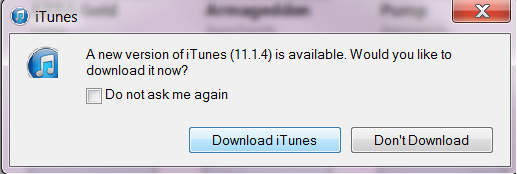
iTunes fails to work after 11.1.4 update

| February 4, 2014 | 0 Comments

Just a warning folks, iTunes updates are back at it again, failing and corrupting your current iTunes setup. Your music should be fine as it’s saved in a music directory, but hey….are you backing up your music just in case? Never know. I’ve had my iPhone blown away from a bad update and thank goodness, a restore was done recently.
schedule-an-appointment

Updates, need ’em, but how bad? I’m willing to risk it sometimes.

itunes update

So tonight I am doing the famous bad update to see what happens. So far, so good. Half way there. And after it was done, all set. iTunes still works. But let’s look at what programs I don’t have, that some of my clients did have on their system that may have caused the update to crash. (*I haven’t rebooted my computer yet either, so we will see if that happens tomorrow am!)

From what I have seen, the Apple Mobile Device services were the partial cause. You can try to start the services again and it might work, but I had to do a full clean up and reinstall on the computer I fixed last.

What is the repair you ask? Basically remove all Apple products from your computer, run a cleaner to remove all registry items associated, reboot and then install from scratch. Be sure to back up your music before hand.

Need our help? Give us a call, we can get it fixed quick for you. 612-865-4475

click here


LogMeIn Free Remote Services No Longer Free

| January 25, 2014 | 0 Comments

logmeinProIf you are of the many folks who use “LogMeIn” to log into your home computers from work, or vice versa…the big news is that it’s no longer free and you will have to pay to continue to use the service. There are many alternatives, but here is my recommendation. As a professional remote support specialist, I believe in paying for what works. If this product has worked for you for years without issues, I recommend paying the fees to upgrade to LogMeinPro and continue using it. It’s important that your day to day stay consistent. I have found that trying new products to stay free, only costs you money in the long run. To remote into 2 computers for a year is $99. I pay that a month for my remote support tools (that allows me day to day remote access to your computers LogMeInRescue). I find this acceptable in terms of price. I know it would be great to find something cheaper, but as I said, if this is working now, upgrade and no time is wasted. If you spend a lot of time finding other software and tools, what is your time worth? If you do not want to pay, then be careful of other free services that are out there and will be popping up here due to the LogMeIn free going away. Be careful if people start calling you, especially from other countries. Scam artists know what people want and how to sell you things fast. If you have any questions, please email Lisa@callthatgirl.biz.

Do you know what version of Windows you have?

| January 23, 2014 | 0 Comments

When I ask a client, “What version of Windows are you using”….many don’t know, or they say “Windows 2010”. So, I thought I would show you pictures and explain in this blog what version of Windows you have. The reason I’m sharing this with you is because in April, Windows XP will no longer be supported by Microsoft. This means you should take your computer off the internet and only use it for music, games and money/finances. Or, you could get a new computer and hey, it’s probably time for one! We will discuss Office products in another blog.

schedule-an-appointment

So let’s review the versions of Windows that you may have. And you may have an older version, if so…you’re lucky!

Windows XP

The button usually looks like the image below (it could look different, but this is the standard…green color under white start letters). You also will notice the old school “log off” and “turn off computer” (some people opt to change their start menu appearance, but this is pretty standard).

windows xp


Windows Vista

Now this fancier button can be deceiving because Windows 7 has the same “circle fancy button” but there are 2 ways to know the difference. Notice the 2 icons next to the start menu button? They are not available on Windows 7. If you look right above the start button, you will see “Start Search”, Windows 7 has “Search programs and files” above the start menu button. See images below.

Image found at http://www.thewwwblog.com/how-to-speed-up-an-external-hard-drive-in-windows-vista.html

Image found at http://www.thewwwblog.com/how-to-speed-up-an-external-hard-drive-in-windows-vista.html

Windows 7 Start Menu Button, notice with a bit more flair. 
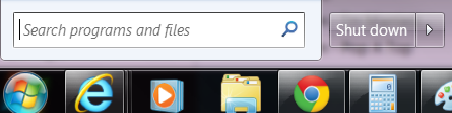
search programs and files

Image found at http://www.freemake.com/blog/windows-8-vs-windows-7-top-10-features-that-will-be-gone/


Now for Windows 8….we went from a nice circle button to this…?????? This isn’t really a start menu button, but an app clicker to get to the apps. I won’t elaborate on this, but if you see this…you have Windows 8.

windows 8

Long story short, if you have Windows XP it’s time for an upgrade! If you need advice on buying a new computer, check out our blog here. For even more guidance,  please call 612-865-4475 or email info@callthatgirl.biz.

schedule-an-appointment

If you have Office 2003, it’s time for you to get new software

| January 18, 2014 | 0 Comments

If you haven’t heard by now, Microsoft is ending life of many software products in the next few months. The big one is Windows XP, (so that means this XP computer should be off the internet as it will not be safe). To read my blog on how to buy a new computer, click here.

office 2003Moving on, Office 2003 is already out of date and not supported. You are for sure on your own there friend! If it breaks, you can’t call Microsoft, but most people just call companies like Call That Girl to fix it anyway. Worst case scenario…we reinstall it, which you can still do.

The problem with Office 2003 either way, is that you can’t install it on a Windows 8 computer or use any of the new technology out there. If you want hosted exchange, you have to upgrade.

The latest Office 2013 is still something I am getting used to. The design is all different, but the important things we need and use on a daily basis are still there, if you can find it! They have changed how to find our usual settings but if you spend enough time, you can figure it out quickly.

Now, on to the purchasing. There are no more disks with Office 2013. You have to create a Microsoft account, and then you purchase. After that, you have access to your software at anytime. There are many packages to buy and some seem a bit more lenient than others. Such as the home version of Office 2013.

To read more about what versions to buy, click here.

Microsoft Office 365, Outlook, iCloud & iPhone Expert Support Portland, Seattle, Spokane, Tacoma, Vancouver, Washington, Oregon

| January 14, 2014

If you are here looking for Microsoft Office 365 & Outlook Expert help, you came to the right place. Lisa and her team of top notch experts in all versions of Outlook and email can assist with all services, repairs and projects. We now support the Portland, Seattle, Spokane, Tacoma and Vancouver, Washington, Oregon Areas.

How can you get the fastest Microsoft Outlook Expert help?
Call That Girl at 612-865-4475

Questions

  • Are you searching for someone to quickly fix an Outlook problem? We can help!
  • Or maybe you have a lot of Outlook issues and need someone to figure them out?
  • Did you buy office 365 and not sure how it works or how to set it up?
  • Are you having difficulties with understanding what products to buy?
  • Are you an IT technician and need side help with Outlook or Office 365?

Did you know?

  • Even if you already have your own IT support company, you can hire us to just do this work
  • We are open nights and weekends
  • No contracts, no monthly fees
  • Same day appointments

MObanner1

mobanner2

mobanner3


What we can help with

General Outlook Repairs

  • Outlook Tune Ups
  • Quick fixes
  • Affordable solutions that help you be more efficient
  • Move PST files
  • Repairing fix OST files
  • iCloud issues

Office 365

  • IT Administration
  • Assist with users accounts, permissions and restrictions
  • Password reset, add new users, delete users
  • Setting up Microsoft Office 365
  • Configuring Exchange, SharePoint, Lync and OneNote

Synchronize your Outlook calendar and contacts to your iPad, iPhone, Android and contacts with the cloud products such as Microsoft Office 365, Hosted Exchange, Outlook.com, 3rd party apps.

  • 3rd party synchronization products
  • 3rd party apps for Gmail
  • iCloud transitional work & repairs
  • Gyschnit
  • CompanionLink
  • Outlook.com
  • Synchronize Outlook info with your smartphone via iTunes
  • Icloud and iTunes synching problems
  • Hosted Exchange Assistance/Set up and Configuration

Training

Software upgrades and transitions

  • Upgrades for Outlook 2013
  • Office 2013 installations
  • Moving to the cloud from POP/IMAP

Migrations

  • Pop3/Pop/IMAP to Microsoft Exchange or Hosted Exchange
  • Google Gmail Transitions
  • Yahoo, Earthlink, AOL transitions to Company branded email (.com)

Outside consulting

  • IT departments who need overflow help with Outlook calls


To book an appointment, please call 612-865-4475 or email info@callthatgirl.biz

Your New Year Technology Check List

| January 7, 2014 | 0 Comments
www.thetogetherteacher.com

www.thetogetherteacher.com

Our clients call in to get current technology problems fixed. In many cases, we end up finding even more problems than they knew about! However, I always help them find the solutions that will make their business day more efficient. It’s my job to know this stuff! Here is a checklist of the main problems people call with. How many can you check off?

1.) Do you have a good paid for antivirus program? Free ones don’t really work. They might for a bit, but when you really need them to, they won’t. Norton is still a favorite, but I don’t recommend using Norton if your computer is slow and old. Norton and McAfee still cause “unknown slowdowns” on fast computers. And not to mention, networking issues on occasion.

2.) Are you for sure backing up? If you are not sure, now is the time to check. If you have an external hard drive, be sure to unplug it when you’re done backing up.

3.) Are you using an old computer with Windows XP? You will need to think about getting a new one in April of 2014, as Windows XP will no longer be supported by Microsoft.

4.) Are your current email, calendar and contacts not synching with your other computers and smartphones? Are you tired of band-aiding multiple computers and smartphones just to keep your life organized?

5.) Are you having difficulty sharing data from one computer to another?

6.) Is your website a mess? Time for a refresh!

We can help you with all of these issues and find you new affordable solutions. Call us or email today. 612-865-4475 Lisa@callthatgirl.biz