Tag: Outlook Email Support

Why Googling things yourself can hurt your computer

| May 21, 2014

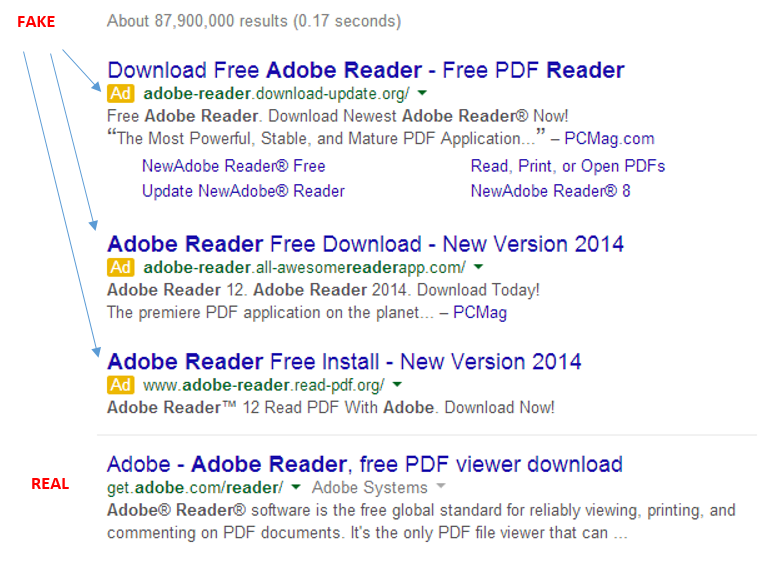
googleCall comes in, client says they downloaded Adobe and now they have junk all over their computer, their search engine is messed up and they have pornographic ads on their google page. Yep, it’s happening! Just downloading an easy program like Adobe can do this to your computer, but come on….Adobe Reader is in Google right? Of course it is, but not at the top of your Google search. It’s about 4 down. See my picture below?
adobefake


It shows you a basic search in Google for Adobe Reader I just did. The real one is the 4th one down, under the “Ads” that is sometimes hard to notice. I know this because the website is actually an Adobe website, not Adobereader.com or something of the like. Very tough to tell these days folks!

But hey Lisa, Adobe is downloaded and works, so what happened?

You did get Adobe, but it was bundled in a “download manager” filled with other junk! Search engine fun and other programs that are annoying. Sometimes you can download up to 20 programs! I have spent over an hour before removing this junk.

So please be mindful when Googling and if you are not sure, don’t do anything and call us to install the programs properly, which will end up being cheaper than a virus removal.

Lisa

612-865-4475

 

Microsoft Office 365 Consultant 2

Is it time for your business to have a company branded email?

| February 13, 2014 | 0 Comments

Microsoft Outlook SpecialistWe’re always trying to find ways to maximize our profits and minimize our expenses. But, can excessively minimizing your expenses negatively affect your business? The answer is YES. Here at Call That Girl, we many times see clients using free email services for their business needs. Now is the time to move off of the free services and move to your business branded email. The transition is easier than you think, we will help you and can set up your new email so everything matchs on your computer, iPhone, iPad, Tablet, Surface, etc. No more band-aiding your deletes and calendar appts.

If you’re using a free email service, such as Yahoo, Gmail, Comcast.net or EarthLink email for your business, it’s time to reconsider. Here are four reasons why you will benefit from using a company branded email instead:

1.) Credibility

  • Increased trustworthiness
  • Increased professionalism
  • Stronger first impression
  • Established and genuine

2.)  Memorable

  • Increased online identity
  • Higher recall rate for past clients

3.) Organization

  • Individual employee emails
  • Department specific emails
    • Shows clients their needs are important to you
    • Allows them to easily contact the right person
    • Decreases inbox clutter
  • Separation of personal and work life

4.) Brand Promotion

  • Allows you to promote YOUR business, not a third-party email provider
  • Keeps company name in front of leads, clients, partners, etc.
  • More exposure!

Bottom line: your business will thrive when you decide to transition to a company branded email! Let our specialists assist you and your team today!


Gsyncit wins over CompanionLink for Outlook, iCloud, Google and iPhone Synching

| February 5, 2014 | 0 Comments

Microsoft Outlook Specialist

Yep, I called it. Gysyncit wins victorious over CompanionLink for installation, configuration and setup and of course…correctly synching iCloud to Google Calendar with Outlook and iPhone in just 20 minutes flat.

The 3 (4)  titans can play together nicely, finally.

If you are having issues syncing your Gmail calendar to your iPhone to your Outlook, give me a call and I’ll help you with this issue. I cannot guarantee a 20 minute set up, but it should be under an hour either way.


Microsoft Office 365 Consultant 2

Outlook Repair of the Day: Outlook Sync Tools

| February 5, 2014 | 0 Comments

Outlook-150x150Today was interesting. I had a client book some time with me today to work on a Outlook, Gmail calendar and contacts sync issue.

office365 podcast2

Since he is using free Gmail, you are held hostage to not being able to sync calendars anymore and forget about contacts unless you use a 3rd party tool. And while there are many out there, I tend to lean towards CompanionLink or Gsyncit. Both work, but I’m finding Gysyncit is working better. Less snags in the setup and first round of syncing.

So the client and I set up CompanionLink, he is on a slow internet connection and we find the syncing very slow and required us to close his Outlook and reboot a couple of times to see the actual Outlook calendar on his Samsung phone. We used the Google option for syncing. I also had to configure the settings a few times and I will guess that an average user of CompanionLink would not know about this, the snooping around I do very fast and furiously. When a client is paying per hour, you wan this to just work!

End of the job, we found appointments syncing. Client happy. Until later, no joy. Now we will try Gsyncit tomorrow. I tell ya, free Gmail is not always free folks. I hate telling clients this, but for me it’s not the best if you love and heart Microsoft Outlook like I do!

outlook-ad-300x130


Office365 Podcast

How to easily backup your hosted exchange email in Outlook 2013

| October 16, 2013 | 0 Comments

Awhile back, I had a client who did an update on her iPhone and during that update, her calendar went missing. She was on hosted exchange and due to some “terms and conditions”, a mailbox restore was not going to happen for the client. (By the way, not all companies refuse to do mailbox restores, just this specific one company that will remain nameless for now).  Even if you have a company that will restore mailboxes, it’s sometimes time critical to get back your information that you have already stored locally.

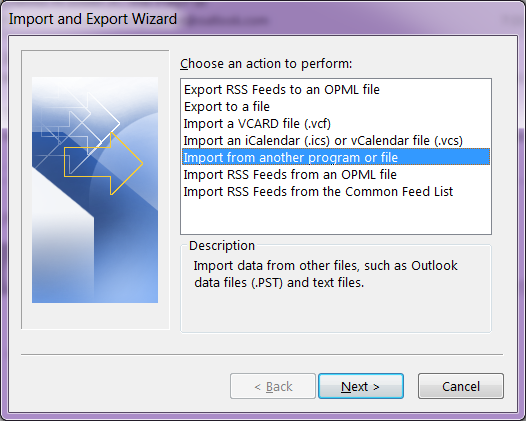
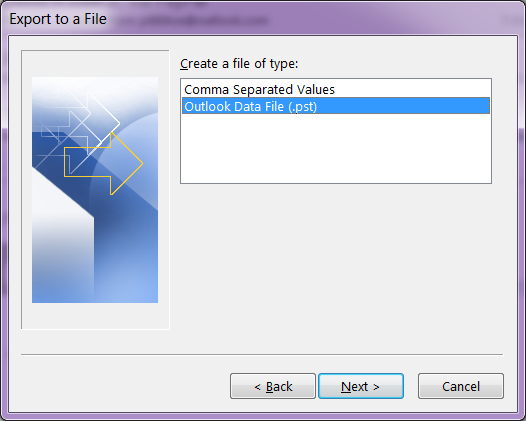
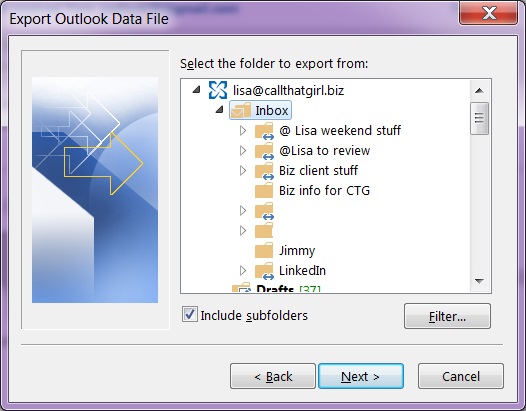
So if you have any version of Outlook, not just Outlook 2013 or Outlook 2010, the same instructions will work to some degree. There are screen shots below. The backup file will be stored in your default Outlook folders in your computer, but these should be backed up to an external backup or online.

If you need online backup, please call me to schedule an appointment. We charge $79 for setup and your products costs are $65 for one computer up to $109 for 3 computers.

  1. In Outlook…click on “File”
  2. Then click on “Open and Export”
  3. Then click on “Import and Export”
  4. Then click on “Export to a file”
  5. Select “Outlook Data File (.pst)
  6. Outlook will show you the mailboxes you can export. Click on the “Inbox” and hit “Next”
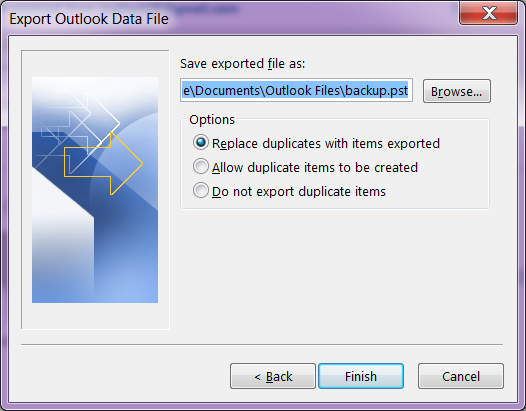
  7. Now Click on the browse button, and by default Outlook should save your file where online backup programs know to backup. It should be in the My Documents, Outlook Files folder.
  8. Create a name for the file and hit “Ok”
  9. Then hit “Finish”

office365 podcast2

The larger your hosted exchange is, the longer a backup will take. I recommend doing this on Fridays before you leave the office or before you go to bed. You will not be able to use Outlook during this time.

outlook1 outlook2 outlook3 outlook4


Click “Finish” and Outlook will now export a full copy of your hosted exchange to your computer.

outlook-ad-300x130


Microsoft Office 365 Consultant 2

Office365 Podcast