Tag: Your message did not reach some or all of the intended recipients

New Outlook Error This message could not be sent

| October 4, 2025

This message could not be sent

Microsoft.Exchange.Data.Storage.QuotaExceededException: Microsoft Unified Storage is full. This message could not be sent. The client operation failed. Try sending the message again later, or contact your network administrator.

Your message did not reach some or all of the intended recipients.

Too long/didn’t read: The above content is all with this error: The account for Microsoft needs to be upgraded to get more space, the $99 plan will do it. 

Storytime: This was in an email from a client who got a bounce back email from Microsoft, using Outlook.com in her Outlook Classic desktop application. Here is what happened and how I fixed it.

Client has just setup Outlook.com. I had migrated all her email to this account from her comcast.net account. All was good until her computer rebooted and Outlook Classic was not pinned on the task bar anymore and New Outlook replaced it. She tried to open New Outlook and it would not set up her Outlook.com account. She called me back and I got her Outlook Classic back up and running but this error still showed up when I tried to send a test message. I logged in online to her outlook.com account and found this error “Your account has been locked“.
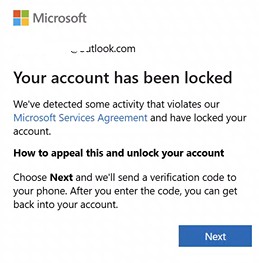
 

I have seen this error before with new Outlook.com accounts, so it was not new to me. Outlook.com will do this on occasion. I got her unlocked and logged back into her online account. Then we found out her account was out of space and needed a personal Microsoft 365 subscription to get more space. After she paid that, it took about 20 min or so and her email was back up and running and we could launch New Outlook just fine.

So she had a two problems actually. If you are having issues, please send me a message using the form below or schedule an appointment.


New Outlook Error: Microsoft.Exchange.Data.Storage.QuotaExceededException

| October 4, 2025

Microsoft.Exchange.Data.Storage.QuotaExceededException: Microsoft Unified Storage is full. This message could not be sent. The client operation failed. Try sending the message again later, or contact your network administrator.

Your message did not reach some or all of the intended recipients.

Too long/didn’t read: The above content is all with this error: The account for Microsoft needs to be upgraded to get more space, the $99 plan will do it. 

Storytime: This was in an email from a client who got a bounce back email from Microsoft, using Outlook.com in her Outlook Classic desktop application. Here is what happened and how I fixed it.

Client has just setup Outlook.com. I had migrated all her email to this account from her comcast.net account. All was good until her computer rebooted and Outlook Classic was not pinned on the task bar anymore and New Outlook replaced it. She tried to open New Outlook and it would not set up her Outlook.com account. She called me back and I got her Outlook Classic back up and running but this error still showed up when I tried to send a test message. I logged in online to her outlook.com account and found this error “Your account has been locked“.


I have seen this error before with new Outlook.com accounts, so it was not new to me. Outlook.com will do this on occasion. I got her unlocked and logged back into her online account. Then we found out her account was out of space and needed a personal Microsoft 365 subscription to get more space. After she paid that, it took about 20 min or so and her email was back up and running and we could launch New Outlook just fine.

So she had a two problems actually. If you are having issues, please send me a message using the form below or schedule an appointment.