Hi again! This week I will discuss setting up Outlook on your new Windows 10 computer. If you didn’t read my last newsletter on tips of setting up a new Windows 10 computer, please check your junk or spam or email me for a copy. It was a good read!
Many calls I get are from clients who are having issues with Outlook involving freezing, synchronizing, weird snags or “there are no default apps” when using a 3rd party software. Here’s my diagnosis…these folks all configured Outlook wrong, have too much email, installed 64-bit Office or are using the trial version pre-installed. If 64-bit is the problem, here’s why…you didn’t have a choice when you installed it from the online Microsoft portal. But…you did have a choice; Microsoft just does a horrible job of letting you know you can install 32-bit still. For some reason, they think 64-bit is for everyone and it’s definitely not! If you have issues with the pre-installed version, you can follow these instructions for reinstalling the 32-bit that works better.
Here are some steps for installing the 32-bit version when you’re setting up your computer. If you are having issues now with Outlook, please call me to help 612-865-4475. While the swap of the Office installs should not have issues, sometimes there are other problems causing your Outlook to have issues. I can properly diagnose and back up your email and calendar and contacts before we reconfigure.
Residential instructions first (Office 365 Home), then Business (Office 365 Business Premium)
Tips for setting up Outlook on a new Windows 10 computer for residential clients
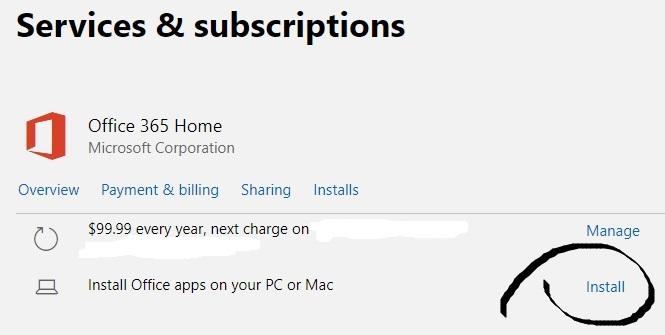
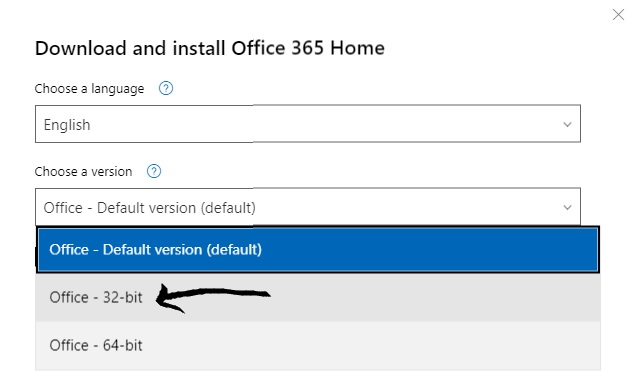
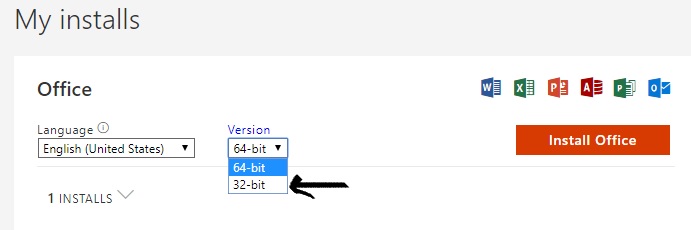
Follow these instructions to download Office 365 Home 32-bit from the Microsoft store. Here is the login page
https://account.microsoft.com/services and look for “Services & subscriptions” at the top of the page.
Tips for setting up Outlook on a new Windows 10 with Office 365 Business accounts.
Follow these instructions to download Office 365 32-bit from your Office 365 account. Log into
www.office.comThis is the area you can see all your applications and admin control panel if you are an administrator of your account.
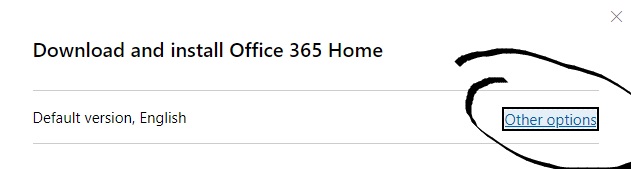
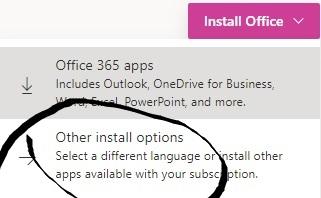
When you click on “Install Office, you’ll see the options for “other install options” and click that.
Then you will see the box below, select 32-bit version and hit “Install Office”
When you first install Office, launch Outlook and just put in your password and then it will auto setup for you.
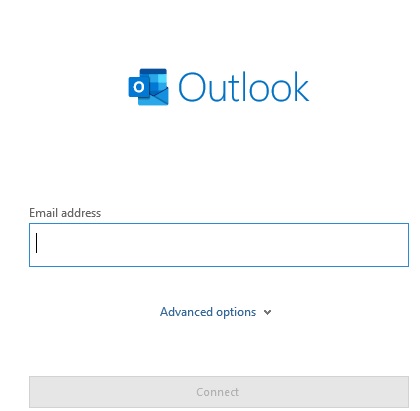
When you go to launch Outlook, you will see a pop up like this –>
Exchange:
If you have Microsoft Exchange, this should just setup fine. If you get errors, you have other issues that I can’t explain in a newsletter. I recommend you call me 612-865-4475.
IMAP:
If you have a free email account like Comcast, Charter, Cox, Gmail, etc…type in your email account and this should setup automatically for you. This will setup as IMAP though. Here is where people have issues and such…they setup their account as IMAP and try to import in their PST and this is a NO NO unless you know what you are doing. This is the time to call me before doing that or else you will possibly have “synchronizing issues” maybe corrupted folders with “This computer only” and a variety of other problems.
POP:
The POP setup will work but doesn’t offer an easy way to connect to your PST files. I do all my setup in the control panel for Outlook so I can add the PST to the accounts properly. Then I launch Outlook. If you have used POP email in the past, then you should call me to help if you don’t know how to do this. Setting up with a pop account has more instructions than what I can offer in a newsletter.
GSuite:
If you want to setup GSuite, you need to download the GSuite Sync for Microsoft Outlook (GSSMO). Please take note, this is not for those that use the free @gmail.com for their email, this is for paid subscribers of the GSuite platform.
If are you setting up a new computer and your old computer was setup for IMAP, please take note that setting up GSuite has a few “issues” and you might not see the exact same folder structure or amount of data downloaded. I can help set this up correctly for you if you want pre-installation help. You can download here
https://tools.google.com/dlpage/gappssync
Remember! Call me to help before you get stuck or start Googling issues with Outlook. 612-865-4475.
I can assist with all email or Outlook related issues, including helping you transfer your Outlook PST files.




 Before you buy!
  Hardware purchase tips
 Buying online from Dell or HP can be a long process. You might see that Windows is an upgrade option. Be sure to check that off as you will need to purchase it as well. Ubuntu is maybe the “Free operating system” option and unless you understand that operating system, you will be sending it back if you don’t!
 If you need the warranty for business, I recommend buying it.
 1.) Never give out your password to anyone online.
 2.) Never let someone you don’t know remote in your computer.
 3.) If you don’t have 2-step security setup on your email
 5.) Backing up your email is just as important as your other files!