RSSCategory: Outlook Support

Microsoft 365 Teams

| August 15, 2020 | 2 Comments

Microsoft 365 Teams

Hi Folks! I have received so many requests in the past few weeks about using Microsoft Teams for your company, that I created a very basic 1-hour personal configuration session which includes setup,  data migration and some training, enough to get you going with using your Teams.  Usually it’s a one on one with the primary/owner of the company, then we schedule more time for me to do the setup and some simple training for the employees/contractors, etc.

I also have group rates for IT companies who want to learn more in depth so they can setup and train their clients.

Below is a list of topics I cover, these can be customized.

1-Hour Personal Configuration Session (might go over if you have more questions or want to take your own notes). If you want both

  • Team setup with channels 
  • Members per channel
  • Guest accounts 
  • Tabs
  • Video
  • Calendar
  • Schedule meetings 
  • Upload some data 
  • View in SharePoint 
  • Admin tips about the back end of the Teams 
  • Sync with desktop 
  • Local vs Cloud/Versioning
  • Tips about data syncing 
  • No more saving? How can that be?
  • How to backup Teams using your computer

Extended Session

For those who have already learned the basics, this session is really good to teach you how to be more efficient and get into an all Teams Environment.

  • Review of Teams, SharePoint and desktop sync and how it works collaborative, real time saving,  
  • Phone setup 
  • Explain OneDrive in Teams
  • OneNote in Teams/Tabs
  • How to edit documents on the phone
  • Create content with phone microphone 
  • Team chat, video and channels
  • Sharepoint calendar 
  • Planner
  • Calls
  • Security

Teams for IT Professional Sessions

Basic and Extended are both offered for IT companies to learn Teams. Contact me for a quote to train your company how to setup and configure and train your clients on Teams!


Microsoft 365 Teams Trainer

| August 15, 2020 | 0 Comments

Microsoft 365 Teams Trainer

Hi Folks! I have received so many requests in the past few weeks about using Microsoft Teams for your company, that I created a very basic 1 hour demo which includes setup, configuration and some training, enough to get you going with using your Teams! Below is a list of topics I cover. Usually it’s a one on one with the primary/owner of the company. I charge $199 for an hour, if you want to include other people in this session, please add on $99 per person.

  • Want to schedule time? Book an hour here on my calendar or book a 3 hour ticket, please keep in mind I only train 1 hour at a time. 3 hours is a good amount though for a group of people. http://bit.ly/1C2IoEO

How it works

  • I remote into your computer with my own software so I can have better control of the mouse and many monitors. Then I will do the demo and setup with you cover the list below. (Please note, you might go over and hour, I go your speed). Then you can decide if you want me to assist helping your company complete the configuration and company wide training. I also offer some “homework” so you have some tasks to accomplish and start re-training your brain before our next session.

Demo includes 

  • Team setup with channels 
  • Members 
  • Guest accounts 
  • Tabs
  • Video
  • Calendar
  • Schedule meetings 
  • Upload data 
  • View in SharePoint 
  • Admin tips about the back end of the Teams 
  • Sync with desktop 
  • Local vs Cloud/Versioning
  • Tips about data syncing 
  • No more saving? How can that be?
  • How to backup Teams 

Extra’s to work on in the next session

  • Review of Teams, SharePoint and desktop sync and how it works collaborative, real time saving,  
  • Phone setup 
  • How to edit documents on the phone
  • Create content with phone microphone 
  • Team chat, video and channels
  • Sharepoint calendar 
  • Planner
  • Calls
  • Security

Microsoft Teams Trainer

| August 15, 2020 | 0 Comments

Microsoft Teams Trainer

Hi Folks! I have received so many requests in the past few weeks about using Microsoft Teams for your company, that I created a very basic 1 hour demo which includes setup, configuration and some training, enough to get you going with using your Teams! Below is a list of topics I cover. Usually it’s a one on one with the primary/owner of the company. I charge $199 for an hour, if you want to include other people in this session, please add on $99 per person.

Want to schedule time? Book an hour here on my calendar or book a 3 hour ticket, please keep in mind I only train 1 hour at a time. 3 hours is a good amount though for a group of people. http://bit.ly/1C2IoEO

How it works

I remote into your computer with my own software so I can have better control of the mouse and many monitors. Then I will do the demo and setup with you cover the list below. (Please note, you might go over and hour, I go your speed). Then you can decide if you want me to assist helping your company complete the configuration and company wide training. I also offer some “homework” so you have some tasks to accomplish and start re-training your brain before our next session.

Demo includes 

  • Team setup with channels 
  • Members 
  • Guest accounts 
  • Tabs
  • Video
  • Calendar
  • Schedule meetings 
  • Upload data 
  • View in SharePoint 
  • Admin tips about the back end of the Teams 
  • Sync with desktop 
  • Tips about data synching 
  • How to backup Teams 

Extra’s to work on in the next session

  • Review of Teams, SharePoint and desktop sync and how it works collaborative, real time saving,  
  • Phone setup 
  • How to edit documents on the phone
  • Create content with phone microphone 
  • Team chat, video and channels
  • Sharepoint calendar 
  • Planner
  • Calls
  • Security


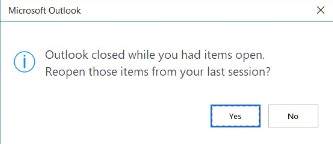
How to disable Outlook closed while you had items opened

| August 10, 2020 | 28 Comments

How to disable Outlook closed while you had items opened

This is a newer annoying feature that most people do not want. You usually get this when you had some emails open in Outlook when you closed it.

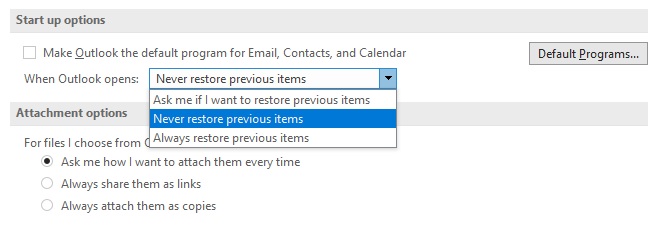
You can disable it by going to:

  • File
  • Options
  • General
  • Start Up Options
  • Change your options
  • Close window


Feel free to leave a comment if this blog helped you! I am enjoying reading and replying to them.


Outlook closed while you had items opened. Reopen those items from your last session?

| August 10, 2020 | 1 Comment

Outlook closed while you had items opened. Reopen those items from your last session?

This is a newer annoying feature that most people do not want. You usually get this when you had some emails open in Outlook when you closed it.

You can disable it by going to:

  • File
  • Options
  • General
  • Start Up Options
  • Change your options
  • Close window


Other Services I Offer

| July 20, 2020 | 0 Comments

Besides marketing my business for Outlook Expert and Microsoft 365 consulting, I also have other services available that I offer to clients. These are also tasks that I know how to do well and enjoy doing. Please review this list and let me know how I can help. I’m also asking that you share with your colleagues who you think might benefit from hiring me to help. Thank you so much, I appreciate the support!

Virtual CIO (vCIO)

Many small businesses have an IT Director and it’s usually the founder/owner of the company. Eventually, you outgrow this role because your business needs you to make more important decisions, lead your team and direct tasks. This is where I can step in and help as a vCIO.

  • Most clients want simple help: tech support when they are busy, train and onboard new employees, assist with the Microsoft 365 accounts, training and projects, make decisions on purchasing software and countless other tasks as they arise. Are you a one person business?
  • Just think how nice it would be to say “Let me check with my Chief Information Officer before purchasing this software”. You can have one too, no matter what size business you own.
  • Having a vCIO is not as expensive as you might think. I sell my 3 hour ticket to keep this service affordable and you only get billed for the time I help.

IT Projects: 

  • One of my specialties is helping clients do transitions to new technology. Many times clients just buy software and have no game plan. Many over buy and have no idea what’s going on with what they purchased. I like to create a game plan for the clients which include buying/testing/deploying and then training. If you are tired of running projects by yourself, I can step in and help get them done. I know and understand deadlines very well. My business is managed by my calendar and I know how to manage expectations
  • Assist IT companies with training technicians how to troubleshoot Outlook
  • Exchange/Email migrations to Microsoft 365
  • New employee training
  • Security testing
  • Employee termination for all IT related accounts and access
  • Training for Outlook best practices, Microsoft 365, SharePoint, OneDrive, basic Team
  • Team restructuring

Data Rescue, Recovery and Investigation

  • I have many years of rescue and recovery for email related problems. Clients have hired me to find lost emails due to negligence on how the email was backed up, employee destroyed,  investigate employee theft and more often I get calls for rescuing lost email that a client lost themselves.
  • Data theft investigation/Data breaches (employee, subscontractors)
  • Email investigation
  • Phishing/hacking

Business Coach Kick Start

  • Small businesses sometimes get in a rut and need a kick start to move ahead or want to learn some new tricks. I learn from watching others online and I myself have hired 2 business coaches to help me move to another level. I can help with business technology, organizing, new management ideas, marketing ideas and for computer technicians, remote support business growth.

Newsletters:

  • For thirteen years I have been the master of my newsletter list. I enjoy creating my own and not hiring people to do them. If you’re interested, I can show you all the things I do for a successful newsletter campaign  that can offer a wide variety of topics, call to action and results. Typically I can cover in one hour enough to give you a good start.

Social Media Training

  • Typically I help folks one on one with social media. Not everyone likes the same social media. I have 13 years of professional experience using the internet and social media for marketing my business and I know 3 things very well.
  • Looking to learn how to do your own SEO with your website? I can help you learn this as it’s my #1 way for getting business
  • Want to start up a YouTube channel? YouTube is my #2 way of getting new clients
  • Not sure about LinkedIn? It has a great search engine that works outside of Google. I can help teach you how to setup your profile to be found and get new contacts and clients. LinkedIn and it’s my #3 way of getting business.