RSSCategory: Outlook Support

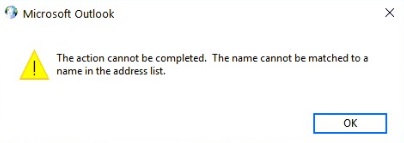
The action cannot be completed. The name cannot be matched to a name in the address list
| October 21, 2018 | 11 Comments

The action cannot be completed. The name cannot be matched to a name in the address list

Wow, this was a difficult fix to get completed. Client called in and said they could not setup their Exchange account. When they tried to set it up, it connected them to an old Outlook.com account. Outlook 2016 uses what is called “Autodiscover” to setup Exchange now. Outlook.com also is Exchanged based now and uses it’s own Autodiscover records. So Outlook got confused and was setting up the Outlook.com first and it would not let you setup another Exchange because my client used the same email for both. How crazy but it happened!

After a bit of time trying my Outlook magic tricks, I went to my Facebook group and asked folks for help on this. Peter Whitehouse from https://scanstation.co.uk gave me the perfect fix! Here it is, and thank you Peter!!!


  • Open the Registry.
  • Back it up
  • Locate and then select the following registry subkey:
    HKEY_CURRENT_USER\Software\Microsoft\Office\16.0\Outlook\AutoDiscover
  • Add a DWORD Entry ExcludeExplicitO365Endpoint
  • Value 1
  • Close Registry
  • Create a new profile.

Here is a link for more information on Microsoft’s site 

That should be it, if not please get in touch. I love to help figuring out these snags with Outlook!

Feel free to leave a comment if this blog helped you! I am enjoying reading and replying to them.

  • Sign up for my newsletter here
  • If you’re looking to earn money just by talking about me to your friends, check out my referral program here
  • Subscribe to my YouTube Channel
  • Follow me on Facebook
  • Invite me on LinkedIn
  • Follow me on Twitter


Office 365 SharePoint Webinars

| October 21, 2018 | 0 Comments

Office 365 SharePoint Webinars

To reduce the amount of data in this file, permanently delete some items that you no longer need.

| October 19, 2018 | 0 Comments

Cannot move the items. The Outlook Data File .ost has reached the maximum size. To reduce the amount of data in this file, permanently delete some items that you no longer need.

If you are getting this error in Outlook, unfortunately there is not super easy fix for this. If you want it fixed right, I recommend you get on my calendar. If you don’t want to hire me, I can email instructions, but I do charge a fee for Do-It-Yourself types. I am an Outlook Expert and do repairs like this often for clients. A typical repair for this is 2 hours of time and it will be done in small increments of time. My fee is $149 an hour.

You can schedule time on my calendar below or submit a request through the message system.


Cannot move the items. The Outlook Data File .ost has reached the maximum size

| October 18, 2018 | 0 Comments

Cannot move the items. The Outlook Data File .ost has reached the maximum size. To reduce the amount of data in this file, permanently delete some items that you no longer need.

If you are getting this error in Outlook, unfortunately there is not super easy fix for this. If you want it fixed right, I recommend you get on my calendar. If you don’t want to hire me, I can email instructions, but I do charge a fee for Do-It-Yourself types. I am an Outlook Expert and do repairs like this often for clients. A typical repair for this is 2 hours of time and it will be done in small increments of time. My fee is $149 an hour.

You can schedule time on my calendar below or submit a request through the message system.


Cannot move the items. The Outlook Data File C:/Users

| October 18, 2018 | 0 Comments

Cannot move the items. The Outlook Data File .ost has reached the maximum size. To reduce the amount of data in this file, permanently delete some items that you no longer need.

If you are getting this error in Outlook, unfortunately there is not super easy fix for this. If you want it fixed right, I recommend you get on my calendar. If you don’t want to hire me, I can email instructions, but I do charge a fee for Do-It-Yourself types. I am an Outlook Expert and do repairs like this often for clients. A typical repair for this is 2 hours of time and it will be done in small increments of time. My fee is $149 an hour.

You can schedule time on my calendar below or submit a request through the message system.


Microsoft 365 Minneapolis MN

| October 18, 2018 | 0 Comments

Microsoft 365 Minneapolis MN

Microsoft 365 Minneapolis MN

Microsoft 365 Minneapolis MN

Microsoft 365 Minneapolis MN