RSSCategory: Uncategorized

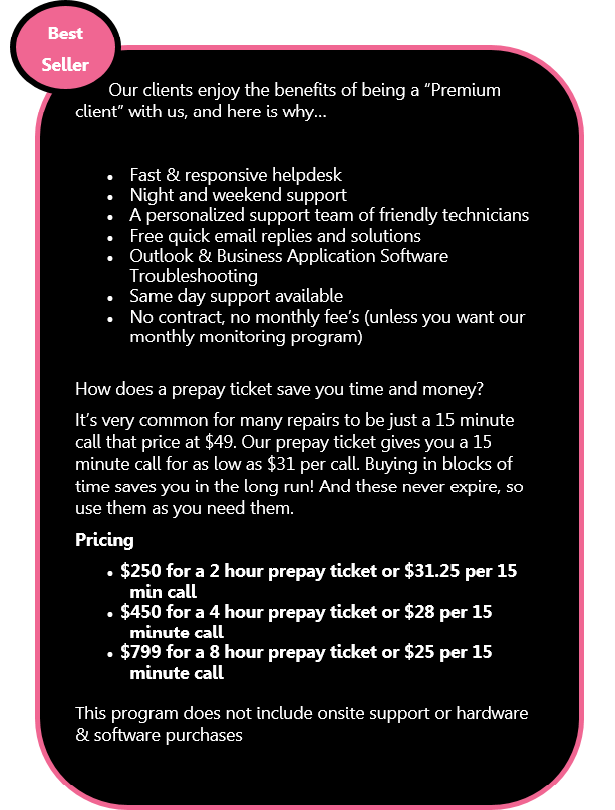
Prepay Tickets and how they can save you money

| October 12, 2013 | 0 Comments

3_Prepay-Tickets

prepaytickets1click here

Email from Adobe: Important Customer Security Alert, Real or Fake?

| October 7, 2013 | 0 Comments

Many clients are now emailing me asking if the Adobe email they are receiving is real or fake. I checked out the links in the email, they all do go to Adobe. I did my own research and apparently, the Important Customer Security Alert is real. Adobe did get hit by an internet cyber attack.

Here is some copy from their blog about this attack:

Cyber attacks are one of the unfortunate realities of doing business today. Given the profile and widespread use of many of our products, Adobe has attracted increasing attention from cyber attackers. Very recently, Adobe’s security team discovered sophisticated attacks on our network, involving the illegal access of customer information as well as source code for numerous Adobe products. We believe these attacks may be related.

Here is the link…

What should you do? Probably just what they request, change your passwords. I would also recommend calling in and asking for a reset link though. Just to insure that it’s real. (I said apparently in the above paragraph, just because who can 100% trust anyone on the internet?).

To call: 1-866-412-8699

They prompted me to this page when I read the above article, how to change your password.

http://helpx.adobe.com/x-productkb/policy-pricing/customer-alert.html

I hope this helps everyone!

Computer Repair St. Paul MN

| October 4, 2013 | 0 Comments

Thank you for visiting Call That Girl Technology Support. We offer services for one person companies, small and large businesses. Need an office visit in the St. Paul, Stillwater, Woodbury, Maplewood, Hastings or Red Wing Areas? We can help…with our remote and onsite packages, we can guarantee your company fast and responsive support!

Whether you need remote support, help with Microsoft Outlook, Hosted Exchange, Microsoft Office 365, online data backup , file sharing. smart phone syncing, virus removals, Word Press website development, blogging, Windows 8, Search Engine Optimization (SEO), anti-virus, or data backup, Call That Girl can work with you to find the right solution. – See more at: https://callthatgirl.biz/#sthash.k0fmMzN6.dpuf

It is time to buy new Office 2013 products, which are best for you?

| September 17, 2013 | 0 Comments

The old days of just buying it and installing Microsoft Office from a disk are long gone. Now they have all the products online and are tracked by email account for purchasing and downloading. I have already downloaded my software this way and enjoy it. The install was easy and no more 25 long code to type in. The installation process is fairly simple and you should not have issues with it.

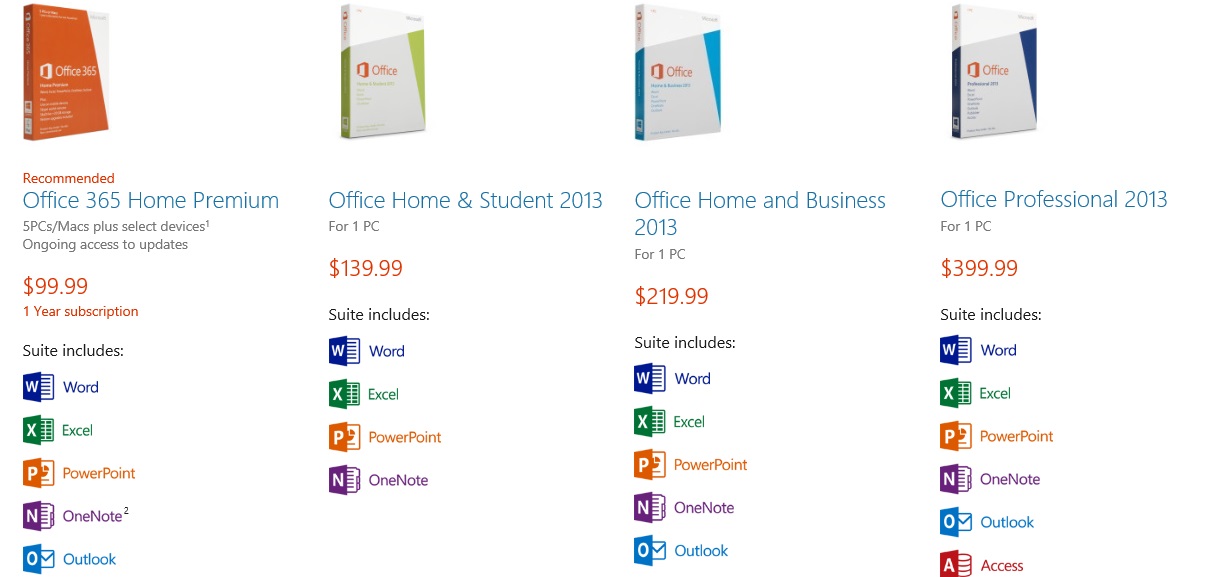
You can purchase 2 types of software from Microsoft from their online store; the product suite or their handy pay per month/year package. I’m not recommending one over another, but you should definitely consider your household, computers and how many need new software and then figure out your budget.

If you have a house full of computers, the 5 install deal seems nice. And you can pay monthly or yearly for this. The upside of buying a subscription is that’s what you are buying, a subscription to hold the license and install on 5 computers. If you buy the suite, you can install on one computer and will probably need to call Microsoft if you need to release it and move to a new computer.

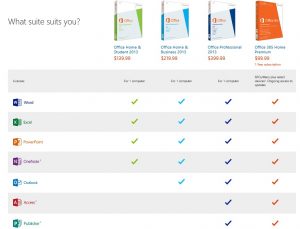
So what’s your preference? As I said, the subscription service is a nice feature. Below is a chart I took from the Microsoft site to show you the products.


Are you ready to buy? Help support Call That Girl by purchasing from our affiliate link below. I have recently become a partner and your prices stay the same, I get an affiliate payment by helping them with sales.


Check out great sales at Microsoft Store <–Click on the pink link

This dog needs a home with no children, great cuddler and very playful

| September 10, 2013 | 0 Comments

He is currently being fostered with Homeward Bound Rescue. If you are interested in meeting Frankie, please contact them for a visit or you can stop by the Dog Adoption at Petco in Fridley this Saturday.http://homewardboundrescue.com/events/event/dog-adoption-at-the-petco-in-fridley-6-2013-09-14/

11:00 AM – 3:00 PM


Dogs who need homes

http://homewardboundrescue.com/dogs


All of these dogs need homes, please support Homeward Bound Rescue based out of the Twin Cities. They are a great organization!

Frankie has the happiest tail that stands up all the time and has cute puppy dog ears. He is a small lab mix at only about 40lbs.  Frankie’s is very friendly and attentive to those that he loves. He likes being a part of the family and participating, whether its lounging on the couch with you or going for a run. He also loves snuggling in with a good bone or a Kong filled with peanut butter. Frankie prefers women but will warm up to men once he gets comfortable around them. He would prefer a family without children as their unpredictable movements make him nervous. Frankie’s favorite exercise is playing “catch it” in the backyard. He also enjoys walks and he runs well while his person rides their bicycle. He does like to chase squirrels and bunnies so a physically fenced yard would be best. Frankie loves to go for car rides and make a great sidekick. He knows some basic commands (such as sit, stay and go get it). He is a very fast runner and would be a great candidate for agility courses. He is housetrained and sleeps in a crate well.  He is really looking the new love of his life and a forever home. This dog has been spayed/neutered, vaccinated, and will be microchipped upon adoption. If you have questions or would like a preadoption questionnaire, please email Nicci at nicci.lee@hotmail.com


Tips on how to buy a new computer to replace your Windows XP computer

| September 9, 2013 | 0 Comments

Since many people are buying new computers because Windows XP will not be supported after April of 2014, here is a guide to buying a new computer and what needs to be done once you buy it. My recommendation? Buy before Christmas too.

Buy the computer is #1!

Here are some ideas on how to purchase, stay in your budget and make a good decision on a computer that will last you many years.

Mac or PC? 

Ah, the big debate! Many PC users are moving to Mac and for a reason, but should you is the question? Many of my clients have called in that have replaced their PC with a Mac to find the learning curve not so easy and the costs outweighing the PC by bounds and leaps. You cannot install your PC software (such as Office) on the Mac and you will need all new. The Mac itself costs much more and the learning curve as I said before…is a lot different, but it can be conquered! Macs are usually better hardware quality, last much longer than a PC and yep, don’t crash as much or get viruses (they can, but not as destructive).


schedule-an-appointment

office365 podcast2

Tower or Laptop?

If you have a nice monitor and prefer a tower, by all means just get another tower. Standard computers are $300 to $500. If you need a more robust computer, you will spend more obviously.

  • A good laptop for the home is around $500
  • A good business computer will run you $500 to $900.

How much memory should you buy with the computer?

I would buy a computer with 6-8 gigs of memory. If you buy less, one day you will want more. The deals are pretty good with the 6-8 so I recommend that.

What about hard drive size?

Most computers today come with 320 gigs to 1 Terabyte of data space. Get as much as you can for the deal you can get.

Windows 8 or Windows 7?

Try to find a Windows 7 computer if you can, If you buy Windows 8 you will need to have some settings adjusted for you to use it in the manner you are used to. We can help you with that of course if you buy Windows 8
click here

Dell, HP or other brand?

Dell and HP are the most common computers sold today. If you want to spend more, you will get a better quality hardware computer.

Do you have your software ready?
Many of you bought a computer years ago and it already had Office on it. You did not get it for free, many people think so. You did pay for it and it probably came preinstalled with  your computer. You need to find your disks and license keys. If you do not have these, you need to contact whoever you bought the computer from to get a copy if you don’t want to buy the new Office 2013.

If you need to buy new software, Microsoft has some handy packages for you to get software at a low price. But they changed their licensing to one computer per install. Not two as it used to be.

To read more, click here

Want just basic word and excel for free? Try Open Office, it has the look and feel of Microsoft products without the extra cost

To download, click here

Buy it!

Now, with all the awesome online deals, you can just buy your new computer online…or should you? I’ve been very disappointed lately with some of the new laptops out there with the touchpad on the left side (due to the fact they added on calculator keys to the laptop keyboard). I bought a laptop with the touchpad on the side and I hated it. I could not get used to working “off” my usual and needed the touchpad in the middle. This may bother you as well.

I do recommend you go to a store that sells computers and touch and feel them. Be sure you don’t have heavy glare in the screen, the keys are ok for you to constantly be typing (some are horrible and float, my fingernails got stuck using!), and be sure it’s not too heavy (laptop only of course) if you will be traveling often or carrying it around.

If you find a good laptop in a store and it has my recommendations, buying it at the store may be best, then you can also return it fast too if you need. Returning online is a pain, but you can get better deals too.

TIPS!

  • If you have wireless in your house, get a computer with wireless already installed on both laptop (standard) and your tower, not standard, but worth getting!
  • Buy the extended warranty if you have a business computer, usually these are good deals and with your business needing to stay running, the warranty may have next day or same day assistance.

Budget!

Stay within a budget that works for you. If you can get financing that is a great deal, go for it. Never buy a computer from a rent a center or retail location that has huge interest rates.

schedule-an-appointment

Set it up

Setting it up at home by yourself may be something you want to do or you can hire us to help. Or you can do it yourself and call us if you need help with certain iss

Here is how we can help. Once you get your new computer up and running, you will need the following done to insure you can get back to work quickly or without hassle if you don’t know how to do it.

  • Install a Windows 8 start menu
  • Transfer your data
  • Set up your printers
  • Set up your Outlook/Email
  • Install your software (new or old)
  • Set up your antivirus
  • Remote the junk preinstalled

For more tips…

To read a blog published awhile back on buying a desktop, click here

Laptop click here

To have us assist, please call 612-865-4475 or email info@callthatgirl.biz and we can help you do the purchasing as well as everything else. You will save money by having us help you even with the buying, did you know most people OVERPAY for their computers?

Subscribe to the Microcenter newsletter, each week they have some good deals! Here is this weeks specials.

If you enjoyed this blog, please use the share buttons below and help support Call That Girl Technology Support! Thank you!


Microsoft Office 365 Consultant 2

Office365 Podcast