iCloud for windows did not install properly
iCloud for windows did not install properly, to repair it, you need to go to Apps and features, select iCloud Outlook from the app list and click modify.

If you find yourself not being able to fix this using the above instructions, here is how I fixed it.
Update Dec 14, 2022
If you are using IMAP for Outlook, you will need to create a PST and make that default before doing this. If you don’t know how to do this, I can help. Please schedule time on my calendar. You might have some data in the (This Computer Only) calendar that should be backed up before you do this action.
- I remove all iCloud apps (iCloud and iCloud Outlook) downloaded in the apps and features, then from the control panel.
- Install fresh from Apple’s page https://support.apple.com/en-us/HT204283
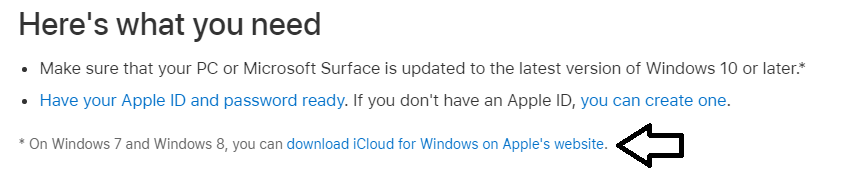
- Find the link with the arrow (see image) download directly.
I hope this helps, if you need my assistance you can book an appt online.
Category: Outlook Support

About the Author (Author Profile)
Lisa Hendrickson is the owner of Call That Girl. She is an Outlook Expert and Microsoft 365 Consultant.Subscribe
If you enjoyed this article, subscribe to receive more just like it.