Welcome to my Guide to Microsoft Outlook OST files. Everything I share with you in this blog are all from my experiences with Microsoft Outlook, PST and OST files.
Warning about this message, take it seriously!
Careful, if you remove this account, its offline cached content will be deleted, learn how to make a backup of the offline .ost file
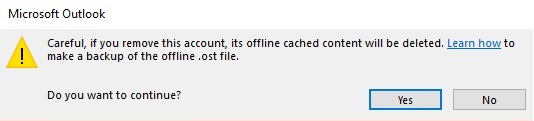
This is a standard message to alert you that you are about to delete all your data saved in your Outlook OST file and to back it up. The problem with this pop up message is that Microsoft doesn’t tell you that “offline cached content” could be many folders, calendar, contacts and other information you have in that OST file. You put data in this OST unknowingly that it could be deleted as fast as hitting “Yes” to continue. After you say “Yes” that file does not go to your deleted items in your computer and it can be expensive to recover, if it can be recovered. I created this blog about IMAP, OST and Outlook. Please take your time reading it and learn more about the OST files if you use IMAP especially for your email.
Let’s start with… what is a PST file?
- It’s most commonly used with Pop email account during setup of Outlook.
- A PST file generally contains email and folders, calendar appointment, contacts, notes, reminders and tasks.
- A PST file can be imported and exported into Outlook and typically backed up by backup programs.
- A PST file can also be opened in Outlook
- PST files are also handy for transferring email from your POP/IMAP/Exchange when you have overload or want to manage your archived data off your server.
- Some of my clients have PST files for archived data organized by year for their email.
Now I will discuss the OST file:
It’s a file similar to a PST file but there are many differences!
- When you setup a new account in Outlook for the first time, you launch Outlook and input in your name, email and password it sets up your account. Outlook will set up an IMAP or Exchange account by default when you add an account through the “add account” option (See graphic below) Every IMAP email you have setup has its own OST File.
- After setting up your IMAP email, it creates an OST file that allows your email in Outlook to synchronize with your computer, the server and your phone. The OST file syncs only the email, that’s why so many of you want other programs that will sync your calendars and contacts with your phones and other devices.
- Outlook typically selects the first IMAP account you setup for calendar and contacts if you were to start adding accounts in your Outlook profile. Read below about backing up and exporting this data.
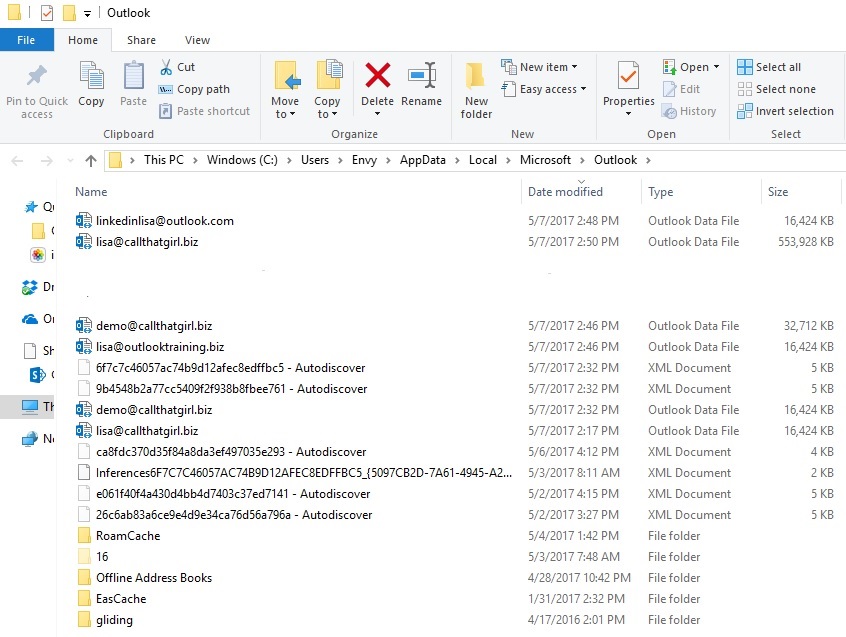
- OST files are stored in a hidden folder in your computer. Microsoft hides this directory by default in your Windows, I assume so you don’t go in and delete it, not sure on why they do this to be honest. I show you in the graphic below how to find your OST files quickly.
- Exchange will hold all data from your Exchange server in an OST file and if you don’t have anything go wrong, there is no need to back up the OST file because if Outlook crashes, you just download a new copy of your Exchange to Outlook. I have seen some OST files with Exchange get corrupted, so be aware and back up the OST file when you backup.
- Finally, as the OST file is not a PST file, the only way to get the data out of it, is to export it to a PST file or CSV (like Excel) from Outlook. If your OST file has been deleted, it needs to be recovered and once recovered, it needs to be converted to a PST file. This is a lot of technical work and can be expensive.
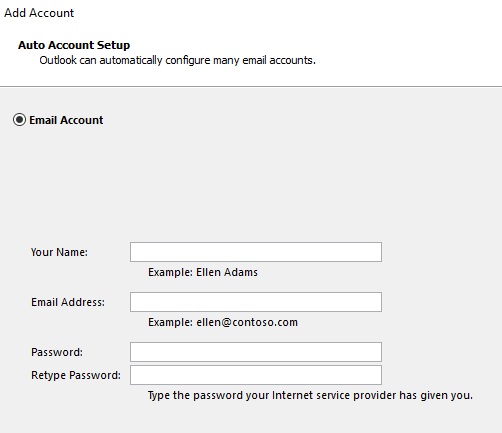
Setting up your new email accounts in Outlook.
POP: If you have an email account setup with POP only, you cannot setup using the box above. You will need to setup manually. Outlook does create a new PST file to go along with this email account. You can add your contacts and calendar and export and import other PST files. PST are usually created and stored in the documents folder in your computer.
IMAP: If you are setting up an IMAP account for the first time, Outlook will create an OST file. Unlike the POP setup, it will not create a PST file for your profile. You need to create one yourself. If you start using the calendar and import old calendars and contacts, that data is being held in an OST file and typically, not backed up by online backup programs. These OST files cannot be imported into another version of Outlook and can be deleted very fast if you accidentally remove the email account from Outlook or delete a profile.
Where are the OST files in Outlook?
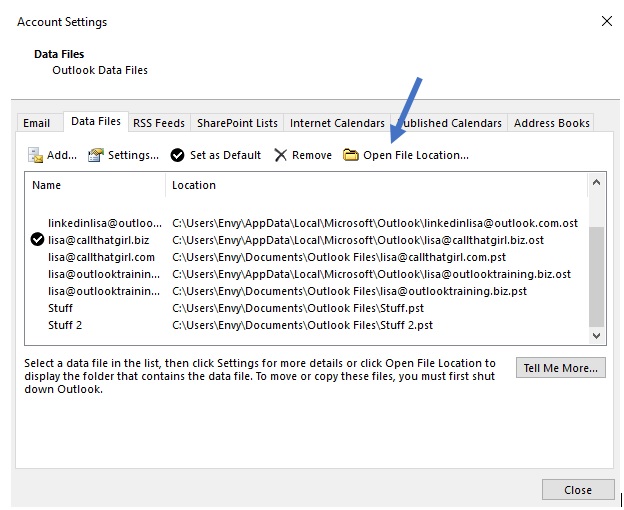
They should be in a hidden folder in the appdata folder in your Windows. You can’t see in Windows unless you “unhide the folders”. But there is an easier way to find them by opening your account setting in Outlook, then go to Data Files and click on the email account and above under the tabs click on “Open File Location” and it will open your hidden appdata folder for you. See pictures below.
Backing up the OST Files
Some technicians don’t believe in backing up these files because they should be easily downloaded again from the server, but I find them to be very important for data retention and in case of an accident removal in Outlook. I highly recommend that you add this folder C:\Users\your profile name\AppData\Local\Microsoft\Outlook to your backup program. If you even want to copy the whole directly, close Outlook and then copy each one even to another directory in your windows. Any copy is better than no copy!
Exporting the OST data to a PST or CSV for new computer transfer or removing an IMAP account from Outlook profile
If you are transferring your data to a new computer or need to remove an IMAP from an Outlook profile or just want a backup of your calendar and contacts, you can export through the import/export wizard in Outlook. You can back up the IMAP emails, contacts, calendars, tasks and notes to a PST file. I usually back up calendar and contacts to a CSV file. If you are not sure how to do this, I can teach you and do an evaluation of your setup. Use my scheduler below to get on my calendar.
Once you are confident these all are backed up to a CSV or PST, then you can safely delete that IMAP account from your Outlook or delete an Outlook profile. And if I have to, I take a copy of that OST file and put in another folder. Keep in mind, this will need to be converted to a PST file if you want to view the data again. (see my software recovery tools below). TIP: I never delete profiles from Outlook unless it’s absolutely necessary.
What happens if you click YES to remove the account and didn’t backup, can that OST file be recovered?
Maybe. That file does disappear from the computer and it is not in the deleted items. But there are programs that can do a computer search and it might find the files. I can help assist with this recovery and I will let you know, it’s not a fast recovery. It is done in two parts. One is to recover the OST file, then you have to extract that data to a PST file. Expect this to be a 1-3 day recovery effort if your OST files are large in size.
Software Recovery Programs
There are many recovery programs out there on the internet. I happened to find fast success using Remo Recover (Windows). I downloaded the free version to be sure the OST files showed up and they did. Tip, only search for OST files! (much faster). I paid then for the program and they recovered the OST files quickly. You will need to use another software program to convert the OST file to a PST file so you can add back into Outlook. I have used many OST to PST converter tools, all of them work pretty much and all run around $99. You’re looking at about $150 if you want to do the recovery yourself.
If you chose to use the programs I am marketing below, click on the graphics and it will take you to my affiliate marketing page. Remember, both have a free download you can run first to see if the files are there or not. Once you purchase, you will most likely need to download the paid version and run the program again. With the paid versions, you can save or extract the data. Most OST programs do offer support so if something happens and you have an issue, contact their support and they will remote in and help.
Other options for you if you use IMAP
- Migrate all your email, contacts, calendars, notes, tasks and reminders to a Microsoft Exchange server. I can assist with this migration, please contact me below to discuss. I also do large scale migrations for companies.
- Export your data that is in the OST file to a PST file, it will attach on its own in Outlook. That PST file then can be backed up and transferred easily to other computers.
Lisa’s Info