

New Outlook Error 080073cf8 New Outlook would not launch, so I tried to uninstall it, But it didn’t uninstall. It would not no matter what I tried. I got the error “You cannot uninstall Outlook” as well. Quick Answer on how I fixed it I typed this in the run line %localappdata%\Microsoft Deleted the OLK […]
Tag: Microsoft Outlook Expert
Microsoft Office 365, Outlook, iCloud & iPhone Expert Support Hartford, Bridgeport, New Haven, Stamford, Waterbury, Connecticut
If you are here looking for Microsoft Office 365 & Outlook Expert help, you came to the right place. Lisa and her team of top notch experts in all versions of Outlook and email can assist with all services, repairs and projects. We now support the Hartford, Bridgeport, New Haven, Stamford and Waterbury, Connecticut Areas.
How can you get the fastest Microsoft Outlook Expert help?
Call That Girl at 612-865-4475
Questions
- Are you searching for someone to quickly fix an Outlook problem? We can help!
- Or maybe you have a lot of Outlook issues and need someone to figure them out?
- Did you buy office 365 and not sure how it works or how to set it up?
- Are you having difficulties with understanding what products to buy?
- Are you an IT technician and need side help with Outlook or Office 365?
Did you know?
- Even if you already have your own IT support company, you can hire us to just do this work
- We are open nights and weekends
- No contracts, no monthly fees
- Same day appointments


What we can help with
General Outlook Repairs
- Outlook Tune Ups
- Quick fixes
- Affordable solutions that help you be more efficient
- Move PST files
- Repairing fix OST files
- iCloud issues
Office 365
- IT Administration
- Assist with users accounts, permissions and restrictions
- Password reset, add new users, delete users
- Setting up Microsoft Office 365
- Configuring Exchange, SharePoint, Lync and OneNote
Synchronize your Outlook calendar and contacts to your iPad, iPhone, Android and contacts with the cloud products such as Microsoft Office 365, Hosted Exchange, Outlook.com, 3rd party apps.
- 3rd party synchronization products
- 3rd party apps for Gmail
- iCloud transitional work & repairs
- Gyschnit
- CompanionLink
- Outlook.com
- Synchronize Outlook info with your smartphone via iTunes
- Icloud and iTunes synching problems
- Hosted Exchange Assistance/Set up and Configuration
Training
- Outlook 2007, 2010 and Outlook 2013 Training
- Private & Groups, customized for your company
- Recordable, save for future use
- Hosted Exchange Training
- Microsoft Exchange Training https://callthatgirl.biz/microsoft-exchange-training
- Office 365 Training
Software upgrades and transitions
- Upgrades for Outlook 2013
- Office 2013 installations
- Moving to the cloud from POP/IMAP
Migrations
- Pop3/Pop/IMAP to Microsoft Exchange or Hosted Exchange
- Google Gmail Transitions
- Yahoo, Earthlink, AOL transitions to Company branded email (.com)
Outside consulting
- IT departments who need overflow help with Outlook calls
To book an appointment, please call 612-865-4475 or email info@callthatgirl.biz
Why Googling things yourself can hurt your computer
 Call comes in, client says they downloaded Adobe and now they have junk all over their computer, their search engine is messed up and they have pornographic ads on their google page. Yep, it’s happening! Just downloading an easy program like Adobe can do this to your computer, but come on….Adobe Reader is in Google right? Of course it is, but not at the top of your Google search. It’s about 4 down. See my picture below?
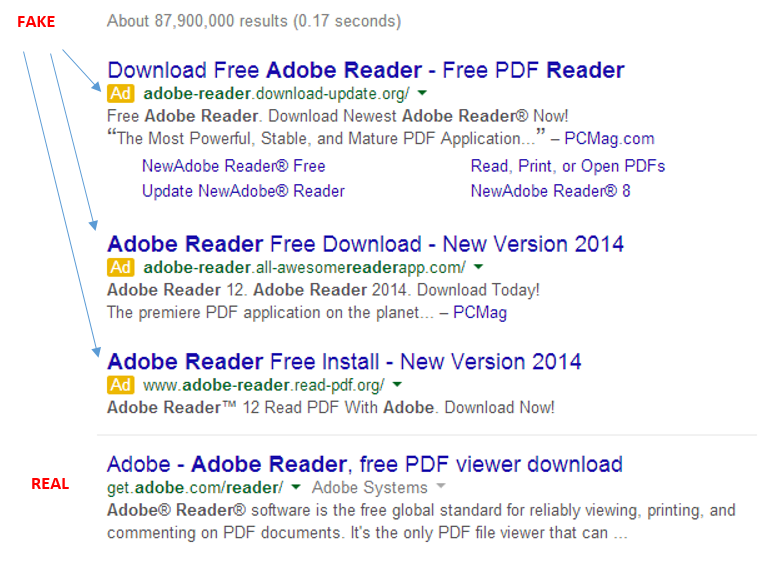
It shows you a basic search in Google for Adobe Reader I just did. The real one is the 4th one down, under the “Ads” that is sometimes hard to notice. I know this because the website is actually an Adobe website, not Adobereader.com or something of the like. Very tough to tell these days folks!
But hey Lisa, Adobe is downloaded and works, so what happened?
You did get Adobe, but it was bundled in a “download manager” filled with other junk! Search engine fun and other programs that are annoying. Sometimes you can download up to 20 programs! I have spent over an hour before removing this junk.
So please be mindful when Googling and if you are not sure, don’t do anything and call us to install the programs properly, which will end up being cheaper than a virus removal.
Lisa
612-865-4475

Outlook Expert Support for the Los Angeles, Orange County, San Francisco and Sacramento California Areas.
If you are here looking for Microsoft Outlook Expert help, you came to the right place. Lisa and her team of top notch experts in all versions of Outlook and email can assist with all services, repairs and projects. We now support the Los Angeles, Orange County, San Francisco and Sacramento California Areas.
How to get the fastest Microsoft Outlook Expert help? Call That Girl at 612-865-4475
Questions
- Are you searching for someone to quickly fix an Outlook problem? We can help!
- Or maybe you have a lot of Outlook issues and need someone to figure them out?
- Did you buy office 365 and not sure how it works or how to set it up?
- Are you having difficulties with understanding what products to buy?
- Are you an IT technician and need side help with Outlook or Office 365?
Did you know?
- Even if you already have your own IT support company, you can hire us to just do this work
- We are open nights and weekends
- No contracts, no monthly fees
- Same day appointments

What we can help with
General Outlook Repairs
- Outlook Tune Ups
- Quick fixes
- Affordable solutions that help you be more efficient
- Move PST files
- Repairing fix OST files
- iCloud issues
Office 365
- IT Administration
- Assist with users accounts, permissions and restrictions
- Password reset, add new users, delete users
- Setting up Microsoft Office 365
- Configuring Exchange, SharePoint, Lync and OneNote
Synchronize your Outlook calendar and contacts to your iPad, iPhone, Android and contacts with the cloud products such as Microsoft Office 365, Hosted Exchange, Outlook.com, 3rd party apps.
- 3rd party synchronization products
- 3rd party apps for Gmail
- iCloud transitional work & repairs
- Gyschnit
- CompanionLink
- Outlook.com
- Synchronize Outlook info with your smartphone via iTunes
- Icloud and iTunes synching problems
- Hosted Exchange Assistance/Set up and Configuration
Training
- Outlook 2007, 2010 and Outlook 2013 Training
- Private & Groups, customized for your company
- Recordable, save for future use
- Hosted Exchange Training
- Microsoft Exchange Training https://callthatgirl.biz/microsoft-exchange-training
- Office 365 Training
Software upgrades and transitions
- Upgrades for Outlook 2013
- Office 2013 installations
- Moving to the cloud from POP/IMAP
Migrations
- Pop3/Pop/IMAP to Microsoft Exchange or Hosted Exchange
- Google Gmail Transitions
- Yahoo, Earthlink, AOL transitions to Company branded email (.com)
Outside consulting
- IT departments who need overflow help with Outlook calls
To book an appointment, please call 612-865-4475 or email info@callthatgirl.biz
What are RSS Feeds In Your Outlook?
 When you set up Outlook for the first time, welcome to RSS feeds friends! You get them set up in the installation process. You sometimes have a chance to not turn them on, but most people just blaze right by that option, so most people have RSS feeds in their Outlook. Let’s start with what RSS feeds are…and what they can do for you and how to turn them off.
RSS means “Rich Site Summary” or the average person calls it “Really Simple Syndication” or just RSS.
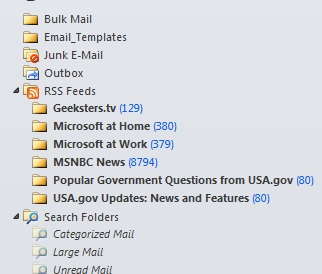 RSS feeds are a way to get updates from your favorite websites in your Outlook. It could be news alerts from MSN or a blog post from your favorite blogger (like me!). If you look down the folder list in your Outlook, you may see RSS with tons of blue numbers. This is common, I see it everyday here with my clients. See the example to the right for where my RSS feeds lives. For the purpose of this blog, instead of removing RSS (which you can do and we will cover in a bit) I saved up a bunch to show you. See that MSNBC News one? 8794 feeds that I didn’t really sign up for, Outlook signs you up by default when you agree to RSS feeds in the setup process. This will be removed now!
How to remove RSS feeds
In your Outlook, you need to find your email settings. See pic below. You can click on the “remove” button on each and get rid of them.
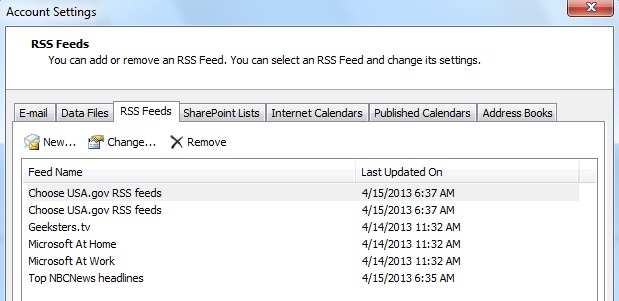
Now how do you add an RSS feed from your favorite blog? Go to the top of my website and you will see the RSS feed button. My site says “Posts” but on some websites you may see “Feeds or RSS” with the commonly known logo. If you are new, you can click on the “subscribe” button and then those feeds will be in your Outlook or whatever other program you use.

Why does software support cost so much?

I will start with the main reason – knowledge. Not every computer repair or support company has the knowledge to support what you need help with. These software support companies put in the time and energy to learn the products on their own so they can support you. But there are few people that know it, so the rates are higher. Compare this to knick knacks you buy at Target. Their section for fun house decor is full of cheap, under $50 trinkets for your home. But if you want something really unique, you go to an antique store where people hand-picked cool stuff. You pay $500 for that one piece that wows people and gives your home a little something extra. Specialty software companies are like antique stores, we know what we are doing and can get things done faster. We know people, the software and how to scoot past first level support (when we call into companies if need be). We also know the quick bugs that the software can create and how to fix them fast. We work in these applications all day, fixing, repairing and supporting is what we know well.
Basic tech support should be relatively affordable; the rates at CTG are competitive in our market and offer quick fixes. But if you are using specialty software such as ACT, CRM systems, Google Apps, Microsoft Office 365 or need server work done, expect higher expenses with your tech support.
Does this make sense? I hope so. I’ve had some clients ask why my Outlook pricing is now a bit more expensive. I have spent 13 years working with Outlook on many different levels; I am fast and fix many problems in 15 minutes or less. If you asked the technician down the street in a local repair shop to fix it, even though their rate may be very low…they could spend hours trying to figure out the problem and not fix it. The may even need to do other things to your Outlook that would make your head spin, like reinstalling, starting from scratch or worse. Their expertise is probably not in Outlook and that costs you more time and money. Hire a knowledgeable software technician and get back to work faster – it will cost less in your time and money.
Call That Girl offers Outlook (all versions), Hosted Exchange Transition Assistance (old POP/IMAP email to exchange, where everything synchs) and is now in training for Microsoft Office 365. If your company is interested in working with us on a beta testing level, we are very interested in talking to you about your company and moving to the robust work of online cloud application support for your IT needs. Call today for a consultation if you’re in need of any of the above. I look forward to helping! 612-865-4475
link rel=”author” href=”http://plus.google.com/100147097284628132482
Skype Won’t Quit Or Close Windows 7
 Is anyone else out there as irritated as I am about Skype not closing or quitting? It’s like the family member that won’t leave at Christmas! Even though I am a technician, not every annoyance deserves my precious time. Just like you, I sometimes just wait until I can’t stand something anymore and deal with it. So let’s deal with it together. First we will deal with Skype just always starting up when your computer turns on.
If your Skype starts up with your computer and hangs out at the bottom of your computer with the rest of your apps, your Skype is set up to “Launch at startup” of your computer. So yea, it’s always there. Here is how you can disable this…
Disable start up in Skype itself. Open Skype and go to “Tools” and select “Options”–then uncheck the box “start Skype when I start Windows”. Then it’s gone and should be gone for good!
But now, let’s say you start Skype up and use it, chat away and then you want to get out. You can sign out, or quit…but guess what? It will probably still linger like that awkward cousin at Christmas! I want it gone, I hate seeing it at the bottom of my screen! First, I try right clicking on the app and choose the option, “Quit Skype.” It will ask if you are sure you want to quite Skype and inform you that you won’t be able to send or recieve messages anymore. Select “Quit” and it should go away, but a lot of time this doesn’t work. So then I go off and kill it in the task manager. Really, that’s the best way I have found to get rid of it. For now, it’s not that important of a tool for me to put much time into figuring out why the thing won’t close properly…other than Skype did it as a master marketing plan to keep it in your face every day and night.
Lisa