


New Outlook Error 080073cf8 New Outlook would not launch, so I tried to uninstall it, But it didn’t uninstall. It would not no matter what I tried. I got the error “You cannot uninstall Outlook” as well. Quick Answer on how I fixed it I typed this in the run line %localappdata%\Microsoft Deleted the OLK […]
 Category: Outlook Support
FIX OneDrive Error Code: 0x8004016C
OneDrive Error Code: 0x8004016C
This is an error I have found when setting up OneDrive on a new computer. The fix I found that work is to remove McAfee but you have to run the removal software. I got the download from MajorGeeks.
If you need my help, use the form below to get in contact.
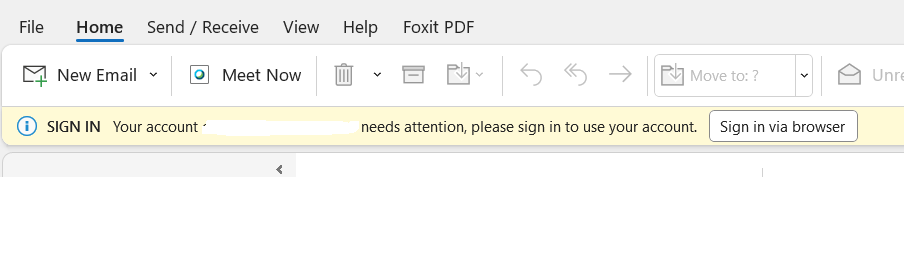
Outlook Sign In Your account needs attention, Please sign in to use your account Sign in via browser
Outlook Sign In Your account needs attention, Please sign in to use your account Sign in via browser
Update: I believe I got the fix finally. It took a bit of troubleshooting but I had to turn off 2-step authentication with the phone, remove the old Microsoft connection and then did some udpates on Office. I also reset the default to Chrome (you can go back to Edge after setting this up if you like). Relaunched Outlook and the sign in took me to Gmail and the new Gmail and Microsoft connection then worked. Is it ok to keep off 2-step with the phone? I can’t say but to get it working in Outlook this is what we had to do. The client is aware of this and accepted it as they wanted Outlook. I will look into this again next client I help. I don’t like turning off security but it’s up to the client. This may be a bug of sorts, but it’s a new error that I’ll still research as calls come in.
Google/Gmail and Outlook have so many bugs with setting up accounts, I wasn’t surprised when I saw this. If you need my help, use the form below to contact me.
Google Workspace Sync for Microsoft Outlook won’t launch to setup user
Google Workspace Sync for Microsoft Outlook won’t launch to setup user
Update Jan 2, 2024
This is an updated post, it might work for you and hopefully it will. It might not though if you have the Windows 24H2 update.
Uninstall GWSMO, then download again. If the Google Workspace Sync New User isn’t showing up, then you can launch a new Google Workspace profile by going to the “profileeditor”
C:\Program Files\Google\Google Apps Sync\profileeditor.exe
OLD POST
I took a call today for a client who had their Windows computer update to the latest 24H2 update and I did all the troubleshooting to only find this update crashed Google Workspace Connector and it’s listed on Google’s “Not Supported” page. https://support.google.com/a/answer/152855?sjid=837151656820201246-EU
The fix due to Google “not supporting” after the latest Windows 24H2 update was for the client was to setup New Outlook and I will watch the Google page for updates. If you need my help, you can use the form below to contact me.
GWSMO won’t install windows 11
GWSMO won’t install windows 11
I took a call today for a client who had their Windows computer update to the latest 24H2 update and I did all the troubleshooting to only find this update crashed Google Workspace Connector and it’s listed on Google’s “Not Supported” page. https://support.google.com/a/answer/152855?sjid=837151656820201246-EU
The fix due to Google “not supporting” after the latest Windows 24H2 update was for the client was to setup New Outlook and I will watch the Google page for updates. If you need my help, you can use the form below to contact me.
Outlook crashes when creating new email HubSpot
Outlook crashes when creating new email HubSpot
Just helped a client with this issue. Turns out his HubSpot had an update on the computer yesterday and today when he tried to write emails within HubSpot, the emails crashed while typing.
- Close Outlook
- Uninstalled the HubSpot software in control panel
- Reinstalled the Outlook add-in for Hubspot
- Launched Outlook and tested, worked great!
Client is still having a weird bug of needing to send an email twice with one of the boxes check “log to CRM” but it does work after the second click.
If you need my help, use the form below to get in contact.