RSSCategory: Outlook Support

Gsyncit wins over CompanionLink for Outlook, iCloud, Google and iPhone Synching

| February 5, 2014 | 0 Comments

Microsoft Outlook Specialist

Yep, I called it. Gysyncit wins victorious over CompanionLink for installation, configuration and setup and of course…correctly synching iCloud to Google Calendar with Outlook and iPhone in just 20 minutes flat.

The 3 (4)  titans can play together nicely, finally.

If you are having issues syncing your Gmail calendar to your iPhone to your Outlook, give me a call and I’ll help you with this issue. I cannot guarantee a 20 minute set up, but it should be under an hour either way.


Microsoft Office 365 Consultant 2

Outlook Repair of the Day: Outlook Sync Tools

| February 5, 2014 | 0 Comments

Outlook-150x150Today was interesting. I had a client book some time with me today to work on a Outlook, Gmail calendar and contacts sync issue.

office365 podcast2

Since he is using free Gmail, you are held hostage to not being able to sync calendars anymore and forget about contacts unless you use a 3rd party tool. And while there are many out there, I tend to lean towards CompanionLink or Gsyncit. Both work, but I’m finding Gysyncit is working better. Less snags in the setup and first round of syncing.

So the client and I set up CompanionLink, he is on a slow internet connection and we find the syncing very slow and required us to close his Outlook and reboot a couple of times to see the actual Outlook calendar on his Samsung phone. We used the Google option for syncing. I also had to configure the settings a few times and I will guess that an average user of CompanionLink would not know about this, the snooping around I do very fast and furiously. When a client is paying per hour, you wan this to just work!

End of the job, we found appointments syncing. Client happy. Until later, no joy. Now we will try Gsyncit tomorrow. I tell ya, free Gmail is not always free folks. I hate telling clients this, but for me it’s not the best if you love and heart Microsoft Outlook like I do!

outlook-ad-300x130


Office365 Podcast

3 Reasons Why You Should Upgrade to Outlook 2013

| February 3, 2014

I purchased Office 2013 many months ago, and while I was kind of not looking forward to the new products (always a learning curve, or getting used to the new look), I have to admit that I do now enjoy Outlook 2013 more than I expected. Here are my top 3 reasons to upgrade.

social networks1.) It’s fast! I love the speed they gave this product. This could be because I have 8 gigs of memory on the computer, but I have noticed the speed on even my 2 gig memory computer. I have noticed while surfing between my folders that this version of Outlook just goes right through them and the search feature even seems faster.

2.) Not as many “White screens of death”….this is compared to the good old Windows blue screen of death. If you are an avid Outlook user and maximizing it (meaning, many emails being checked, many folders and PST files), you have to had a few “white screens”. Outlook 2013 has very few. I have gotten them, but that’s usually when I’m doing mad crazy work. I overclock it.

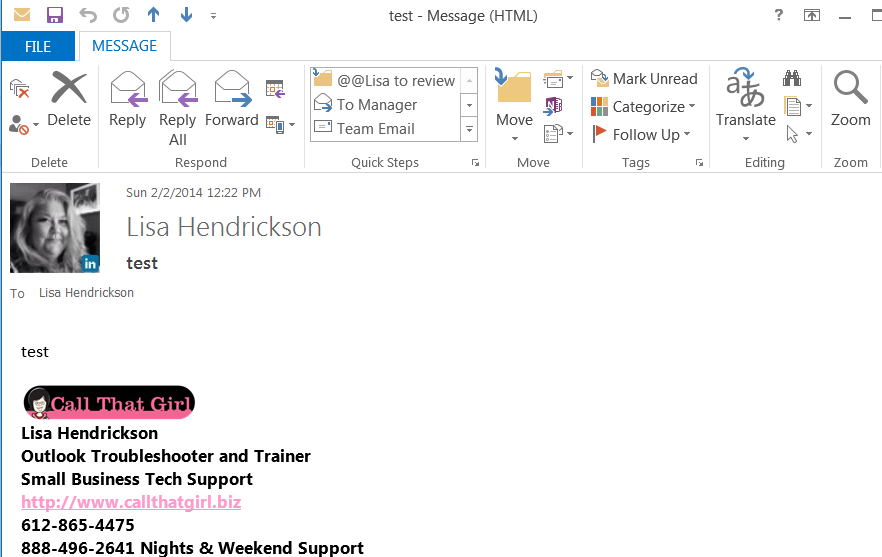
3.) Social Network Connector, it’s awesome! I signed in with my LinkedIn and Facebook, and now anytime I get an email from someone who has an account with that email in LinkedIn or Facebook, it shows their picture and links to view their social networks quickly. Pictured above is how you add it and below is how an email looks after receiving an email.


Lisa linkedin


callthatgirl250x250alt

Microsoft Outlook and Email Expert Troubleshooting

| January 19, 2014 | 0 Comments

Outlook-150x150Outlook E-Mail Help & Support for Minneapolis, MN and national remote support. Fast and responsive Outlook assistance (repairs, new computer setup, fixing contact lists, iCloud & iTunes glitches, broken PST files, Gmail problems, Outlook being slow, send/receive issues, whatever your issues are, we can help! (yes, Outlook 2013 too!)


Maybe you just need an Outlook Tune-Up? Click here for more info! 

.

Outlook-specialist

We also support

  • Hosted Exchange Transitions
  • Microsoft Office 365 Assistance
  • IT Administration
  • Training
  • Entourage, Mac Mail, Outlook 2011
  • Outlook 2013 and Exchange Online

Typical Outlook problems we see on a daily basis at Call That Girl….

  • “My Outlook won’t open!”
  • “My email will receive, but not send”.
  • “Nothing synchronizes and I’m frustrated”
  • “My Outlook will open, but I can’t access old files”
  • “My Outlook is slow and crashes often”
  • “Since I moved to Gmail, my Outlook is all messed up”

We hear that a lot here at Call That Girl. If you ever have that problem or have corrupted PST files, need help setting up Outlook, transition your email from Outlook POP/IMAP/web access to Microsoft Outlook 2003, Outlook 2007 or Outlook 2010…. or have trouble sending and receiving in Outlook -Call That Girl! We have over 14 years experience troubleshooting just about every problem with Outlook.

Call That Girl Ron McCoy

Lisa Hendrickson the owner of Call That Girl is our Outlook expert will get your email running the way you want it without much effort on your end. Outlook support is typically done with remote service, so as long as you have internet connection, we can help you from anywhere in the world!

What we can help with any type of  Outlook problems
• Set up and configuration
• Backup and restorations
• Explaining how Outlook really works
• How to move from your Gmail to Outlook
• How to stop using free email programs for business
• How to export your contacts to load into social media networks
• How to export your LinkedIn contacts into outlook
• How to setup and use your Blackberry with Outlook
• Setting up rules for email (and following them!)
• Managing your email life much better
• How to manage more than one calendar (personal and business)
• Using Tasks and Notes
• Keeping more than one contacts list (for networking/emailing purposes)
• Moving from Outlook express to Outlook 2003/2007
• Calendar management
• Move from POP to IMAP or to Hosted Exchange (Synch your world!)

Outlook-specialist

How to easily backup your hosted exchange email in Outlook 2013

| October 16, 2013 | 0 Comments

Awhile back, I had a client who did an update on her iPhone and during that update, her calendar went missing. She was on hosted exchange and due to some “terms and conditions”, a mailbox restore was not going to happen for the client. (By the way, not all companies refuse to do mailbox restores, just this specific one company that will remain nameless for now).  Even if you have a company that will restore mailboxes, it’s sometimes time critical to get back your information that you have already stored locally.

So if you have any version of Outlook, not just Outlook 2013 or Outlook 2010, the same instructions will work to some degree. There are screen shots below. The backup file will be stored in your default Outlook folders in your computer, but these should be backed up to an external backup or online.

If you need online backup, please call me to schedule an appointment. We charge $79 for setup and your products costs are $65 for one computer up to $109 for 3 computers.

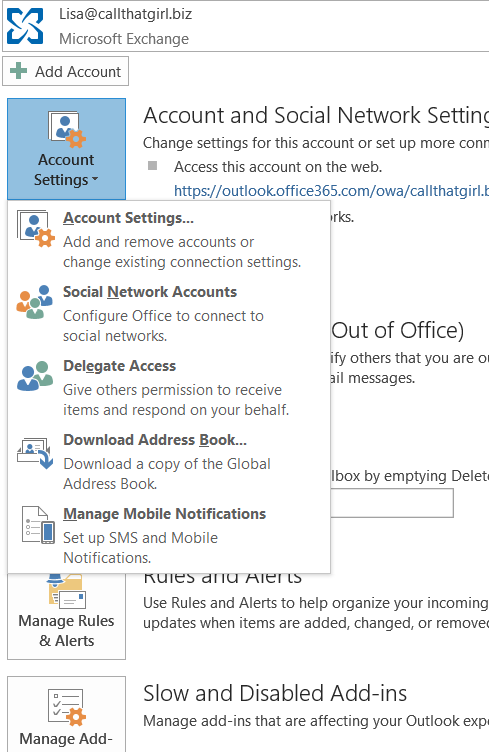
  1. In Outlook…click on “File”
  2. Then click on “Open and Export”
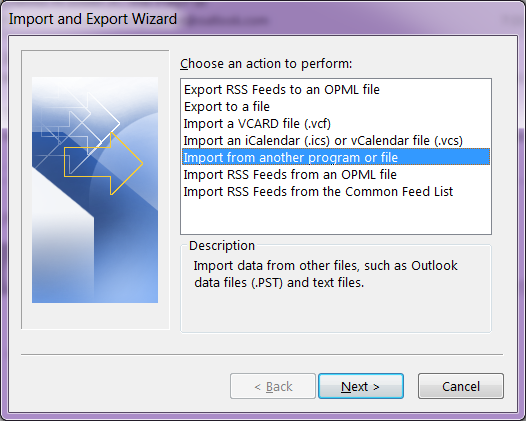
  3. Then click on “Import and Export”
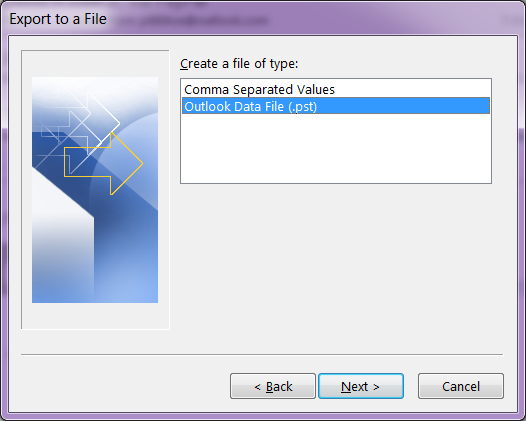
  4. Then click on “Export to a file”
  5. Select “Outlook Data File (.pst)
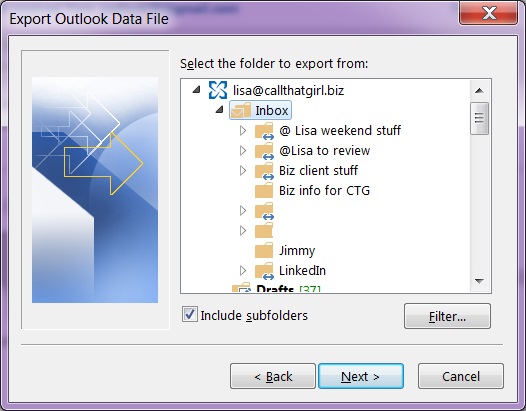
  6. Outlook will show you the mailboxes you can export. Click on the “Inbox” and hit “Next”
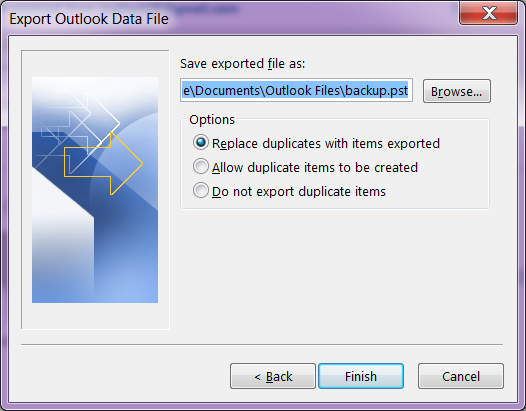
  7. Now Click on the browse button, and by default Outlook should save your file where online backup programs know to backup. It should be in the My Documents, Outlook Files folder.
  8. Create a name for the file and hit “Ok”
  9. Then hit “Finish”

office365 podcast2

The larger your hosted exchange is, the longer a backup will take. I recommend doing this on Fridays before you leave the office or before you go to bed. You will not be able to use Outlook during this time.
outlook1 outlook2 outlook3 outlook4


Click “Finish” and Outlook will now export a full copy of your hosted exchange to your computer.


outlook-ad-300x130


Microsoft Office 365 Consultant 2

Office365 Podcast