New Outlook Error 080073cf8 New Outlook would not launch, so I tried to uninstall it, But it didn’t uninstall. It would not no matter what I tried. I got the error “You cannot uninstall Outlook” as well. Quick Answer on how I fixed it I typed this in the run line %localappdata%\Microsoft Deleted the OLK […]
Tag: New Outlook Expert
New Outlook Consultant
All work is personally completed by me, Lisa Hendrickson. You can reach me by phone during normal business hours at 612-865-4475. If I’m unavailable, please leave a voicemail and I will return your call promptly. I also respond quickly to emails at lisa@callthatgirl.biz. Please note that I do not text, as I focus on phone and email communication to provide the best support.
I offer daily appointment availability and can handle short projects without requiring much lead time.
Please review the services list and use the form below to get in touch with me
How I Help Clients Set Up, Migrate, and Master the New Outlook
-
Personalized Account Setup: I assist clients in configuring their New Outlook accounts tailored to their unique needs — whether it’s Microsoft 365, POP, IMAP, Gmail, or iCloud — ensuring smooth connection and optimized settings for email, calendars, and contacts.
-
Comprehensive Data Migration: I manage the entire migration process, from exporting PST files and local data to importing into New Outlook or Microsoft 365 mailboxes. I ensure “This Computer Only” data such as calendars and contacts are properly transferred, avoiding data loss and duplication.
-
Multi-Device Synchronization: I configure seamless syncing between desktop Outlook and mobile devices, including iPhones and Android phones, setting up Exchange ActiveSync or equivalent protocols so clients have consistent access to their email, calendar, and contacts on all devices.
-
Troubleshooting & Optimization: I proactively identify and resolve common setup and migration issues—like sync conflicts, authentication errors, or missing data—helping clients avoid downtime and frustrations.
-
Step-by-Step Guidance & Training: I provide clear, easy-to-follow instructions and training tailored to the client’s technical comfort level. This includes live walkthroughs, documentation, and ongoing support to ensure clients feel confident using New Outlook daily.
-
Migration Planning & Risk Mitigation: I help plan migrations carefully by assessing client environments, backing up important data, and scheduling changes to minimize disruption.
-
Custom Configuration: Whether it’s setting up rules, categories, focused inbox, or third-party add-ins, I help clients customize New Outlook to maximize productivity and align with their workflows.
New Outlook Migration
Hi folks, this is the form I’m asking all my clients to fill out before the schedule a 10 min consult or their onboarding appt. This form has a lot of details I need to know, if you don’t feel comfortable adding any information to the form no worries, please just let me know during the time we have together. I ask for this information so I know what you let you know during our appointment. New Outlook has a lot of configuration changes from Classic Outlook and I’d rather know up front what you have/need so I can set it up correctly or know what issues I will have during your migration.
Want even more information or use other social media/communities?
- Follow my New Outlook Articles on Linkedin: https://www.linkedin.com/in/callthatgirl/recent-activity/all/
- Interested in learning about New Outlook? Read my New Outlook Resource Guide, with all my links to articles, YouTube videos and podcast https://callthatgirl.biz/new-outlook-resource-guide
- Follow my YouTube Channel where I post more videos, click here https://youtube.com/callthatgirl
- Follow me on Linkedin, I will be posting articles there www.linkedin.com/in/callthatgirl
- Love Reddit? Join my community https://www.reddit.com/r/NewOutlook
Want to contact me? Fill out the form below!

New Outlook Will Not Setup an Email
I’m finding this to be a common problem with New Outlook. Some email hosts that offer IMAP are the most suspect. New Outlook has automatic setups and I have seen sometimes that some hosting companies are on older servers with technology that force you to try to set it up manually. And that’s not even a guarantee it will setup.
Here are a few options to help you get your email setup:
Setup from launching New Outlook
- New Outlook will prompt you to type in your email. Microsoft prefers its own servers, so it will look for a Microsoft account with that email. Take note: If you have a personal Microsoft (home/family) account with the same email as your business Microsoft 365 account, you might have options when you log in. Work/School or Personal. If you only have a personal account, more than likely you are using an old account that probably got corrupted in the server crash of 2017. Microsoft migrated their accounts to Exchange and many accounts broke and have a user name outlook_and a bunch of letters and numbers.
- Take note: Yahoo, Gmail, AOL, etc. might launch an app for you to login to the website to approve the setup. Or it might send you to 2-step authentication.
- If you see the next box “Advanced Setup”, asking for type of email, then select IMAP, POP is not supported at this point even though it’s an option.
- Be sure to have the correct incoming email server and outgoing email server as well as server port settings. Including if they require encryption (SSL/STARTTLS). If your email host does not require it, that might be one reason why New Outlook will not setup. Microsoft is requiring many changes to use their products. Older email servers sometimes don’t have added security so therefore they can get hacked easier. I don’t think that having encryption in Outlook/New Outlook makes your email more secure from hackers but it’s what Microsoft is requiring.
If normal setup fails, then try setup manually via Windows
- Try adding the account through Windows first. In the search box, type in “Settings” and on the left side is “Accounts”, scroll down to the area that has “Email & Accounts” and click on “Add account” at the top. This section will allow you to manually add an account, so you can select IMAP or whatever other type of email you have.
- Launch New Outlook and see if it connects
- If this fails, then you might not be able to set up the email in New Outlook. I have already seen this happen a few times when I have helped my clients.
If all these fail
- You might need to change your email server to another company and of course, Microsoft is a good choice for New Outlook and you can also sync your calendar and contacts with other computers/devices/phones. You can also chose Google Workspace.
Other tips:
If you are trying to log into iCloud and get an error from Microsoft, it’s most likely because you have a Microsoft account with the same email as your iCloud. Microsoft will always setup itself first, so then you need to change your Apple ID. I did this last week for a client, it was actually pretty easy.
Keep in mind that most of your data in classic Outlook if you’re using POP with PST will not be in the New Outlook. IMAP email will most likely be there. Exchange and Google Workspace will be there. Any calendar or contacts with (This computer only) will not be there. You will need to export that data from classic Outlook into the server via classic Outlook. This is a very confusing topic to explain in a blog post. Feel free to reach out if you want help doing this.
That’s it for now, other than what I posted as of Sep 21, 2024 I have no other options, but I will add on as I find new solutions. If you need my help migrating data from classic Outlook to the New Outlook, use the form below to get in contact
Want even more information or use other social media/communities?
- Follow my New Outlook Articles on Linkedin: https://www.linkedin.com/in/callthatgirl/recent-activity/all/
- Interested in learning about New Outlook? Read my New Outlook Resource Guide, with all my links to articles, YouTube videos and podcast https://callthatgirl.biz/new-outlook-resource-guide
- Follow my YouTube Channel where I post more videos, click here https://youtube.com/callthatgirl
- Follow me on Linkedin, I will be posting articles there www.linkedin.com/in/callthatgirl
- Love Reddit? Join my community https://www.reddit.com/r/NewOutlook
Want to contact me? Fill out the form below!
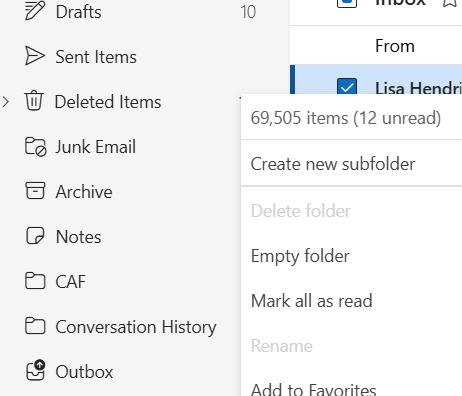
How to Find Total Number of Emails in a Folder in New Outlook
New Outlook changed many things and one is how to find the total number of emails in a folder. The classic used to have a view at the bottom left corner of Outlook. Now you have to put your mouse in the three dots on the right side of the folder in the folder pane. A quick view of the total will pop up for you to see.
Or you can right click on the folder and then you can see more options, the total is at the top.
If you need my help with any New Outlook issues, use the form below to get in contact with me.
Want even more information or use other social media/communities?
- Follow my New Outlook Articles on Linkedin: https://www.linkedin.com/in/callthatgirl/recent-activity/all/
- Interested in learning about New Outlook? Read my New Outlook Resource Guide, with all my links to articles, YouTube videos and podcast https://callthatgirl.biz/new-outlook-resource-guide
- Follow my YouTube Channel where I post more videos, click here https://youtube.com/callthatgirl
- Follow me on Linkedin, I will be posting articles there www.linkedin.com/in/callthatgirl
- Love Reddit? Join my community https://www.reddit.com/r/NewOutlook
Want to contact me? Fill out the form below!

New Outlook Resource Guide
Hi folks, this is the page I will keep everything updated as I publish or release the information. Posts are at the top, podcast links are below and my YouTube videos. Enjoy! You can also sign up for my newsletter Newsletter Sign Up
You can sign up for my LinkedIn New Outlook Newsletters, published weekly Subscribe on LinkedIn https://www.linkedin.com/build-relation/newsletter-follow?entityUrn=7306074119194779649
My New Outlook Book Technicians Guide For Mastering New Outlook is now available to read for free on my website. Click that link to read all nine chapters.
Posts:
Why is Outlook search not working?
iCloud for Windows not synching with New Outlook
How to block junk or spam in Microsoft 365 from never hitting your inbox or junk folder
New Outlook Stuck On Loading People
New Outlook Cannot Add a New Email Without a Microsoft License
New Outlook Features for Gmail Users
Microsoft Access not emailing from New Outlook
How many PST files can you add to New Outlook
How to change the order of accounts in New Outlook
Microsoft Error: Your account has been locked Outlook.com
New Outlook Error This message could not be sent
New Outlook Error: Microsoft.Exchange.Data.Storage.QuotaExceededException
New Outlook Accounts are grayed out cannot remove
New Outlook Gmail has flickering gray lines in inbox emails not loading
New Outlook Cannot Add a New Email Without a Microsoft License
New Outlook Adding a Signture to Calendar Events
New Outlook and the future with 365 Apps
How do I add RSS feeds in New Outlook
Zoom calendar event won’t add to New Outlook
New Outlook Gmail only downloading 10 emails
New Outlook Gmail not receiving new email
FIXED: New Outlook crashing and closing immediately after launching
New Outlook Workshops for Technicians
Can you change the subject line in an email in New Outlook?
Where are the Junk Mail options in New Outlook
How to Export Contacts Out of New Outlook
Does Classic Outlook and New Outlook share any data files?
Is iCloud for Windows compatible with New Outlook
Can you use Outlook Classic and New Outlook at the same time?
How to Import and Export PST into New Outlook
Custom Forms and Fields Missing in New Outlook
Where is Journal in New Outlook
Free Expert New Outlook Speaker and Presentations
New Outlook Vs. Outlook Classic Search
How Signatures Work with New Outlook
Older CRM products and New Outlook
How to Import Contacts into New Outlook
How to import autocomplete from Outlook Classic into New Outlook
How to add a Gmail account in New Outlook
How to migrate emails from Classic Outlook to New Outlook
How to move emails from one account to another in New Outlook
How to add Zoom add-in to New Outlook
Where are the quick steps in New Outlook
How to make a rule in New Outlook
Rules are missing in New Outlook
New Outlook Google Workspace Not Sending Email
New Outlook now supports PST files
Yahoo email calendars and contacts sync with New Outlook
We detected a problem launching the new Outlook
How to setup iCloud in New Outlook
Private instructor-led virtual classes New Outlook
Group Online Training New Outlook
How do I import my old calendar in Outlook into New Outlook
Calendar is missing in New Outlook
How to change the Zoom level in New Outlook
How to print to a PDF in New Outlook
How to Send to OneNote in New Outlook
New Outlook Will Not Setup an Email
How to analyze email headers in New Outlook
Why can’t I copy folders in New Outlook
Where are Notes in the New Outlook
**UPDATE** Can you drag emails to calendar and contacts in New Outlook?
How to Find Total Number of Emails in a Folder in New Outlook
How to Add New Accounts to New Outlook
Contacts Missing in New Outlook
How to Import PST into New Outlook
New Outlook Preparation Check List
PST migration to Microsoft 365
Tutorial Step-by-Step How to Import Outlook PST to Microsoft Exchange using Azure
LinkedIn Articles:
New Outlook Preparation Checklist
New Outlook Vs Classic Outlook
Podcasts:
- Topics: Microsoft launching New Outlook on Jan 6
- Topics: 7 new issues I came across while helping clients
- Migration Options
New Outlook Podcast Show #2 Top 5 Issues
- Top 5 issues I see
New Outlook Podcast Show #1 Kick off show
- My kick off show!
Videos:
Tutorial and review of the new outlook
New Outlook Expert
New Outlook Expert
New Outlook is something else! If you are googling for these keywords, I can most definitely help you. Whether you like or love the New Outlook or need help transitioning data, or reversing to the old classic Outlook, let me help. This page will be updated soon with all the videos and blogs I am going to create focusing on you, the end user! And trust this, I have so many topics coming out, please follow me on YouTube to get the videos, or check back on this page as it will have the updated blogs.\
Other pages with good information:
https://callthatgirl.biz/new-outlook-migration/
https://callthatgirl.biz/pst-migration-to-microsoft-365/\
Few important things to know:
- If one day you launch Outlook and your old Outlook is gone and you are missing all of your calendar, contacts and PST files, please note that you can most likely go back to the classic Outlook and your data SHOULD be there. I say that loud and bold because it should but it might not be. I can maybe get it back if it’s gone.
- PST files are not supported yet with the New Outlook so your PST files will not show up. If you had Outlook configured with POP and PST, I can help migrate that data to a platform that New Outlook will read, or try helping reverse back to classic Outlook.
- PST’s might be readable in the New Outlook one day. I’m going to guess that they will not work as they have for all these years, but you might be able to read the data. Who knows though, Microsoft might allow them to be able to read/move and change. Things I will keep you all updated with in the future.
- Cool features: Gmail, iCloud, Yahoo has full synchronizing abiliity with their online calendars and contacts. So far! I find this most amazing, so it’s a great update for those wanting “everything to synch” and for home users mostly.
- Missing features: Oh wow, so many! Contacts, definitely lost many features like fields and just so much. It was a sad day for me to see that. I help so many clients now customize their contacts to perfection. Also many calendar features
- Tasks, will now be in the To do app and there is a lot coming up with that. Think “Planner”, using Teams. More to come!
- Search, it’s fast! Way faster than classic Outlook!
Below are some videos to watch! I’ll add more as I have them!
Use the form below to get in touch if you want to talk
Want to listen to my New Outlook Podcast?
Apple https://podcasts.apple.com/us/podcast/new-outlook-podcast/id1761264434
Podbean https://callthatgirl.podbean.com
Spotify link coming


