Author Archive: Lisa Hendrickson

Lisa Hendrickson is the owner of Call That Girl. She is an Outlook Expert and Microsoft 365 Consultant.

rss feed

Author's Website

How to Start a Remote Support Business

| August 12, 2017

How to Start a Remote Support Business

Welcome to Call That Girl’s Guide to starting a computer repair and support business blog series. If you found a blog out of order, you can start with the first blog by clicking here How to start a computer repair business. Each blog will lead you to the next one until you reach the final blog.

In this series I will give tips, examples and information about how to start a computer repair business that I learned my way. I will also offer help on what type of computer repair business to start, business and legal information, products and services you can sell, tools your computer repair busines might need, a guide to pricing, a list of resources, and marketing advice.

In this blog, I will talk about starting a remote support business.

When I started my business part-time in 2003, I was already doing remote support at my job at the Mayo Clinic in Rochester, MN. In fact, that’s all I did. Only on very rare occasions was I asked to go onsite (Usually some Outlook emergency for a top Dr). I worked in a call center and troubleshooting software is a heck of a lot different than supporting hardware. In fact, when I got the job, I remember sitting next to my team members and I could tell that all the guys all were definitely not in the position they wanted there, most wanted to be onsite techs, work as an Analyst or be on the LAN team. Helpdesk, as many see it as a stepping stone job…was the job for me. This is where I found the love for remote support. I could manage many things at once from my one happy bench, my master computer. Backing up a bit, you might wonder how did I start Call That Girl at the Mayo Clinic when I didn’t go onsite? Well friends, I got friendly with the staff calling in and they asked me to come over after work to fix their home computers. Without much hardware knowledge, I can’t say that I messed up too many jobs. I left with a few bucks in my pocket and realized that “hey, I can do this”. For the next four years, I did only onsite home jobs. It was all software usually, side-by-side support I called it.

In 2007, as you might have read in my blog series “How to start a computer business” and in my , I discuss more in depth about remote support and how I got going (I found onsite to be a waste of time and gas for quick software fixes).

Remote support is all about being efficient, being more affordable (for some fixes) and maximizing your bench to be a master computer that can do many things at once. Most experienced technicians should be able to manage at least 3 and up to 5 non-talking-to client jobs at once, such as virus removals & tune ups. If you are on the phone with a client, of course you should only be with them, but heck…if you’re doing a virus removal in the background…well, there is nothing wrong with that unless you are not paying attention to your talking client. After 7 years of doing onsite jobs, running 3 brick and mortar stores, I gave it all up for remote support only. It took awhile, but eventually I trained all of my clients how I can serve them and they accepted my offer. I have now moved into MSP type offerings, more services, better packages, and I have to say, I’m doing quite well for myself finally. This might not be the life for you, but if you love talking on the phone, love software and helping clients, this is perfect for you, too!

Here is a short list of hardware and software you might need

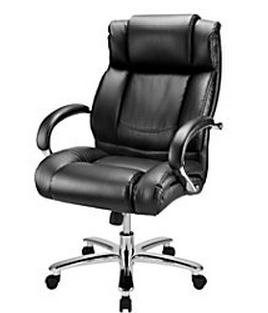
Best Computer Chair in the WorldHardware

  • 2+ monitors: I have one 19″ monitor, 1 24″ monitor
  • Desktop HP Pavilion, 8 gigs of memory, 64 bit, Windows 7 Home Premium, AMD 2.10 GHz Processor
  • Set of speakers
  • iPhone holder that is stationed on my desktop
  • USB chargers for my phone
  • Plantronics Bluetooth has a charger that also charges my NetGear ATT HotSpot (in case my internet blows)
  • External hard drive
  • That’s all for hardware, except my killer Queen’s chair (built for a woman of size). Good chair, HIGHLY recommended. If you are a big person, this is the chair for you! Best computer chair in the world.

Software

  • Remote Support Software: I use LogMeInRescue. I also Support Instant Housecall.
  • Ticketing System: Mhelpdesk.
  • Back up Tech Support (GFI sales, SOS online backup and helpdesk): RS Tech Team
  • File sharing, I use Dropbox for day to day, Click here to test it out.

To read the next blog –>  Do you need certifications to start a computer repair business

Lisa’s Marketing 

Feel free to leave a comment if this blog helped you! I am enjoying reading and replying to them.

  • Sign up for my newsletter here
  • If you’re looking to earn money just by talking about me to your friends, check out my referral program here
  • Subscribe to my YouTube Channel
  • Follow me on Facebook
  • Invite me on LinkedIn
  • Follow me on Twitter


How to Start a Computer Repair Business

| August 12, 2017

Welcome to my How to Start a Computer Repair Business series of blogs.  Every story, example and tip is based on my past experience of onsite repairs, offices, stores and finally going remote support only.


Let’s get going!

I’m going to guess if you are out Googling “How to Start a Computer Repair Business”, you are seeking advice and want to learn from  experts on what you should do. Let me first ask you, why do you want to start a computer repair business? Do you have the passion to work for yourself? Do you not like working for others? Do you want a variety of work not limited by your current employer? Do you want to make more money or grow a large support company? These are the most common reasons techs venture out on their own. But are you one of those that can take it to the level of running a successful computer repair business? Do you have what it takes to be self-managed and wear many hats? Owning a business is more than fixing computers! Owning a business in any industry means you work work and work and work some more. The work is not fixing; it’s managing, doing paperwork, marketing and much more (these things…are not everyone’s favorite). As you read through these blogs, I hope you find enough positive and encouraging information to keep you on track to start your own business.

Moving ahead…

Consider this a guide of sorts based upon my knowledge and experience since 2003. This first blog post is a short story about how I got started and a bit about me. Below is the list of blogs and the topics I cover in this series.

  1. How to Start a Computer Repair Business
  2. Tips on Starting a Computer Repair Business
  3. Deciding on What Type of Computer Repair Business you want to Start
  4. What You Need To Start Your Computer Repair Business
  5. Business and Legal Information for Computer Repair Businesses
  6. Products and Services Your Computer Repair Business Can Sell
  7. Tools You Need to Start Your Computer Repair Business
  8. Guide to Pricing Your Computer Repair Business Services
  9. Free Marketing Advice for Computer Repair Businesses
  10. Resources for Computer Repair and Support Businesses
  11. Computer Repair and Support Podcast Shows
  12. How to Grow Your Computer Repair Business
  13. How to Start a Remote Support Business
  14. Do You Need Certifications to Start a Computer Repair Business

So you may ask….What is my experience?

In 2007, after being let go from a 2 week position with a law firm because “I didn’t fit in” (probably because I smoked and had visible tattoos), I came home with hot coffee in hand, sat down and started putting resumes out again. By noon, I was already sick of looking for the next job I would probably hate and had decided that I was done with this corporate life (7 years) and wanted to do Call That Girl (CTG) full-time. I started CTG in 2003 while I was between jobs, but never could commit full-time. I really didn’t feel “ready”.  Now was the time though, I felt more than ready. Nothing makes you more ready than just getting fired from a job you didn’t like anyway. So I figured I could do this or die trying. I hated working for others. I was always the type that just liked running my own show at any job. I  worked too hard, I had too much passion and liked working nights and weekends. I was built to be an entrepreneur. Done! I’m doing it! I spent all afternoon feeling excited and started writing down ideas I had for the new CTG. I made list after list, and scoured Google for information. No one I knew owned a business and I really was all alone on this venture. By 5:00 pm I had purchased CallThatGirl.biz because the .com was not available, but that didn’t bother me. I just knew I had to have something and find someone to create my website. I was ready to get going and I had a mission….new job, new business, new life. I spent the weekend feeling elated I was doing this, even though I had no idea what I was doing. I didn’t have hardware experience, I was a software tech, all I knew was that I liked supporting clients and taking care of tech problems. I was a helpdesk tech!  A neighbor gave me one piece of advice that I will be eternally grateful for, “Go to networking events” and this is not “computer networking events” but rather “face to face meetings.” I had no idea what she was talking about, so she sent me an invite to one meeting, and after attending I was hooked from the get go. I loved getting out, meeting others and talking to them about their needs and more importantly, talking about me and my business! So as CTG started to gain strength over the next few years… I networked, marketed, failed at some ideas, succeeded at some, learned the hard way.  I grew my company to three stores,  16 employees, closed all three stores and now run the company I finally wanted to run.  What I have passion for: My remote support only company. Yep, that is it in a nutshell! As we move along the blog series, I will give advice the best I can. I wish you well with your adventures in business! Each blog will end with my eBooks that I sell, (all excellent step-by-step guides) and other eBooks and free technical resources. Feel free to send me a comment if you want information added, or just want to send me a comment. Thank you!


What You Need To Start Your Computer Repair Business

| August 12, 2017

What You Need To Start Your Computer Repair Business

Welcome to Call That Girl’s Guide to starting a computer repair and support business blog series. If you found a blog out of order, you can start with the first blog by clicking here How to start a computer repair business. Each blog will lead you to the next one until you reach the final blog.

In this series I will give tips, examples and information about how to start a computer repair business that I learned on my own initially and then later on through the help of online technical resources & friends.

I will also offer advice on what type of computer repair business to start, business and legal information, remote support, products and services you can sell, tools your computer repair business might need, a guide to pricing, a list of resources, and marketing advice.

Now we can move into the good stuff. You’ve decided to officially start your business, now what do you really need to start your own computer repair business?  I am a bit excited about writing this for you all because from my experience, I didn’t really know and just “winged” it. Back in 2007 of course there was information out there, but now there is TONS of information. Other experienced techs who might be reading this may have a different opinion, but again, this is based off my past experience.

Let’s get going!

  1. Naming your business – Of course, the fun part! A name for your business and website. Now I’m sure the day you thought of starting your own computer repair business, you either knew the business name right away or have been pondering a good name. I’ve seen many techs want their name to be “Justin’s Computer Repair”  (personally branded, hard to sell later) or “Boca Raton Computer Repair” (location branded, easier to sell later). Or some folks have just a name that they made up and liked, like me, “Call That Girl”.  Before you fall in love with a name, check out www.register.com and make sure the domain is available for the .com, I took .biz because I didn’t care. It’s your call though. Either way, the business name and website should match up.
  2. outlook expert 2Get a logo – I will talk more about website design in the “marketing” blog, but you will need a logo to get started. I have been through at least a dozen designers before I found the nifty and cost efficient website www.fiverr.com. Since last summer, I have fallen in love with Fiverr and use a few different designers. All for just, yep, $5. Before you send out a crazy idea to the designers, think about a few things and what you want your new business name to represent about you and your new business. Marketing pro’s recommend 2 or 3 colors, simple graphics,  font choices that are easy to use on your own computer (I do a lot of my own graphics, so my designer uses Gisha). I like using logos that can be adapted to other graphic needs. See my example here with my “girl” with a monitor and the Outlook icon on in the monitor. She is my “brand” and people see the girl and know it’s my business attached somehow. I have her on almost every form of marketing and advertising I have, including all of my podcast shows and eBooks.
  3. Business plan – Yep, you need a plan of sorts. Do you need an official “business plan” that is very structured and intended to follow to a T? Maybe, if you are planning on getting a bank loan to help you finance your operations or have an investor, they may require it. Most techs though, just start on a wing and a prayer. I did this. I had no idea what I was doing, but I did create a “Game Plan” more than a “business plan” so I could follow along. Mind you, my plan changed often because of new ideas I would come across, new people I met and new adventures. Keep your eyes open and you might find you have an ever changing “plan” too.  This is the fun part, never knowing what can happen tomorrow. If you do need a business plan, then I recommend working with SCORE, they can help you write an official plan. The members of SCORE are all retired business folks and are very helpful. I was with them for almost two years. I will be discussing SCORE in another blog coming up.
  4. Services List – What are you going to offer to your clients? Now that you have read in my last blog how you want to service clients, what are you going to offer to them? Basics are usually the best to get going. Since I told you about four ways to support your clients, you can offer the same services to all four, then add on as you are comfortable or find more requests coming in. When I was starting out, I offered home support only. And that included pretty much everything in terms of servicing. Below is a list of the main services a computer repair business offers:

    1. General computer repair -hardware/software

    2. Laptop repair – hardware replacement/repair/soldering/etc.

    3. Virus removal & Tune ups

    4. Data recovery services

    5. Data backup

    8. Computer training

    10. Computer parts

  5. Forms and paper work stuff
    1. Client agreement of any sort… probably the most important form you will need. If you need an intake form at your front counter or something for a client to sign off on onsite, or an outtake form….I am not the best “form creator” so at this point, I will be referring you to take a good look at a kit created by my friend Bryce Whitty Technibble Computer Business Kit 3

To check out the next blog click here –> Business and Legal Information for Computer Repair Businesses


Call That Girl’s eBooks and Training Videos

Welcome to my eBooks and Videos sales page. Below you will find everything I sell and support as well as some free information at the bottom.

Lisa’s eBooks, all 5 eBooks $39

The Remote Support Guide (Best seller!)

  • A step by step guide to setting up your business to have a successful remote support business
  • Tips and information on how to service your clients remotely
  • How to increase your daily sales with new services, prepay tickets and daily monitoring plans
  • Includes templates for email booking appointments, client & project agreement forms, terms and conditions, small business proposal, pricing guidelines and scheduling appointment forms.

The Manual of Operations 

  • This is an old document but many still like using it for a template
  • 40 page Word document
  • Delivered as a Microsoft Word Template, easy for “cut and pasting” your business name into the document
  • Standard operating procedures
  • Employee conditions for employment
  • Job descriptions
  • Human Resources policies
  • Much more…

The Social Media Guide 

  • 29 page workbook style (outdated but have valuable info!)
  • Great tips and tricks that I learned the hard way
  • Easy to understand steps on how to push out social media messages
  • Newsletters, blogging and WordPress information
  • Toolkit information you will need and other things you will need to use social media
  • A social media to do list
  • How to do a social media blast

The Guide to Microsoft Exchange Migrations 

  • 22 page PDF
  • Step by step instructions on how to do a migration without tools with screenshots
  • Learning how to back up current mailboxes, calendars and contacts
  • Learn how to update the DNS for migration
  • Importing mail/calendars and contacts into new server
  • Aftercare lists
  • How to sell administrative support tickets

How to Start a Computer Repair Business 

  • Get all the free blogs in a 48 page PDF
  • Conversational Style Guide

$199

Created just for technicians! Outlook is a program that contains a lot of data, lots of moving parts and offers 100’s of features which are all guaranteed to break at some point. As well, it’s the program most used with the Office 365 Business Plans. These videos will train you how to properly prepare, repair and learn Outlook in a 360 view.

What you get with your purchase

  • 7 videos
  • 4 hours of intense training ~each made in short videos so you can stop & practice
  • Access to Lisa’s private Facebook group

SEO/Google Ranking Services

Get found today! So many technician friends I know have great websites up, but not many have good SEO to help them get found. My services help you get found by creating content in your website using your location and your services. I have a starter set for $450 and buy as you like “next level” for $175. No contracts, no monthly fees, just buy as you want.

Click here to learn more and get found on the internet! If you can’t be found, you can’t be called right? 

Free Learning Guide

Sign up for my newsletter

Check out my Podcast

Need to Hire Me? Below is a list of tech to tech services I provide. Contact me below.

  • Outlook Expert
  • Exchange Migration Coaching
  • Exchange Migration Management
  • Client Outlook Training
  • OST recovery
  • Email investigation


Tips on Growing Your Computer Repair Business

| August 12, 2017

Tips on Growing Your Computer Repair Business

Welcome to Call That Girl’s Guide to starting a computer repair and support business blog series. If you found a blog out of order, you can start with the first blog by clicking here How to start a computer repair business. Each blog will lead you to the next one until you reach the final blog.

In this series I will give tips, examples and information about how to start a computer repair business that I learned on my own initially and then later on through the help of online technical resources & friends.

I will also offer advice on what type of computer repair business to start, business and legal information, remote support, products and services you can sell, tools your computer repair business might need, a guide to pricing, a list of resources, and marketing advice. 

When you first start out with your own computer repair business, fantasizing about what your business can and will become is part of the fun. I can recall many days of dreaming of what would become of Call That Girl and now over 7 years later, it’s nothing what I dreamed of in 2007.

My first dream was to have techs all over the Minneapolis area doing the onsite work and managing the jobs. I even bought a 6 foot map of the Twin Cities to post on my wall, and circled all the suburbs where I wanted techs. But the problem I found was this…when I first started out, I did the math (like you probably did, we all think alike!)

  • I need to do 5 jobs per week to make $375 and that is enough for me to LIVE on. Barely
  • I need 10 jobs to make $700 per week, GOAL! If I could make that, I would be thrilled!

Then of course, the dreams grew…. but hey, it takes a long time when you first start out to get just 5 jobs a week and when you get over 5 and dream for 10, that takes time. In that first year, I did so much marketing that it took me well into a year to get to the 5 per week. Then after my first year, I immediately jumped to 10 per week consistently. I think all that hard core marketing paid off!

Eventually I found out as the years went by, that I was not doing what I really loved. Doing the onsite was fun, but after I found remote support, I was back in love with my desk life again and didn’t prefer onsite jobs. So I got an office for people to bring computers to me so, yep, I could be in one place. Through the years, I hired techs and opened stores and managed contracts. Again, not doing what I loved, what I had passion for. As you read in my first blog, I eventually closed all my stores and went remote only.

Dreaming…

  • Dream of growth, but don’t get too excited too early on. You will get there if you want a bigger store/business. You have to go through the tough times of figuring out your company first. Fix processes that need be in place. fix broken processes that don’t work. Every time you experience a failure of any type, try to figure out a success that came from that failure. You will have many and don’t worry, you are not alone here. It has been said that without failures, you cannot succeed. I firmly believe that and still have failures even after 7 years.


  • Don’t consider projects too big for your britches. I learned this the very hard way. I took on a contract that I was not ready for. In 2010, I had an opportunity to support a retail location for computer refreshes. After succeeding with one store, they asked me to do 3 more stores, then after that 2 more stores…and within 5 months I was offered all 22 of their stores. In 9 months, I had techs in 4 states and 22 stores. Did I know what I was doing? Hell no! But I did get a managed system in place eventually and by the time it was working like a system, they told me that they decided to go in-house. I didn’t have a good contract in place, I didn’t have a paid lawyer review the terms of the agreement and really….it was all too much for me. After they closed the contract, I had to slowly start letting employees go and some of the CTG FT employees, as well. Now that I think back, it was an experience, but one I will never do again.


  • Don’t dream of having employees until you have too much work on your plate for many months. If you get excited too early on and start hiring, then you might go through some slow times (for months) and will not have enough work to pay them.


  • Before you hire employees, consider many factors
    • Do you have enough money to keep them on payroll for a few weeks if you are slow?
    • Do you have a good bookkeeping system?
    • Do you pay your bills on time now? If not, you need to fix this fast.
    • Taxes are due when they are due, or else you pay penalties.
    • Do you have a training manual in place?
    • Do you have the patience to train someone?


  • Before you open a store, consider many factors
    • How much overhead you will have
    • How many unexpected expenses you might have
    • How much money you need to live on
    • Taxes! City, State, Federal
    • Profit, you will need it to keep the store running and make you happy
    • Savings for when times are slow and you can pay the bills
    • Insurance needs for the store/employees
    • Workers Compensation
    • Location, is it in a good visible place for traffic and foot traffic to find you?
    • Parking, you will need good parking
    • Do you have the money now to buy all the print materials to set it up right?
    • Do you have the money to get the furniture and desks and equipment to set it up right?

Click here to read the next blog How to start a remote support business


Call That Girl’s eBooks and Training Videos

Welcome to my eBooks and Videos sales page. Below you will find everything I sell and support as well as some free information at the bottom.

Lisa’s eBooks, all 5 eBooks $39

The Remote Support Guide (Best seller!)

  • A step by step guide to setting up your business to have a successful remote support business
  • Tips and information on how to service your clients remotely
  • How to increase your daily sales with new services, prepay tickets and daily monitoring plans
  • Includes templates for email booking appointments, client & project agreement forms, terms and conditions, small business proposal, pricing guidelines and scheduling appointment forms.

The Manual of Operations 

  • This is an old document but many still like using it for a template
  • 40 page Word document
  • Delivered as a Microsoft Word Template, easy for “cut and pasting” your business name into the document
  • Standard operating procedures
  • Employee conditions for employment
  • Job descriptions
  • Human Resources policies
  • Much more…

The Social Media Guide 

  • 29 page workbook style (outdated but have valuable info!)
  • Great tips and tricks that I learned the hard way
  • Easy to understand steps on how to push out social media messages
  • Newsletters, blogging and WordPress information
  • Toolkit information you will need and other things you will need to use social media
  • A social media to do list
  • How to do a social media blast

The Guide to Microsoft Exchange Migrations 

  • 22 page PDF
  • Step by step instructions on how to do a migration without tools with screenshots
  • Learning how to back up current mailboxes, calendars and contacts
  • Learn how to update the DNS for migration
  • Importing mail/calendars and contacts into new server
  • Aftercare lists
  • How to sell administrative support tickets

How to Start a Computer Repair Business 

  • Get all the free blogs in a 48 page PDF
  • Conversational Style Guide

$199

Created just for technicians! Outlook is a program that contains a lot of data, lots of moving parts and offers 100’s of features which are all guaranteed to break at some point. As well, it’s the program most used with the Office 365 Business Plans. These videos will train you how to properly prepare, repair and learn Outlook in a 360 view.

What you get with your purchase

  • 7 videos
  • 4 hours of intense training ~each made in short videos so you can stop & practice
  • Access to Lisa’s private Facebook group

SEO/Google Ranking Services

Get found today! So many technician friends I know have great websites up, but not many have good SEO to help them get found. My services help you get found by creating content in your website using your location and your services. I have a starter set for $450 and buy as you like “next level” for $175. No contracts, no monthly fees, just buy as you want.

Click here to learn more and get found on the internet! If you can’t be found, you can’t be called right? 

Free Learning Guide

Sign up for my newsletter

Check out my Podcast

Need to Hire Me? Below is a list of tech to tech services I provide. Contact me below.

  • Outlook Expert
  • Exchange Migration Coaching
  • Exchange Migration Management
  • Client Outlook Training
  • OST recovery
  • Email investigation


Tools You Need to Start Your Computer Repair Business

| August 12, 2017

 Tools You Need to Start Your Computer Repair Business

Welcome to Call That Girl’s Guide to starting a computer repair and support business blog series. If you found a blog out of order, you can start with the first blog by clicking here How to start a computer repair business. Each blog will lead you to the next one until you reach the final blog.

In this series I will give tips, examples and information about how to start a computer repair business that I learned on my own initially and then later on through the help of online technical resources & friends.

I will also offer advice on what type of computer repair business to start, business and legal information, remote support, products and services you can sell, tools your computer repair business might need, a guide to pricing, a list of resources, and marketing advice. 

When you first start out with your ideas for a computer repair business, you might already have some tools, heck you might be already doing computer repair “on the side” and have a full tool kit. Since I am talking about four different scenarios for support: Onsite, store/shop, office or only remote…creating a tool list is a bit tough, but I will do my best.


  1. Hardware – This will be determined by the types of hardware you support – basic tools of course are necessary. If you support hardware, you already know what you need (I hope); if not, you can discuss this topic on Technibble.com (I am not a hardware tech and only can recommend talking to others).
  2. Software – I keep a “software kit” of all my software tools in Dropbox. Back when I was onsite and had techs, we kept a good list on Dropbox, then saved to USB drives to use in our shops and on the road. All virus removal software of course is needed, all of your tune up tools, Windows repair disks, Winsock utilities, drivers, etc.
  3. Remote support software – If you are going to be doing remote support, you will need to do testing on products you will want to use. Matt Rodela did a great review of many products and voted for his remote support software of choice. To read that article, click here.
  4. Forms – You will need forms for your clients and also forms for your business for general use. Technibbles’ Business Kit is the perfect “everything” kit, I highly recommend you check it out – you can review it here
  5. Ticketing – There are many ticketing programs out there to review and try. When I first started out, though, I didn’t even know ticketing systems existed, so I just used an Excel spreadsheet to keep track of my jobs. I also kept track of the marketing in the spreadsheet, “How people found me.” In 2010, once I hired employees, I had to move to a ticketing system, because I had 2 stores to support. (Honestly, I still keep and use that original Excel spreadsheet!). Currently I use Mhelpdesk for all my ticketing, invoicing and client data tracking. If you want to check it out for 14 days, click here.


To check out my next blog click here –> Guide to Pricing Your Computer Repair Business Services


  • Sign up for my newsletter here
  • If you’re looking to earn money just by talking about me to your friends, check out my referral program here
  • Subscribe to my YouTube Channel
  • Follow me on Facebook
  • Invite me on LinkedIn
  • Follow me on Twitter

Resources for Computer Repair and Support Businesses

| August 12, 2017

Resources for Computer Repair and Support Businesses

Welcome to Call That Girl’s Guide to starting a computer repair and support business blog series. If you found a blog out of order, you can start with the first blog by clicking here How to start a computer repair business. Each blog will lead you to the next one until you reach the final blog.

In this series I will give tips, examples and information about how to start a computer repair business that I learned on my own initially and then later on through the help of online technical resources & friends.

I will also offer advice on what type of computer repair business to start, business and legal information, remote support, products and services you can sell, tools your computer repair business might need, a guide to pricing, a list of resources, and marketing advice. 

When I first started my computer repair business, I only had one resource…the internet. Back in 2007, there was a lot out there, but it took me a long time  to find “the good stuff” aka….Resources for computer repair and support businesses

Below is a list of resources I use often, listen to, partner with or have become a member of the community.

Good tech support, advice and help (to get listed here, please contact Lisa@callthatgirl.biz)

Magazines and Online News

ChannelPro Network, chock full of goodies there folks. Free subscription! Click here to check it out.

eBooks

Computer Repair Business Lessons Learned by Dan Hand; you can check it out here.

MSP or Fail by Dan Hand is available here (Never read it, but from what I have heard, it’s a good read for those wanting to get into MSP).

bookimageMatt Rodela How to Quit Your Job and Start a Computer Business, 80+ Ways to Advertise Your Computer Business and 20 Things You Can Do Right Now To Improve Your Computer Business, Check them out here

LinkedIn Groups

LinkedIn has some great groups with good discussions going. Here are some I am in:

ACRBO is a group that was created to support ACRBO members, it is all basically computer repair and support discussions. Click here to join.

Technibble also has a lively discussion group on LinkedIn, click here to apply to join.

MAXFocus is a GFI based group. The topics mostly revolve around GFI, but sometimes you’ll find a good nugget of other info, click here to join.

CompTIA, group discussions are about CompTIA certs and IT related stuff.  I don’t really do a lot of it, but I went to their convention in Phoenix last year and had a nice time. Met a lot of cool techs from around the country. Click here to check out their group.

Websites & Forums

Technibble  Membership forum, ask and give tech advice, focused on anything in general about tech support and owning and running a computer repair business. They sell a good Business Computer Kit, you can view it here.

Britec Tech Support Forum  Membership forum, ask and give tech advice. Focused on Malware/Viruses.

Bleeping Computer A Website where a lot of downloads are to fix and help you repair issues (esp. viruses) You can find their forums here.

Tom’s Hardware Pretty much an “everything tech” type of website and forum, click here for the forum.

Here are some lists in Google I found of tech forums

Top 10 Computer Repair Forums and Message Boards, click here to check ’em out.

TOP 10 COMPUTER FORUMS YOU CANNOT IGNORE IN 2014 Click here to read ’em.

CNET Newbies forum, if you’re new, this might be for you 🙂 Click here to read up.

Top 10 Sites For Computer Troubleshooting & Tech Support – more forums! It never ends! Click here to check out their list.

Podcast Shows

Podnutz, a Tech Podcast Network offers a variety of live and downloadable tech podcasts with many hosts. (Including my own Office 365 show!) Click here to subscribe and listen while you work!

Mike Tech Show is a weekly live tech podcast with video and live chat room.  Click here to download past shows.

Matt Rodela’s Your Friendly Neighborhood Computer Guy.  Matt has an active blog, podcasts and has 3 eBooks available for purchase. You can click here to read more.

YouTube Channels

If you’re into videos, you need to follow these two guys, and me!

Call That Girl Offers videos from her podcast shows and how-to tutorials about Outlook and Office 365.

Britec “Your Computer Paramedic” Britec Tech Tips – Malware Removal – PC Computer Repair” How-To videos and Troubleshooting and Repair videos to help those to help themselves on how to fix computers.

Technical Groups

ACRBO Association of Computer Repair Owners, free and paid memberships.

To read my next blog click here –> Computer Repair and Support Podcast Shows

Call That Girl’s eBooks and Training Videos

Welcome to my eBooks and Videos sales page. Below you will find everything I sell and support as well as some free information at the bottom.
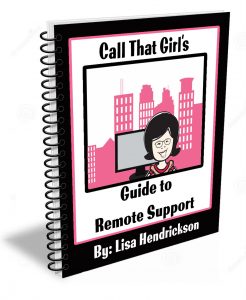
Lisa’s eBooks, all 5 eBooks $39

The Remote Support Guide (Best seller!)

  • A step by step guide to setting up your business to have a successful remote support business
  • Tips and information on how to service your clients remotely
  • How to increase your daily sales with new services, prepay tickets and daily monitoring plans
  • Includes templates for email booking appointments, client & project agreement forms, terms and conditions, small business proposal, pricing guidelines and scheduling appointment forms.

The Manual of Operations 

  • This is an old document but many still like using it for a template
  • 40 page Word document
  • Delivered as a Microsoft Word Template, easy for “cut and pasting” your business name into the document
  • Standard operating procedures
  • Employee conditions for employment
  • Job descriptions
  • Human Resources policies
  • Much more…

The Social Media Guide 

  • 29 page workbook style (outdated but have valuable info!)
  • Great tips and tricks that I learned the hard way
  • Easy to understand steps on how to push out social media messages
  • Newsletters, blogging and WordPress information
  • Toolkit information you will need and other things you will need to use social media
  • A social media to do list
  • How to do a social media blast

The Guide to Microsoft Exchange Migrations 

  • 22 page PDF
  • Step by step instructions on how to do a migration without tools with screenshots
  • Learning how to back up current mailboxes, calendars and contacts
  • Learn how to update the DNS for migration
  • Importing mail/calendars and contacts into new server
  • Aftercare lists
  • How to sell administrative support tickets

How to Start a Computer Repair Business 

  • Get all the free blogs in a 48 page PDF
  • Conversational Style Guide

$199

Created just for technicians! Outlook is a program that contains a lot of data, lots of moving parts and offers 100’s of features which are all guaranteed to break at some point. As well, it’s the program most used with the Office 365 Business Plans. These videos will train you how to properly prepare, repair and learn Outlook in a 360 view.

What you get with your purchase

  • 7 videos
  • 4 hours of intense training ~each made in short videos so you can stop & practice
  • Access to Lisa’s private Facebook group

SEO/Google Ranking Services

Get found today! So many technician friends I know have great websites up, but not many have good SEO to help them get found. My services help you get found by creating content in your website using your location and your services. I have a starter set for $450 and buy as you like “next level” for $175. No contracts, no monthly fees, just buy as you want.

Click here to learn more and get found on the internet! If you can’t be found, you can’t be called right? 

Free Learning Guide

Sign up for my newsletter

Check out my Podcast
Need to Hire Me? Below is a list of tech to tech services I provide. Contact me below.

  • Outlook Expert
  • Exchange Migration Coaching
  • Exchange Migration Management
  • Client Outlook Training
  • OST recovery
  • Email investigation