

New Outlook Error 080073cf8 New Outlook would not launch, so I tried to uninstall it, But it didn’t uninstall. It would not no matter what I tried. I got the error “You cannot uninstall Outlook” as well. Quick Answer on how I fixed it I typed this in the run line %localappdata%\Microsoft Deleted the OLK […]
 Category: Outlook Support
Outlook Training For Experienced Users
Outlook Training For Experienced Users
If your company is looking for some Outlook training, I offer a customized 1-hour training session that skips over all the basics and gets to the good stuff. I also don’t go slow and keep a fast-paced hour. As these sessions are recorded, your team can watch again later if they want to review. Before we schedule the training, I always ask the team lead to ask all the staff what they want to learn in the session, and I incorporate the questions into the 5 topics below. Since I’m a technician and trainer, you get the added benefit of having me available after the training to help with individuals who need tech support.
Review below and fill out the form if you want to schedule a no-cost consult.
- 1-hour of Outlook training
- Trained workshop style, watch on one monitor, follow along using your own Outlook on the other monitor
- Recorded so you can view again at another time
- Lisa Hendrickson is our trainer, she reviewed all your survey questions and incorporated them into the session
- There will be time at the end for any last questions
5 topics
- 15 features you might not know, but you’ll definitely use after this workshop (efficiency tips, views and settings, etc.)
- Email management tips for the two types of email users, which one are you? (Organizing tips, rules, downloading)
- Folder people, you file every email into many folders
- Inbox people, you keep every email in your inbox
- Start and end of your email day tips
- Archiving and troubleshooting tips
- Questions/answer
To get started, fill out this form and I’ll email you to schedule a consult to discuss customizing and a soft quote.
How to Download and Install Microsoft Office Windows 11
How to Download and Install Microsoft Office Windows 11
Hi Folks, this is my kick off video for my Windows 11 series for the 365 products. If you need my help, please use the scheduler at the bottom of this page.
If you want to subscribe to my YouTube Channel click here
Subscribe to my newsletter here
Topics I’ll cover in the next set of videos:
- How to install Office 365 on Windows 11
- How to setup Exchange Outlook on Windows 11
- How to setup POP Outlook Windows 11
- How to setup IMAP Outlook Windows 11
- How to setup iCloud Outlook Windows 11
- How to setup GMAIL POP Outlook Windows 11
- How to add Gmail IMAP to Outlook Windows 11
- How to setup a new profile in Outlook Windows 11
- How to setup Microsoft Bookings
- How to setup Teams on Windows 11
- How to setup SharePoint on Windows 11
- How to setup OneDrive on Windows 11 business
- How to setup OneDrive Home/family on Windows 11
- How to remove a Microsoft account on Windows 11
- How to have a local account with Windows 11
Outlook and Phone Synchronizing Process
If you’re interested in hiring me to assist reconfiguring your Outlook to sync with your phone (iPhone or Android), here is a list of the work I need to do to complete the request and how the process works.
Please know upfront that this is not a simple request, it will be a minimum of 2 hours and could (and most likely) will be over 2 hours if you have a lot of iCloud, email and contacts, calendars in different platforms.
These requests are not typically done in one session, expect a few sessions each under an hour and a follow up appointment at the end. This is a one time “surgery” so you should not need to do it again unless you want to move to another Exchange account. My follow up appt includes testing and any questions you have. I also keep detailed notes so the next time you call, I will know everything from this session. All the backups I create will be saved your documents folder.
Please have all of your account passwords ready before we start. If you can use a different phone when we configure the phones it’s best.
I provide best effort for iCloud. I do my best to extract all the data out of iCloud and merge with your other contacts and calendars, some times I cannot get the data and we figure out another solution.
You will be 100% involved with this request as it’s your data, Outlook and phone. I do all the work, you can relax. The more questions you ask, the longer the work will take to complete.
I offer 2 types of data migrations and for one person or small businesses I may do the work myself. For larger teams, I refer the work to my vendor, and I do the prep work.
- For home users, we use a free Exchange server
- For business users, we use a 365 Business Exchange server
The Process
- I will do my onboarding, let you know of any potential issues
- Backup the data we will be migrating to your new Exchange server
- Reconfigure Outlook
- Then setup new Exchange, add other email accounts
- Import data
- Let synchronize
- Clean up folders, extra data
- Setup phone
- Fine tune
- Follow up and aftercare
Microsoft 365 Advanced Exchange Workshop May 4, 2022 6:30 PM EST
 This 1-hour workshop will cover how to navigate the Exchange admin center and create advanced tasks. It will be recorded and you can send in questions before the workshop so your questions can be answered in the Q&A portion of the workshop. You can also ask them during the workshop.
This workshop will be $50 per attendee
We will cover:
- Introduction to that Microsoft 365 Exchange Admin portal
- Overview of the Exchange Admin portal
- How to manage mailboxes, groups, resources and contacts
- How to trace email messages
- How to set up rules to manage mail flow
- How to prevent valid emails from going to your junk folder and go to inbox
- How to put a banner on all external emails (phishing prevention)
- How to set up alerts
- How to check and manage quarantined emails
- How to conditional forward emails
- How to manage mailbox delegation/new hire/terminations
- Question/Answer
Register by filling out the short form, then you will be directed to the payment page
I will send you an email letting you know that you are registered
The morning of the meeting, I will email the meeting link
Introduction into Microsoft 365 Administration
Hi Folks! I’m hosting a series of workshops to learn more about the components of 365. Below is a free workshop on my YouTube channel to learn the basics. If you’re interested in learning more, we will have advanced workshops coming up for Exchange, Azure, InTune, etc.
Please sign up for my newsletter to get the announcements. https://callthatgirl.biz/keep-up-with-call-that-girl
What is covered in this workshop
- Basic Intro to Office 365
- Personal vs Business, how to determine if you have both accounts and the differences
- How to log into your 365 Admin portal
- Overview of the various components (SharePoint, Exchange, Teams One Drive, bookings and etc.)
- A tour of the admin portal
- How to add mailboxes/add/modify a user/delete accounts
- How to add/modify a group/shared mailbox
- Overview of admin roles and permissions
- How to reset passwords
- Add/remove licenses
- Verify the correct amount of licenses needed
- How to get support from Microsoft or your vendor
- How to setup company branding (Your logo shows up on the login page)
iCloud for windows did not install properly
iCloud for windows did not install properly, to repair it, you need to go to Apps and features, select iCloud Outlook from the app list and click modify.

If you find yourself not being able to fix this using the above instructions, here is how I fixed it.
Update Dec 14, 2022
If you are using IMAP for Outlook, you will need to create a PST and make that default before doing this. If you don’t know how to do this, I can help. Please schedule time on my calendar. You might have some data in the (This Computer Only) calendar that should be backed up before you do this action.
- I remove all iCloud apps (iCloud and iCloud Outlook) downloaded in the apps and features, then from the control panel.
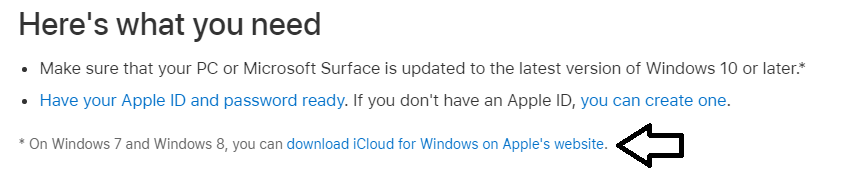
- Install fresh from Apple’s page https://support.apple.com/en-us/HT204283
- Find the link with the arrow (see image) download directly.
I hope this helps, if you need my assistance you can book an appt online.