RSSCategory: Outlook Support

Microsoft Office 365 E5 Providers

| August 12, 2017 | 0 Comments

Microsoft Office 365 E5 Providers. If you are out searching for a company to help your company provide and support Microsoft Office 365, I can assist with finding a good match for your company and have many referrals for you.

Smaller companies are finding that Microsoft will not sell the E5 plan unless you have 50 end users or more. This is why Microsoft refers those under 50 to a CSP partner. Finding a partner by Microsoft recommendations is not your only choice. I am a well connected in the technical communities and know of many smaller companies that will offer great sales and support. As well, you can work with Call That Girl (Outlook Expert) on extended support needs.

Not every company offers the same plans, so I recommend you review your company’s end user count, support needs and a budget. Also consider if you want to have a month to month contract or a yearly contract. Many yearly contracts offer more for support. Month to month contracts usually cover basic support but outside issues will be billed by the hour. Some companies offer prepay ticket plans.

Where does Call That Girl come into play and why are promoting this blog? We have a prepay ticket that clients purchase for issues outside of what the other companies might not provide, such as extended training, 3rd party applications, basic SharePoint training, contact management, etc. Anything outside of what they support, we can help with.

Once you know your budget and what you want included in your Microsoft Office 365 E5 plan, contact us and we will do a short consult over the phone and I will put you in touch with a couple of Microsoft CSP Providers you can interview and work with.

Review my Prepay Tickets here https://callthatgirl.biz/pricing-expectations

Use my form below to get in touch, thank you and I look forward to working with you!

 

Do You Need Certifications to Start a Computer Repair Business

| August 12, 2017

Do You Need Certifications to Start a Computer Repair Business

Welcome to Call That Girl’s Guide to starting a computer repair and support business blog series. If you found a blog out of order, you can start with the first blog by clicking here How to start a computer repair business. Each blog will lead you to the next one until you reach the final blog.

In this series I will give tips, examples and information about how to start a computer repair business that I learned my way. I will also offer help on what type of computer repair business to start, business and legal information, products and services you can sell, tools your computer repair business might need, a guide to pricing, a list of resources, and marketing advice.

In this blog, I will talk about certifications and starting your own computer repair business.


In our industry, as far as I know…we are not regulated by the government (at least in the USA). We do not have to have a computer repair certificate or be A+ certified, or even have any type of background in computer support & repair to open a business. Heck, you don’t even have to know anything about business. So basically, if your neighbor who is handy at building computers decides to open “John’s Computer Builds” and runs it out of his house, he can do that. Now it’s up to him to follow the laws of his city, state and the federal government in terms of taxes, etc. If your area requires a license, be sure to have it. If you’re not sure, call your local city office to find out. I personally have no certifications and my business has not suffered from it. So please read my info below, and use it as a guide. As I’m not sure what type of computer repair business you want to start, this is just a guide. You might need to ask other techs, or get counsel from a local tech company.

Below are some questions you may have and my answers to the best of my knowledge.

  • Do certifications help you be a better business owner? Not in my opinion. Running and operating a computer repair business does not require certifications. It requires passion and the ability to service clients in terms of technical and customer service skills.
  • Do certifications make you a better tech? Only you can make yourself become a better tech. Some of the best techs I know do not have any certs.
  • Do certifications help you get more clients? Maybe. Some care and want certs, some just want the job done right and to be treated well.
  • Do your clients care if you have certifications? Maybe, not many ask me if I have any. Those that do, I tell them “I got my certs from the streets, I have 18 years of experience and certs don’t always help in real life scenarios.” It’s true, though. I can’t find a cert that fits my skill set anyway!
  • Should you get certifications for what you want to service and sell? Sometimes you need to be certified for some software and some hardware. As far as I know, most basic software tools we use as an industry do not require certs (antivirus, etc.).
  • What if I’m supporting a certain manufacturer, such as HP or Dell? If you want to become a local tech contracted by some of the bigger firms such as  Field Nation, Work Market, etc… then they might ask you to be certified for some manufacturers, or you might be able to get more jobs.
  • Should you be A+ certified? I am a software tech, so A+ cert would not be helpful to me at all. I did take the test though and failed. I also had 11 extra screws in the PC build I did during the A+ class. Good sign I was not going to build computers. But…. Professor Messer is the guy you want to follow to know more! http://www.professormesser.com/ He offers great daily quizzes and has a YouTube channel, training courses, study groups, etc.
  • What if I want to start a MSB business, do I need Cisco network certs? CCNA? I would think yes (but then again, I don’t know…check with other techs on this), networking and servers are very technical and unless you are leaving a job where you have a lot of hands-on experience, the cert is probably a must have, not only because of the knowledge you need, but the training behind it is not “normal” tech work.


Gmail Google Apps Agreement

| July 21, 2017 | 0 Comments

Please read this FAQ about how I work with Gmail and Outlook fixing IMAP synchronizing.

Usual issues

  • Email not syncing with server/other computers

  • Email missing

  • Errors when moving email from one folder to another

  • Drafts do not work

  • Inbox synchronizing at the bottom/never finishes

These calls typically come from folks who have years of emails in 100’s of folders. Many also have no idea how much email is on their server, so the first thing I do is a spot check of all of your Outlook files, folders, filters, mailbox folder size, OST size and then I work on a game plan to get this fixed and working again. I also will backup all email to a local PST and the contacts and calendars to CSV before performing work. This is how we end our first appointment usually.  Expect at least two appointments or more. Expect this to maybe take longer than a few days to repair.

Good news? I have fixed 100’s of these in the past few years, so I know how to fix it, but it might take time. I only bill for time on your computer and these are considered “Projects” so I only bill you for the time that we are doing something, usually this might be a 20 min call, next day 20 min call, etc. This is to be expected if you have 100’s of folders and a lot of email.

My fee is $169 per hour for these requests, average is two hours to get done. If you understand what I explained and want to continue to book the appointment, complete the agreement below. Thanks! ~ Lisa

Google Ranking Services

| July 1, 2017 | 0 Comments

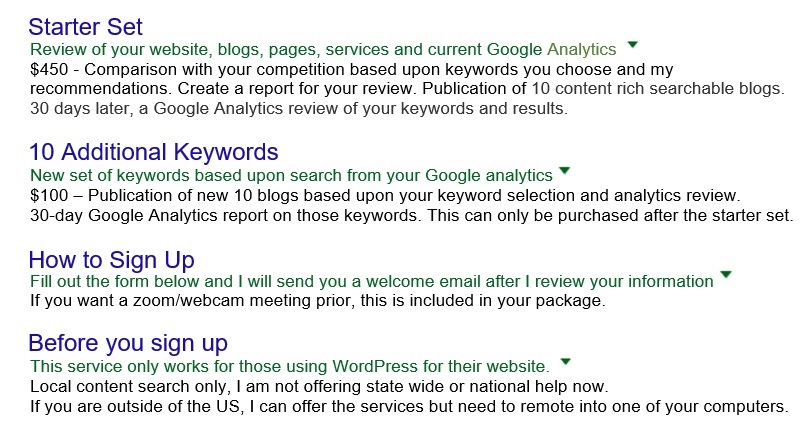
Google has many ways to offer to get your website into your client’s searches. You can pay for ads and those work, but what about other options? Content in your website helps but if you’re not actively adding content, Google has nothing new to search. If you didn’t add your content in the right places on your site, you might not even be found. I am offering my Google Ranking Services so you can be found for your technical services in your town.

Marketing and advertising take time no matter what you opt to use to get your business out there. The good news about my services is that as long as Google and your website are in sync with content, the blogs I create for you should last even after buying the starter set. I created the 10 blog purchase so you can buy another set at a price that won’t break your budget and you get to choose the keywords and how often.


We’re sorry, but Word has run into an error that is preventing it from working correctly

| June 24, 2017 | 1 Comment

We’re sorry, but Word has run into an error that is preventing it from working correctly. Word will need to be closed as a result. Would you like us to repair now

If you get these type of error, might not be “exact”, Clicking on the repair does nothing. Closing will close without saving. I took notice that all of my Office 365 (Office 2016) programs were not logged in in the account settings area and the subscription (O365 Business build 1706 Build 8229.2045) was not up. It also stated I was running ‘Unlicensed”

I did try to do an online repair with Office 365, didn’t work. I tried the full repair, that didn’t work. I rebooted and my computer crashed. I had to do a system restore! Just an FYI, I’ve had some issues with my computer since last week’s updates. One day I had a complete freeze up and another day two freeze ups. Maybe time for a reinstall but for now…we troubleshoot! (For those curious, I rolled back to June 19th when I had a Windows Module Installer” update.

So after the sys restore, I still got that error. I searched online to see what others or MS had to say and what I found that worked was this:

  • I went to this directory C:\Program Files (x86)\Microsoft Office\root\Office16
  • Right clicked on the programs that were getting this error (All of them for me)
  • Did the “Troubleshoot compatibility”
  • Selected “Troubleshoot program” and checked the bottom boxes for the next window “I don’t see my problem listed”
  • Next box, I had selected “Windows 8” as that is what other forums said to try
  • What display problems did you notice? I selected “I don’t see my problem listed”
  • And so far, so good. Errors gone and I can work again.

I hope that helps! If not, I would contact Microsoft about this issue. If you are an Office 365 subscriber, you get support for free.


~Lisa

Feel free to leave a comment if this blog helped you! I am enjoying reading and replying to them.

  • Sign up for my newsletter here
  • If you’re looking to earn money just by talking about me to your friends, check out my referral program here
  • Subscribe to my YouTube Channel
  • Follow me on Facebook
  • Invite me on LinkedIn
  • Follow me on Twitter


Something went wrong and your search couldn’t be completed

| June 17, 2017 | 2 Comments

Something went wrong and your search couldn’t be completed

Update: July 10

Apparently this update KB3203467  has caused Outlook 2010 search to not index. Uninstall this update, reboot, you might need to index again. Link below for the Windows 7 update. You can also check the “Optional updates” for “2017 Monthly Rollup” that update should fix it as well. Read more here from MS.

https://support.microsoft.com/en-us/help/4022168/windows-7-sp1-windows-server-2008-r2-sp1-update-kb4022168

Windows 10 should have rolled out the updated fix for you.

Now if the updates don’t work, and if you are on Office 365 or an Office product still supported by Microsoft, I recommend having them remote in and repair it. They often have little fixes that they don’t tell us about.

If you want to keep trying, below are some typical steps to repair search

Steps worth trying

  • Before doing anything check the Windows updates. See what has happened under the hood. Outlook 2010 had a massive dump, I think over 50 updates on June 13th. This is what I am seeing my 2010 clients having anyway. A restore would be a better option before doing the list below!

  • First be sure that Outlook indexing is at zero (0 items remaining to be indexed). If not at zero, then leave Outlook open until it reaches 0. This might take overnight to happen. If it slowly goes up (by 100 at a time), then there is still something wrong. It should go up quickly and then hit 100,000 or higher and then come down.

  • Start with a new creating a new profile to test. Do not delete the old one! Let all the email download from Exchange or IMAP and see if search works. This is the easiest fix, even though fixing up a new profile is not fun either, at least there is light at the end of the tunnel. Roll back if you can. One last thing I’ll mention, my text profile only had Exchange and it was said online that the PST files might be having the issue.

  • Also, worth testing is not adding in all the PST folders with this new profile test. The search should work with just one account. If you try to search “All Outlook Items” is when you might see the errors more. Happened to me, my test profile works great with just one account.

  • If these don’t work, check the indexing in the control panel. Outlook should be in the “included list”. You can try unchecking Outlook, that worked for one of my clients today. If the indexing looks ok, you can “rebuild” (advanced options). Oddly enough, the search might work after doing this, but the ugly “Something went wrong and your search couldn’t be completed” shows up, not a good fix, but search works again.

  • Next, try the troubleshooter in the Index Settings. Worth a shot.

  • Then if those fail, “rebuild” this will take a long time if the computer has a lot of data. Put the computer in “never sleep” mode and it will finish faster, Needs to run over night usually.

  • Check the services.msc – be sure Window search is turned on and running. You can stop it and restart it.

  • Turn on search or indexing. Go to your “Programs and Features” and on the left side is “Turn Windows features on or off”.  I believe Windows 7 only has this, it’s not in my Windows 10.

  • This guy has a few tricks worth trying. I believe that this was an internet credit thing, many folks are now blogging about it. I’ll give him credit as he had many comments. Fix #1 and #3 https://www.technipages.com/outlook-search-doesnt-work

  • Finally, Repair/Reinstall Office. –I almost never do this but you might have to.

  • Last, reinstall Windows. -I seriously hope no one has to do this.

Good luck Googlers!