

RSSCategory: Outlook Support

iPhone missing Mail app from home screen

| November 6, 2016 | 0 Comments

If your Mail app on  your home screen on your iPhone went missing like mine did this morning, here is a non-traditional fix. Like you, I Google’d this as well after my troubleshooting efforts.

Here is what happened to me. This am, all my apps from the home screen were gone but the “Messages” and I looked all over the phone, in folders, etc. Nothing, all gone. Then I found a link that said to “reset home screen and layout” (Settings->General->Reset) tried that but only the “Messages” came back, still no Mail app.

Then on a forum I go to, I asked the question, “iPhone missing Mail app from home screen” and another tech recommended that I go looking in the apps folders, well….nothing there. So I went to the “Apps Store” and searched “Mail” and there is was, I downloaded it and installed and boom, Mail back!

iHope this was helpful 🙂

~Lisa

Protected: Office 365 Videos for Technicians

| November 6, 2016 | 0 Comments

This content is password-protected. To view it, please enter the password below.

How to Change Your Font Size in Outlook

| October 24, 2016 | 0 Comments

How to Change Your Font Size in Outlook

You can also change many colors as well, play around, have fun! Make Outlook work for YOU!

Check out my quick vid on YouTube.


Office 365 Videos for LinkedMinnesota

| October 21, 2016 | 0 Comments

Hi everyone, thanks for checking out my Office 365 Videos. After you are done watching, feel free to email me or call to setup a time to discuss your company’s needs if you need my assistance. Lisa@callthatgirl.biz or call 612-865-4475

Total time, under 25 min.


Protected: Office 365 Resources

| October 9, 2016 | 0 Comments

This content is password-protected. To view it, please enter the password below.

How to disable Birthday calendar in Office 365 Microsoft Outlook Exchange

| October 8, 2016 | 3 Comments

If you are looking for a way to remove the birthday calendar from your Outlook calendar, you can do it quite easily with these instructions.

Log into your Office 365 portal www.outlook.office365.com.

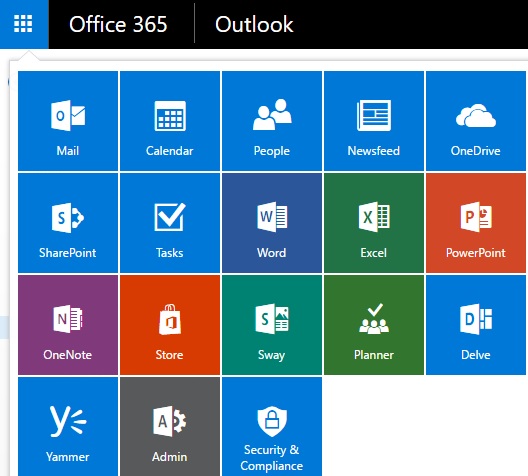
Then click on the top left corner where the 9 boxes are. Select “Calendar”


how-to-disable-birthday-calendar-in-microsoft-outlook-exchange


Now click on the “settings” at the upper right. In the search bar, type in “Options” and then select “message options”


settings1


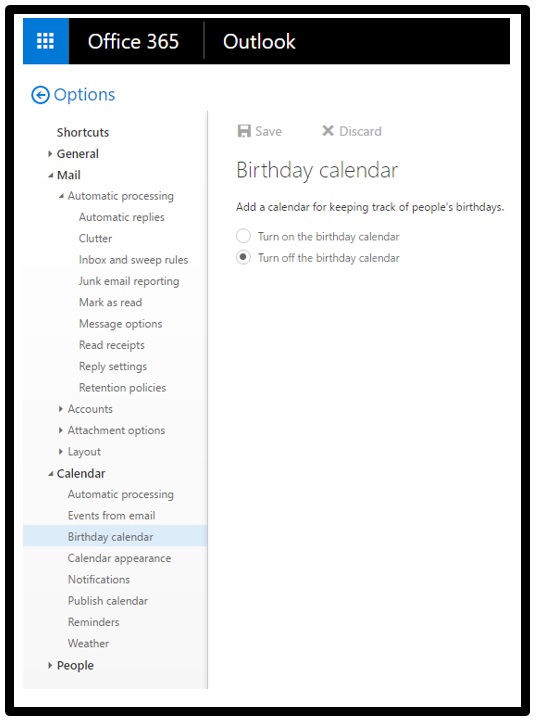
Scroll down to the “calendar” and expand that and then “Birthday calendar” will pop up and you can turn it off.

Give the server a minute or two to remove it and then your Outlook will remove it as well.

birthday