
How to Add Yahoo Email to Outlook After Comcast Switch
How to Add Yahoo Email to Outlook After Comcast Switch
If you found this blog, please note that I spent probably four hours working with a client to resolve this, so it was not an easy fix by any means. As it took me so long to figure out, I also had to go through a lot of troubleshooting EVERYTHING before I found the right recipe. I’ll start with what happened and then offer all the solutions in order. There are plenty of them.
Few things to know:
- Yahoo now has an app password, please get that before starting these long-winded repairs
- Always back up your registry before deleting any registry keys
- This can be a very long frustrating time before you get it connected
- Check your Microsoft 365 license, if you are logged in using your Comcast.net email, this is most likely the case of why it won’t connect in Outlook
- If you create a new profile, never delete your old profile. It most likely has all of your calendar and contact items, and these are very hard to recover.
- Due to so many changes going on in tech, if none of these helped you and you found a solution, please email me lisa@callthatgirl.biz
Repairs
- Client got a new computer. Comcast email would not add to Outlook Classic; we opted to come back later and try. Removed McAfee, ran MCPR.exe, no VPN and no added Firewalls. Windows Updates all completed and Office updates completed. (The reason why is I found out during troubleshooting is due to his Microsoft 365 personal license using a comcast.net email. If you change the license to another account, you might have a good shot, but this did not work for my client initially).
- When you add a Yahoo (comcast.net) email to Outlook, a pop-up window will/should immediately pop up and have you log into Yahoo and put in your credentials (password or app password). This never happened with my client; it went right to the IMAP setup. Nothing would get that pop up window for Yahoo to happen.
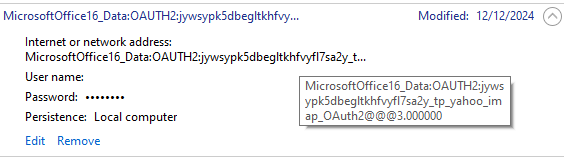
- When client wanted me to give it another shot, it was after March 6, 2026 credentials (Microsoft 365 apps) update issue many Gmail users are having now. The fix for this is to go into Windows credential manager and delete any Yahoo related OAUTH. Be careful if you have Gmail set up in Outlook, removing Gmail will require you to add the credentials again.
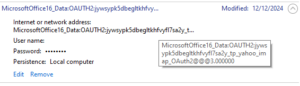
- Outlook would still not connect the email to Yahoo, so I found that his comcast.net email was still in the email prefilled in Outlook set up, I dug deeper into this. (In the end, don’t worry about this, it might not ever go away)
- After investigating more, I found in an online blog that deleting this registry key will help. This part can be tricky if you have a lot of emails setup in Outlook. This key will go to the profile and show all the keys for all the emails. EXAMPLE: (the ending in red will change for you as each key has a unique key and Outlook profile name is whatever name your profile is that you are having the issue with):
- Computer\HKEY_CURRENT_USER\Software\Microsoft\Office\16.0\Outlook\Profiles\
- Outlook profile name\9375CFF0413111d3B88A00104B2A6676\00000010
- This somewhat helped my client. Now the Yahoo pop up window showed up, but it would never connect. I found these instructions next: VERY DETAILED.
- This next set of instructions might help, if not, go to #8. Follow each step:
- Create an app password in yahoo for the comcast account
- Try to add the comcast account using that app password as your password
- Sign-in will fail but a new window will open
- On the window, click change account settings. A new window will open
- In the first “server” edit box past this: imap.mail.yahoo.com
- Paste this into the first port edit box: 993
- Paste this into the second server edit box: smtp.mail.yahoo.com
- Paste this into the second port edit box: 465
- Click next
- You should land back on the password screen. Your app password should still be there so you should just press Enter
- While this should work, it would still not connect to Outlook. I found while researching on my test computer, that his comcast.net was also found in this registry key. Yours might be different but this was what I found:
- Computer\HKEY_CURRENT_USER\Software\Microsoft\Office\16.0\Common\Identity\Identities\
- 3vd6qkvhmej23bltagwiwr2r4m_tp_yahoo_imap_OAuth2
- This was the actual registry key that helped it finally connect, but it was still not an easy connect. At first, it acted like it was going to connect, then it gave me a new window with a Yahoo sign in error. Eventually with a mix of password and app password, we got it set up!
- When it does connect finally, you will see the Microsoft 365 apps and be sure to check the boxes.
- After it connects, give Outlook some time to complete downloading all the system folders, then your folders and then email.
That’s it folks, I hope this helps you. If it did, please do me a favor and do 2 things: Subscribe to my newsletter https://callthatgirl.biz/keep-up-with-call-that-girl and if you are on LinkedIn, subscribe to my LinkedIn newsletter
If you need my help with this, please use the form below or schedule an appointment.
Category: Outlook Support

About the Author (Author Profile)
Lisa Hendrickson is the owner of Call That Girl. She is an Outlook Expert and Microsoft 365 Consultant.Subscribe
If you enjoyed this article, subscribe to receive more just like it.

